00196683-01 - IM Installation Manual Siplace Pro 8.0_en.pdf - 第23页
4 Installation of SIPLACE Pro and possible Setup Types Installation Manual Edition 03/2010 US SIPLACE Pro 8.0 21 4.2 Individual setup types and next step s 4.2.1 Setup T ype – Custom This setup type allo ws the experienc…

Installation Manual 4 Installation of SIPLACE Pro and possible Setup Types
SIPLACE Pro 8.0 Edition 03/2010 US
20
Note
If a database already exists. Setup performs an Integrity Check. If the Integrity Check fails, you
might need to cancel Setup. More information in Chapter 6. 4
4 Installation of SIPLACE Pro and possible Setup Types Installation Manual
Edition 03/2010 US SIPLACE Pro 8.0
21
4.2 Individual setup types and next steps
4.2.1 Setup Type – Custom
This setup type allows the experienced user to select any possible combination of SIPLACE Pro
components. However, you should use one of the other specified setup types if you are installing
standard components, since this means the necessary components are always installed and you
do not have to pay attention to the details. 4
Step 1
Æ Run through the steps in ”Starting installation – first steps” from page 15.
Æ Select the Custom setup type
Æ Click Next.
Step 2
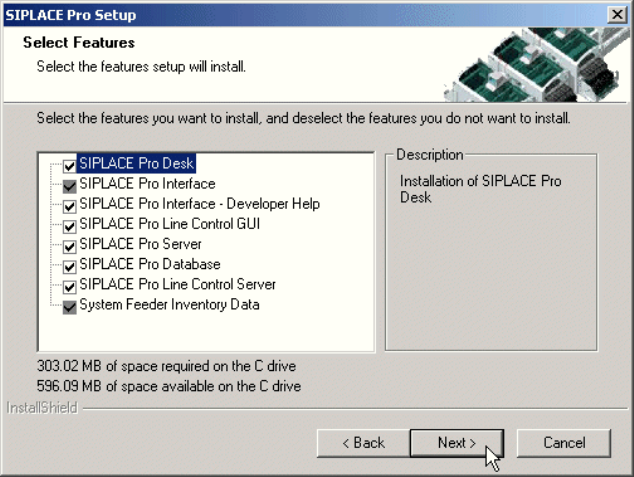
In the "Setup Features" dialog box, select the features you want to install. 4
4
Fig. 4 - 7 "Select Features" dialog box
– The disk space required by all selected components is shown. The size information for
SIPLACE Pro Database is misleading, since it only takes into account the size of the SQL
scripts copied by InstallShield and installed for these components. The size of the database
itself should also be considered. The initial value is defined in a later dialog when creating a
new database. The database size is dynamic anyway - it will grow as required during use of
SIPLACE Pro.
Æ Select the features you want to install.
Installation Manual 4 Installation of SIPLACE Pro and possible Setup Types
SIPLACE Pro 8.0 Edition 03/2010 US
22
Hint
You need to install SIPLACE Pro Interface as minimum requirement for external applications. 4
Note
After choosing the feature "SIPLACE Pro Database" and clicking Next, setup immediately checks
if SQL server or MSDE (Microsoft Data Desktop Engine) is installed on the computer. 4
Æ Click Next.
Note
From this point onwards, the dialog boxes displayed depend on which features have been
selected (either implicit via the other Setup Type selection or explicit in the Custom Setup Type).
The sequence varies according to which features and options have been selected, so there are
many possible combinations. It is not feasible to describe all the combinations for Custom instal-
lation here. However, you will see the individual dialog boxes occuring in the course of the follow-
ing setup types. 4