00196658-01 - IM SIPLACE Pro 7.1_en.pdf - 第64页
Installation Manual 7 Troubleshooting SIPLACE Pro 7.1 Edition 11/2009 US 62 7.2.3 Error message af ter rep air installation at W indows Vist a Error description: 7 Y ou perform a repair inst allation at Windows Vist a wi…

7 Troubleshooting Installation Manual
Edition 11/2009 US SIPLACE Pro 7.1
61
Note
Make sure that you log in using an account with administrator rights. 7
Installation Manual 7 Troubleshooting
SIPLACE Pro 7.1 Edition 11/2009 US
62
7.2.3 Error message after repair installation at Windows Vista
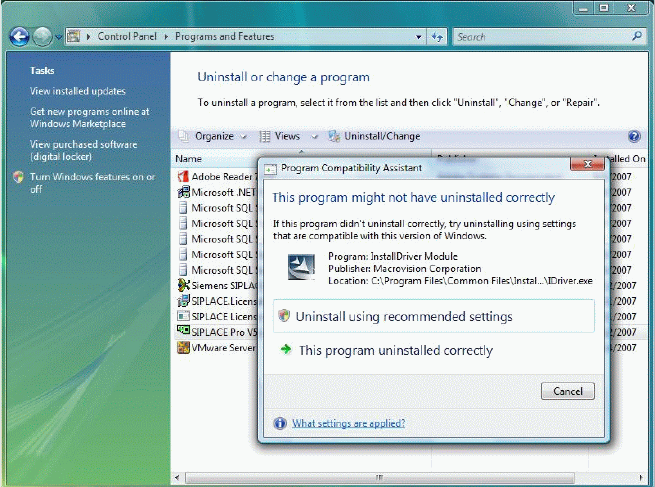
Error description: 7
You perform a repair installation at Windows Vista without changing anything. After the repair in-
stallation has successfully completed following screenshot ist displayed. 7
7
Fig. 7 - 13 Repair installation at Vista
Solution: 7
Æ Click Cancel because this message has no influence on the program and can be ignored.
7

8 Uninstalling Installation Manual
Edition 11/2009 US SIPLACE Pro 7.1
63
8 Uninstalling
8.1 Uninstalling the software
Uninstalling SIPLACE Pro deletes all SIPLACE Pro software components from the system except
for the SIPLACE Pro Database. 8
The SIPLACE Pro Database is not automatically uninstalled in order to prevent possible data
loss. 8
Step 1
Uninstall SIPLACE Pro via the Control Panel. 8
You require the uninstall window in Windows for uninstalling. 8
Æ Click Start in the Windows start menu.
Æ Click Settings.
Æ Click Control Panel.
Æ Double-click Add / Remove Programs.
A list appears with the names of the software packages installed on the computer. 8
Æ Select SIPLACE Pro.
Æ Click the Change/Remove components button.
Æ Select Remove to remove all installed features.
Æ Click Next to continue.
Æ In the "Confirm File Deletion" dialog box, click OK if you wish to proceed or Cancel if you wish
to cancel the uninstall process.
Æ Click Next to continue.
Æ In the "Confirm Uninstall" dialog box, click OK if you wish to proceed or Cancel if you wish to
cancel the uninstall process.