00196737-09_IM_eWinXP_DE_EN.pdf - 第19页
W indows XP Em bedded / I nstallat ion Ma nual Ausgabe 10/2014 Edit ion 19 5 Installin g and Calibrat ing the T ouch S creen Now the to uch sc reen has to be install ed and calibr ated (s tation com puter on ly). ► Log o…
Windows XP Embedded / Installation Manual Ausgabe 10/2014 Edition
18
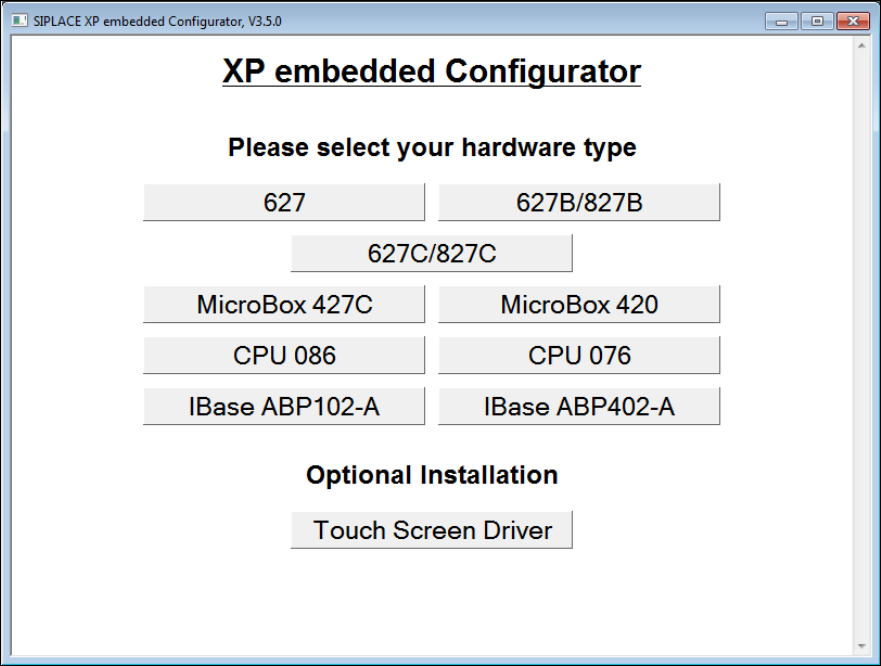
The following window is displayed:
Figure 4-2: Window SIPLACE XP embedded Configurator
► Click on the required hardware to select it and follow the further selection instructions in the
following windows.
► If necessary, enter the station IP-address for SIPLACE Pro LAN (required for a station
computer only).
The SIPLACE settings are automatically performed and the computer reboots.
After the reboot, you are logged on as Operator.
► If no touch screen is used (Vision or MC computer), remove the software CD from the DVD
drive.
Windows XP Embedded / Installation Manual Ausgabe 10/2014 Edition
19
5 Installing and Calibrating the Touch Screen
Now the touch screen has to be installed and calibrated (station computer only).
► Log on as Administrator and enter a password.
► In the "SIPLACE XP embedded Configurator", click on the Touch Screen Driver button under
Optional Installation to install the desired touch screen driver and follow the installation
instructions.
► After installation, calibrate the touch screen as described in the installation manual for the
station software.
► Remove the software CD from the DVD drive.
If you have installed Windows XP Embedded in one-computer operation or on a machine
computer in two-computer operation, the installation is completed now.
► Install the SIPLACE machine software as described in the installation manual for the station
software.
If you have installed Windows XP Embedded on a Vision computer in two-computer operation:
► Perform the steps in chapter 6.
Windows XP Embedded / Installation Manual Ausgabe 10/2014 Edition
20
6 Restoring the Initial Configuration
The following steps only have to been performed, if you have installed Windows XP Embedded
on a Vision computer in two-computer operation:
► Reconnect the keyboard to the machine computer.
► Switch the video multiplexer back to the machine computer.
► Unplug the USB cable for the DVD drive from the Vision computer and plug it into the machine
computer.
► Install the SIPLACE machine software as described in the installation manual for the station
software.