770715-EM-Eye-ESD-Event-Meter-Guide.pdf - 第5页
TB-91 19 Page 5 of 10 © 2024 DESCO INDUSTRIES INC Employee Owned SCS - 926 JR Industrial Drive, Sanford, NC 27332 East: (919) 718-0000 | West: (909) 627-9634 • Website: StaticControl.com ESD Event Detection Sensor The SC…
TB-9119 Page 4 of 10
© 2024 DESCO INDUSTRIES INC
Employee Owned
SCS - 926 JR Industrial Drive, Sanford, NC 27332
East: (919) 718-0000 | West: (909) 627-9634 • Website: StaticControl.com
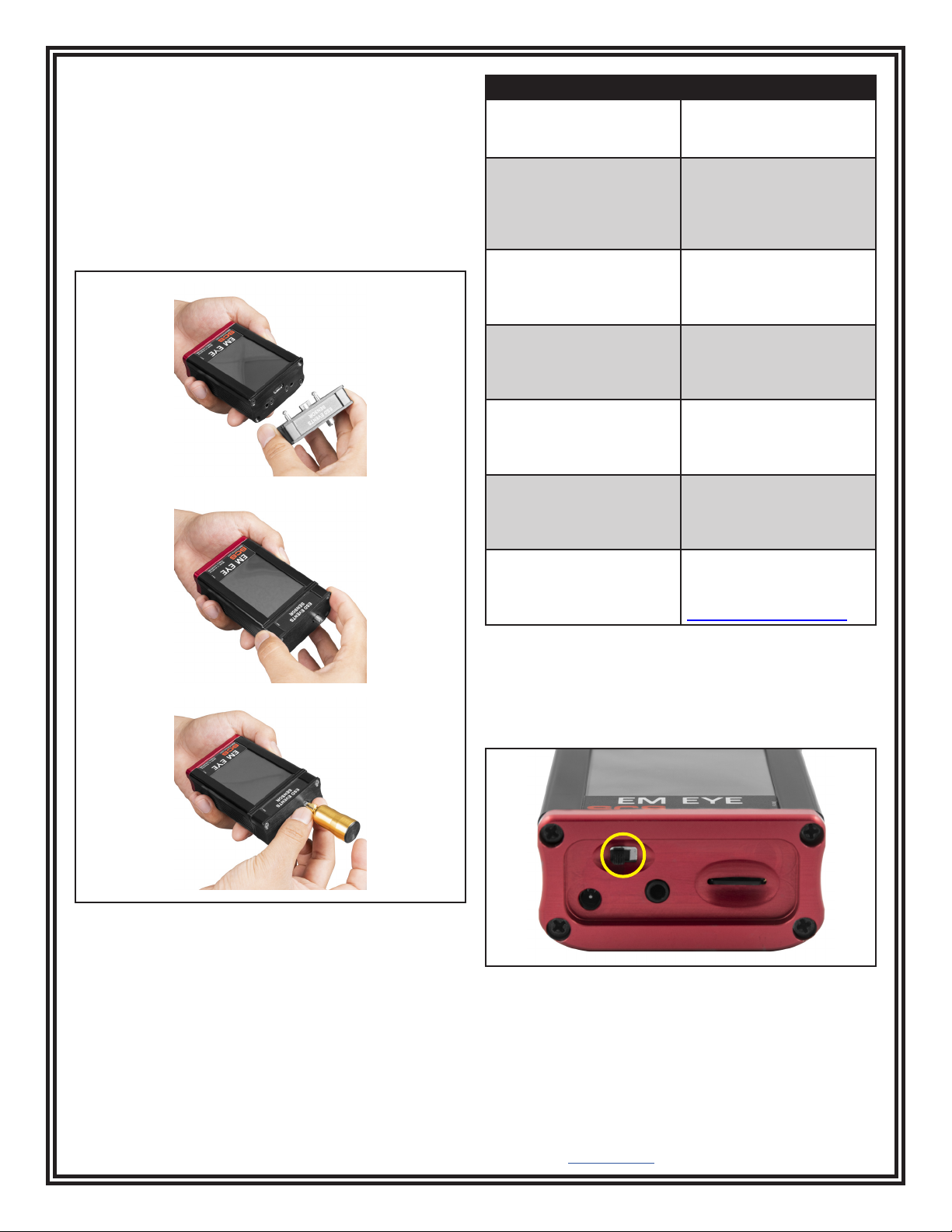
Modular Assembly and Disassembly
1. Position the sensor head so that the dowel pins
align with the holes.
2. With the initial head midway through, reposition it so
that it is parallel to the body. Press the sensor head
firmly against the body until both surfaces are flat
with each other.
3. Insert and screw in the antenna making sure that it
is not too tight or too loose. Do not use any tools.
Error Message Reason for Error
ERROR: Sensor is
disconnected. Click here
to turn device o.
The meter is turned
on without the sensor
module.
ERROR: Card was
removed. Data may be
lost and card could be
damaged. Click here to
close the window.
The storage card
(microSD) is removed
while the meter is
powered on.
WARNING: No memory
card. You can add it at
any time. Click here to
close the window.
The meter is turned on
with no storage card in
place.
PREPARING CARD FOR
RECORDING!!! DO NOT
REMOVE!!! PLEASE
WAIT.
A new card is inserted or
when a card is empty.
WARNING: This card
contains the data.
Remove the card or click
here to erase the data.
Inserting a card that has
contents other than the
EM Eye Meter les.
ERROR: Invalid memory
card. Format or replace
it. Click here to close the
window.
The card is not formatted
to FAT32. Formatting is
done using the PC.
ERROR!!! STACK
OVERFLOWED. Click
here to turn device o.
This is a fatal error. If
it appears even after
resetting, please contact
SCS Customer Service.
Power Reset
If the EM Eye Meter locks up or the display freezes,
cycle the power to the meter by sliding its power switch
to the OFF position and back to the ON position.
If the assembly is not done correctly, one of the
following error and warning messages may appear. To
correct, follow the instructions as indicated within the
message.
Figure 7. Location of the power switch at the bottom of
the EM Eye Meter
Figure 6. Attaching the sensor module to the EM Eye
Meter
TB-9119 Page 5 of 10
© 2024 DESCO INDUSTRIES INC
Employee Owned
SCS - 926 JR Industrial Drive, Sanford, NC 27332
East: (919) 718-0000 | West: (909) 627-9634 • Website: StaticControl.com
ESD Event Detection Sensor
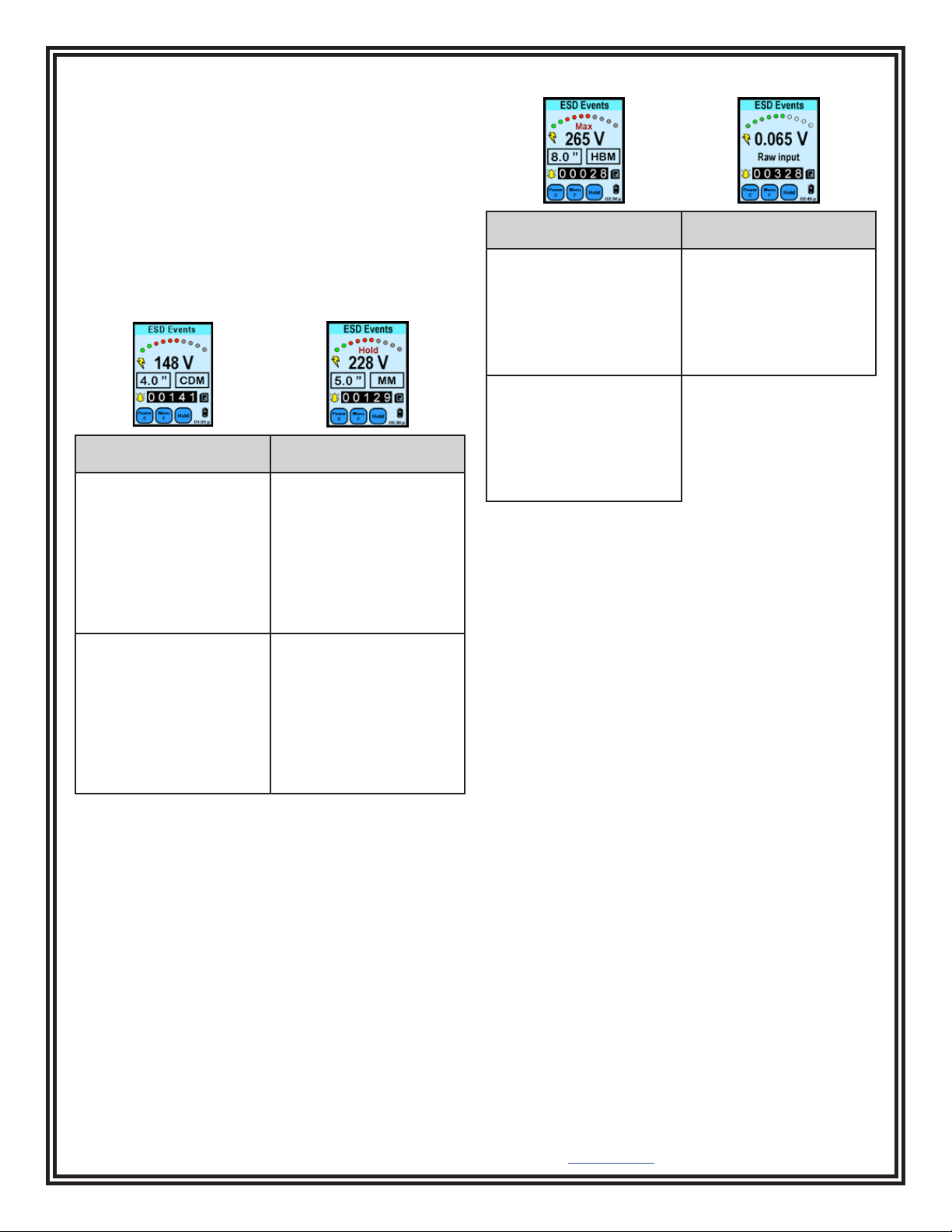
The SCS EM Eye Meter will help you detect most ESD
events. This will help you make sound decisions in
tackling what may have been a daunting task. The EM
Eye Meter detects the magnitude of events and using
the filters built into the unit. It can provide approximate
values for some ESD Events for models (CDM, MM,
HBM) using proprietary algorithms. Switching between
any of the modes will give you immediate data analysis.
Solving ESD problems requires data; a before-and-after
analysis of data may now be measured and used to
tailor ESD control programs.
CDM Mode MM Mode
In IC testing, ICs that are
sliding through tubes may
be charged up. Once the
lead touches the metal
tracks, a CDM event can
occur.
A moving, ungrounded
cart may accumulate
charges in its path. As
it approaches a metallic
worktable and bumps
into it, a discharge may
occur and may adversely
aect nearby products or
instruments
In feeder bowls where the
ICs are arranged for sort-
ing or orientation, voltages
may be induced by the
vibrating bowl.
In using a bad soldering
iron, induced voltages
may cause discharges to
the components mounted
into the PCB. Use ground-
ed tools and conrm that
no ESD events will be
detected by using the MM
mode.
HBM Mode Raw Input Mode
In IC testing, operators
that are handling an IC
(i.e. xing bent leads) may
be discharging through
the IC.
For engineers who want
to simply analyze raw
ESD signals for further
analysis, the Raw Input
mode provides actual
voltages received by an
antenna.
During picking up of an IC
by a person not properly
wearing a wrist strap, use
the EM Eye Meter to
alarm the operator of such
events.
TB-9119 Page 6 of 10
© 2024 DESCO INDUSTRIES INC
Employee Owned
SCS - 926 JR Industrial Drive, Sanford, NC 27332
East: (919) 718-0000 | West: (909) 627-9634 • Website: StaticControl.com
ESD Events Sensor - Display and
Controls
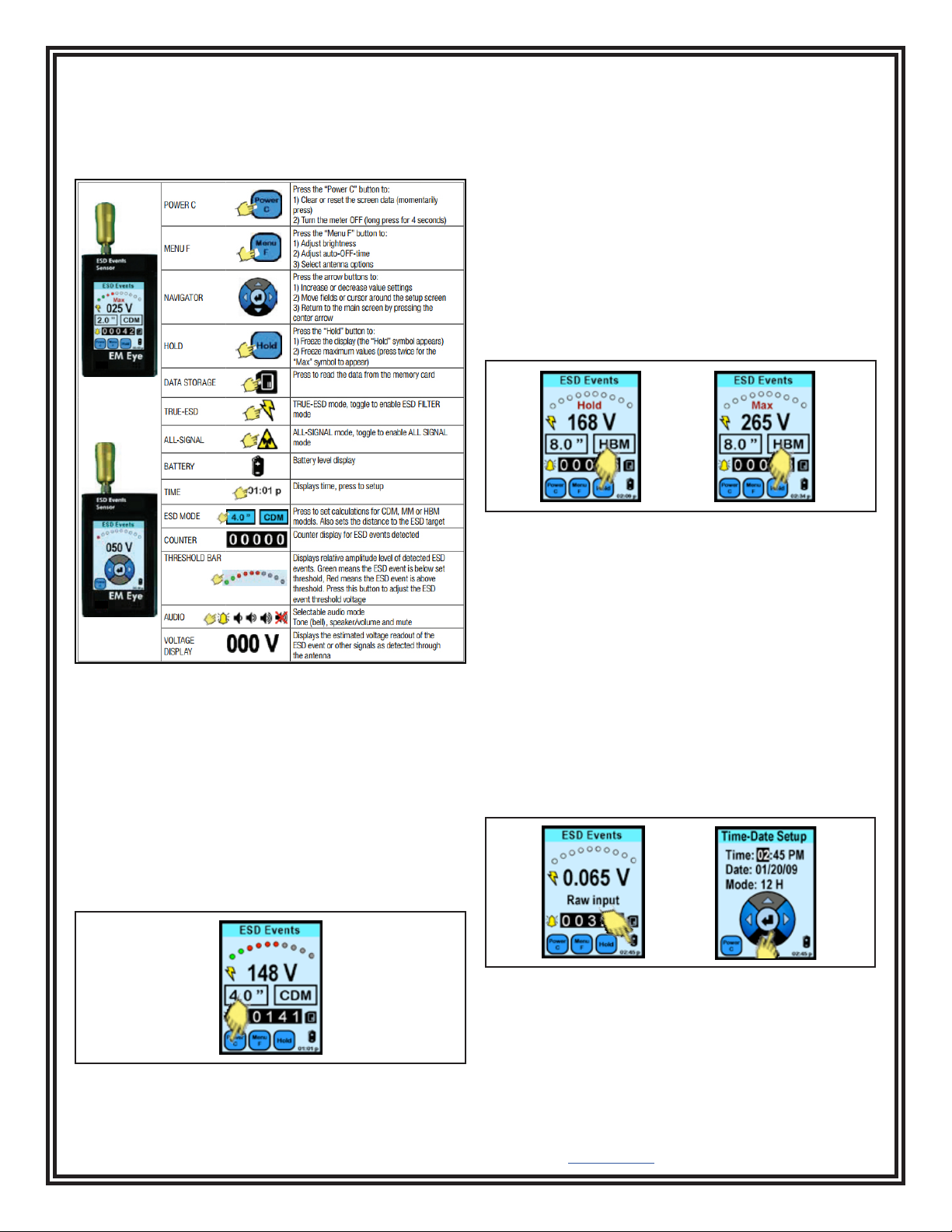
For the detection of most ESD events using CDM, MM
or HBM models.
Common Display and Controls
POWER and CLEAR
The POWER C button turns off the SCS EM Eye Meter
or clears the values that are on display.
To turn off the meter, press and hold the POWER C
button for approximately four seconds or longer until the
meter goes off.
To reset all of the values on the display, press the
POWER C button for approximately one second.
Figure 8. ESD Event Sensor displays and controls
Figure 9. Using the Power / Clear button
HOLD and MAX
The HOLD button toggles the HOLD data and MAX data
sequentially.
HOLD freezes the current data on the display. The
instrument will not be active at this point.
MAX displays the maximum voltages detected by the
EM Eye Meter above the set threshold.
Pressing the HOLD button for the third time will disable
the HOLD and MAX function and returns to normal run
mode.
HOLD and MAX does not affect recording into memory
storage. Data is still being recorded even if HOLD and
MAX is active.
Figure 10. Using the Hold button
TIME
To set the time, press the battery icon.
The NAVIGATOR screen appears.
Press the left or right arrows to move the shaded area
that need to be changed.
Press the up or down button to scroll and set the
numbers.
Press the center button to return to the main screen.
Time: AM/PM format or 24-hour format
Date: Format as MM/DD/YY
Mode: 12-hour, 24-hour format
Figure 11. Setting the time