00194547-02.pdf - 第16页
Installation Manual Station Software Version 601.02 Edition 07/2005 4.2.1.1 Changing the display settings → Select Start Æ Settings Æ Control Panel Æ Display . → Click the Settings tab. → Make the following settings here…

Installation Manual Station Software Version 601.02 Edition 07/2005
→ Insert the floppy you have created in the floppy drive of the machine controller and boot from
the floppy by switching the machine on. The BIOS settings are now performed automatically.
→ After the settings have been made, remove the floppy from the drive and switch the machine off
again.
4.2 Installing the SIPLACE software
4.2.1 Requirements
You must have installed the Windows XP Professional operating system with service pack 2
before installing the station computer version 601 (see section 3).
Caution:
When installing the RMOS operating system (see section 4.5.3 "Installing the machine
controller operating system") it is imperative that the Version 601.02 installation floppies
are used. The machine will not boot if this is not done.
The default Windows display settings must be changed and the touchscreen must be calibrated.
You must be logged on as the
Administrator in order to be able to carry out this work.
15 of 82
Installation Manual Station Software Version 601.02 Edition 07/2005
4.2.1.1 Changing the display settings
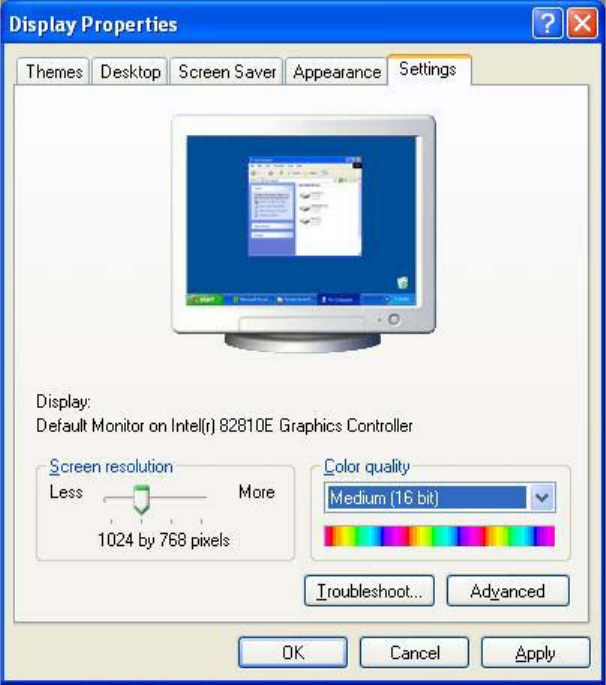
→ Select Start Æ Settings Æ Control Panel Æ Display.
→ Click the Settings tab.
→ Make the following settings here:
Fig. 4-1: Screen settings
16 of 82
Installation Manual Station Software Version 601.02 Edition 07/2005
4.2.1.2 Calibrating the touchscreen
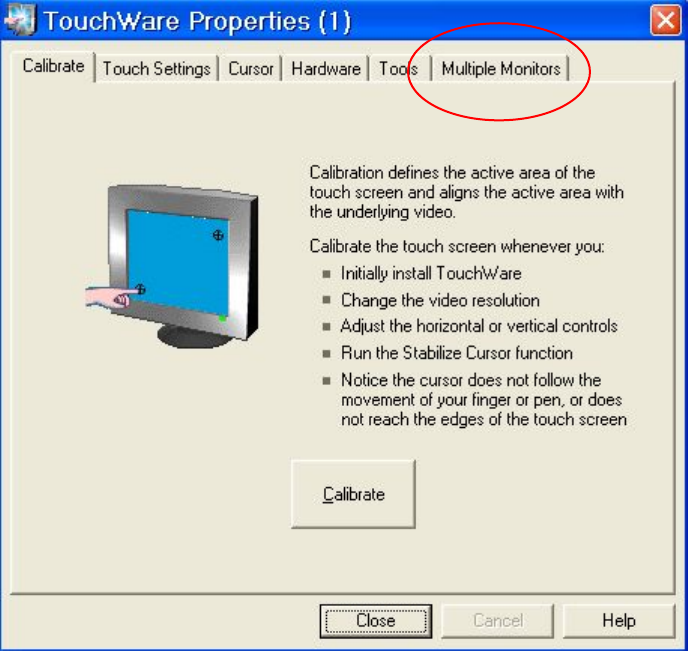
Select Start Æ Settings Æ TouchWare, to start the TouchWare Properties applet.
Fig. 4-2: TouchWare Properties
→ Open the Multiple Monitors tab.
17 of 82