Infinity EX Screens and Screen Images.pdf - 第10页
INFINITY EX SCRE ENS AN D SCRE EN IM AGES SCREEN FI DUCIAL MA INTEN ANCE 26.1 0 Technical Reference Manual Chapter Iss ue 1 Mar 01 6. Place the shield over the f iducial area and ge ntly rub the scr een surface with the …
INFINITY
EX
SCREENS AND SCREEN IMAGES
SCREEN FIDUCIAL MAINTENANCE
Chapter Issue 1 Mar 01 Technical Reference Manual 26.9
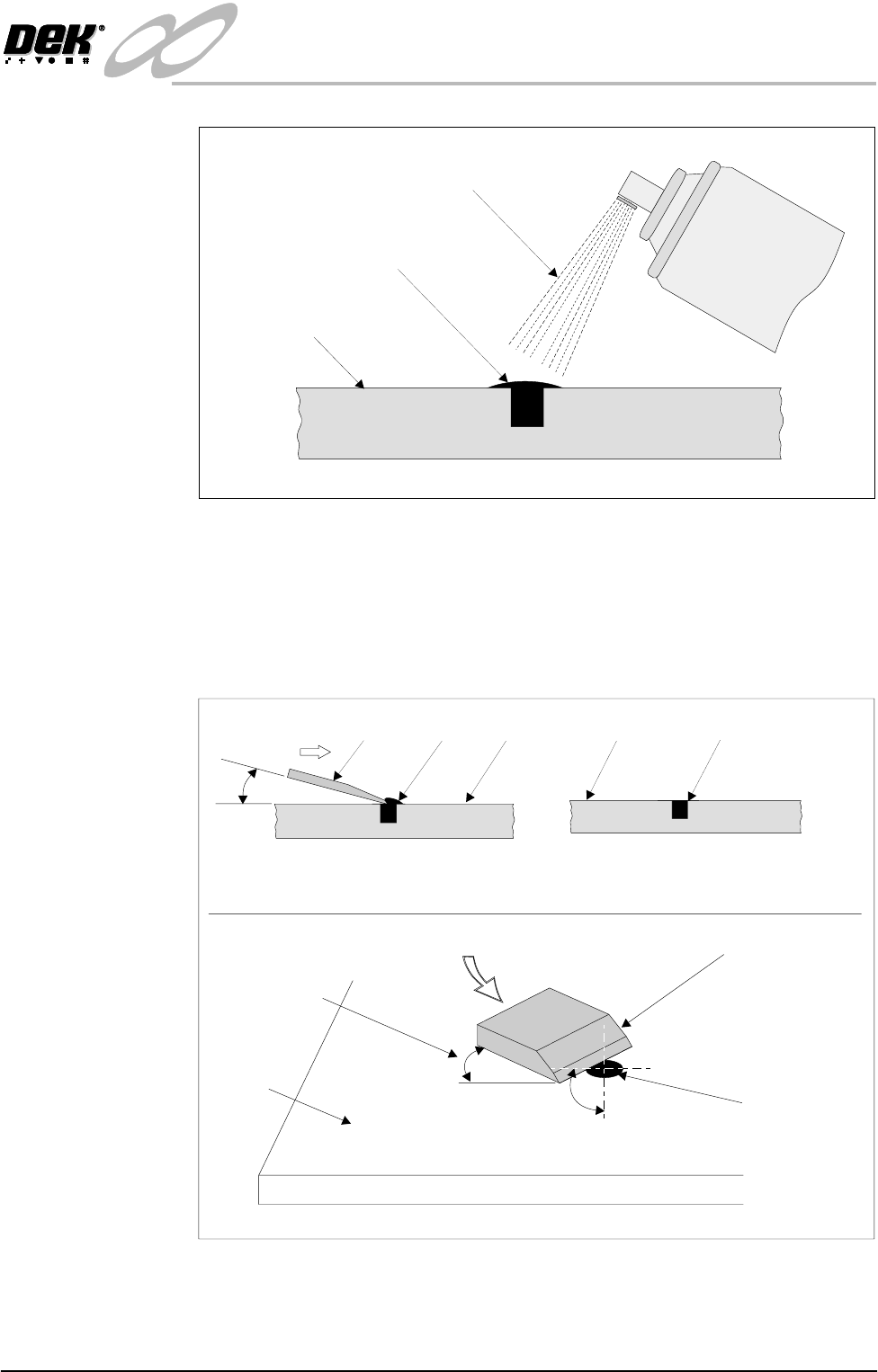
Figure 26-6 Fiducial Activator Application
5. Using a sharp blade remove the excess filler so that it is flush with the screen
surface, as shown in the Figure called Pairing the Filler.
CAUTION
SCORING SCREEN. Care must be taken not to score the screen surface
Figure 26-7 Pairing the Filler
Stencil
Filler
Spray
ACTIVATOR
StencilBlade Filler
Removal of Excess Filler
(see View Below)
Stencil Filler Flush with
Stencil Surface
Excess Filler Removed
20 Deg
Removing Excess Filler
45 Deg
20 Deg
Slicing Action of Blade Across Filler
Angle of Blade
from Stencil
Stencil
Filler
Scalpel Blade
INFINITY
EX
SCREENS AND SCREEN IMAGES
SCREEN FIDUCIAL MAINTENANCE
26.10 Technical Reference Manual Chapter Issue 1 Mar 01
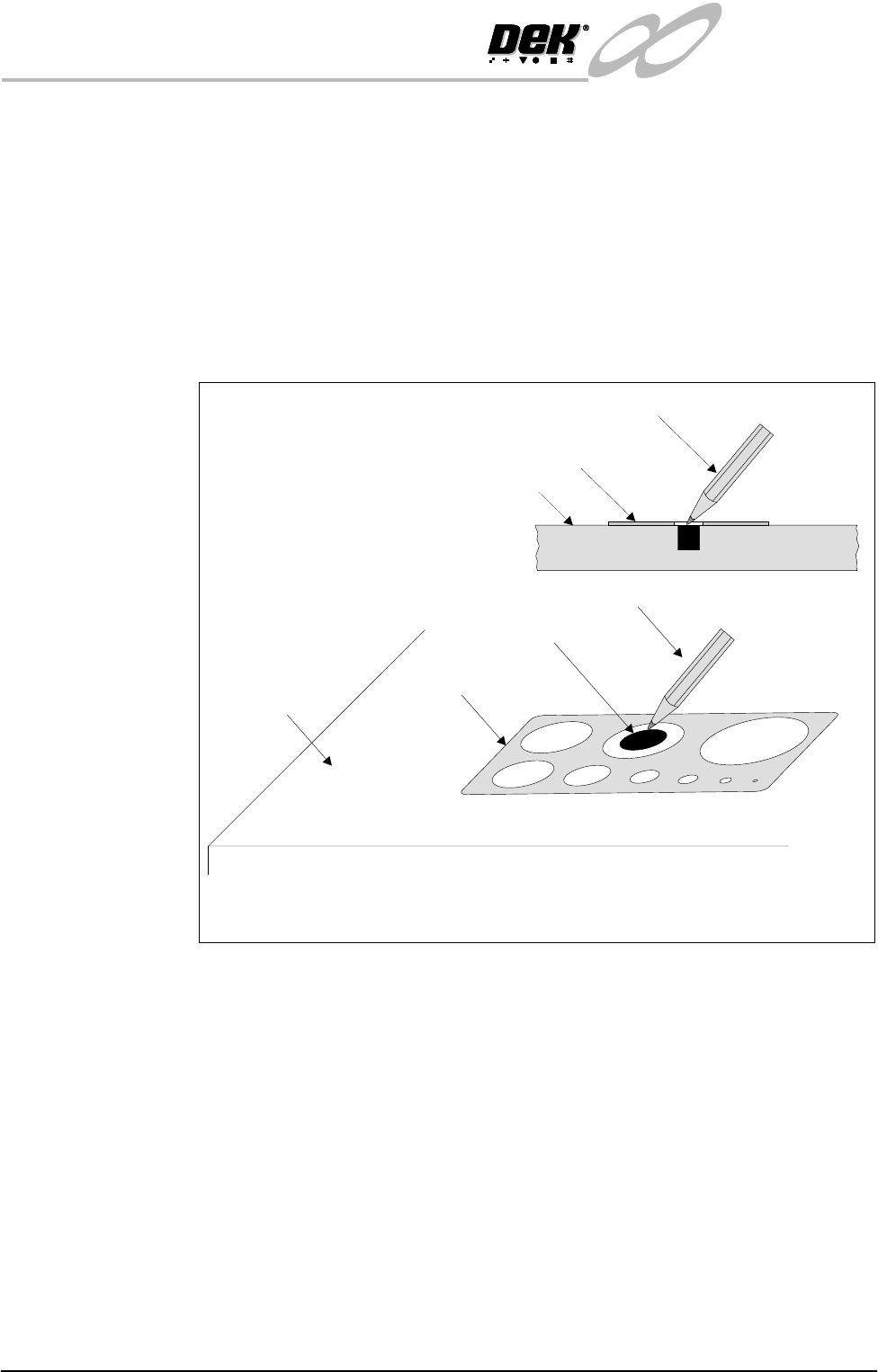
6. Place the shield over the fiducial area and gently rub the screen surface with
the course eraser, as shown in the Figure. Do not rub aggressively. The
objective is to remove any minute excess of the filler and to create the
contrast between the screen and fiducial.
7. With the shield still in place rub gently with the soft eraser to give the screen
a bright finish. This enhances the screen to fiducial contrast.
After the pre-determined maintenance period has lapsed, the fiducial to screen
contrast requires a touch up, therefore a screen burnish is required. If fiducial
erosion is occurring, the fiducial fill procedure is required.
Figure 26-8 Fiducial Burnishing
Stencil
Eraser
Eraser Shield
Eraser
Burnishing the Screen and Fiducial Using Eraser and Shield
Stencil
Filler
Eraser Shield

INFINITY
EX
SCREENS AND SCREEN IMAGES
SCREEN FIDUCIAL MAINTENANCE
Chapter Issue 1 Mar 01 Technical Reference Manual 26.11
Burnishing Carry out the following burnishing procedure for brass stencils:
1. Place the shield over the fiducial area and gently rub the screen surface with
the course eraser. Do not rub aggressively. The objective is to remove any
tarnishing to create the contrast between the screen and fiducial.
2. With the shield still in place rub gently with the soft eraser to give the screen
a bright finish. This enhances the screen to fiducial contrast.
Materials • Filler & activator - Black Tak 410 from Loctite type.
• Eraser - course type as used for typing correction.
• Eraser - soft type as used for drafting film.
• Applicator - green, available from Loctite.
• Blade - scalpel type Swan-Morton No. 11 + holder.
• Shield - thin metal type with various shapes and sizes ie circles squares etc.
Fiducial Repair Kit A kit for fiducial filling is available from the DEK Precision Screen Division.
• Part No. 173257