Infinity EX Screens and Screen Images.pdf - 第7页
INFINITY EX SCREE NS AND SC REE N IMAGE S IMAGE POSITIONING Chapter Issu e 1 Mar 01 Technical Reference Manual 26.7 The follo w ing fi gure sho ws the Custom Screen parameters re lati v e to a screen frame. Figure 26-4 C…

INFINITY
EX
SCREENS AND SCREEN IMAGES
IMAGE POSITIONING
26.6 Technical Reference Manual Chapter Issue 1 Mar 01
Custom Screen
Image
User definable screen image positions are accommodated for with the Custom
Screen menu parameter.
Selecting Custom Screen activates the following menu parameters:
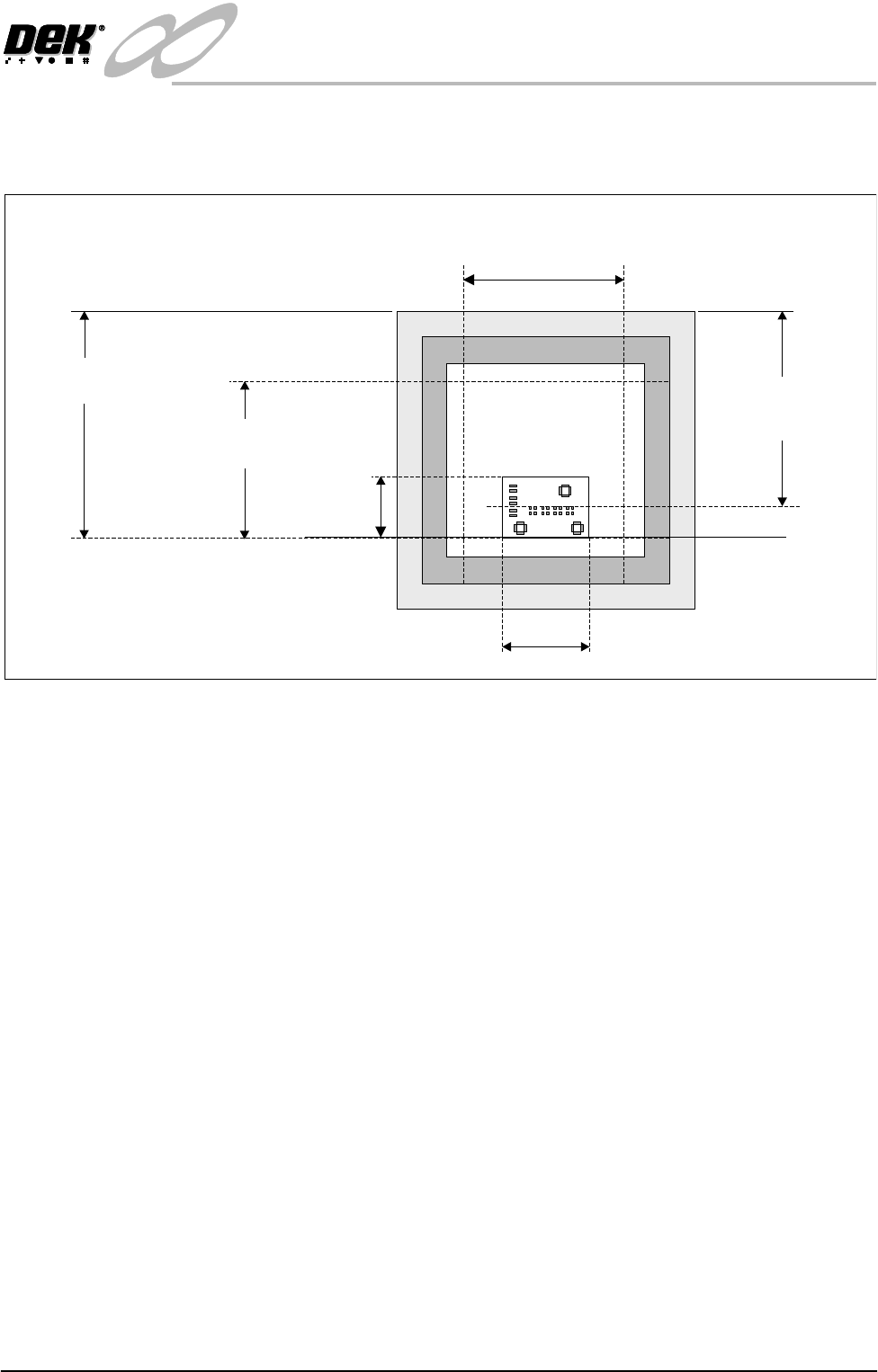
• Print Area Length
• Print Area Width
• Distance to Image
Print Area Length The Print Area Length parameter is used to control the board width ranges. This
is the maximum printable distance in the Y direction, ie the maximum distance
the squeegee can travel, front to back.
Print Area Width The Print Area Width is used to control the board stop position and the paste
dispenser start and stop positions. For certain screen widths a warning is
displayed that the screen clean unit should not be used. This is the maximum
length of squeegee that could be fiited to the printer, taking into account screen
frame and the amount of mesh surrounding the mask. This is also the maximum
length of paste that can be dispensed.
NOTE
When setting ‘print area’ parameters, care must be taken to ensure that a large
enough safety margin is maintained between the board edges and inside edges
of the screen frame. An adequate safety margin prevents any process problems
and allows for squeegee movement and screen alignment. A distance of at least
60mm is usually acceptable.
Distance to Image The parameter has two meanings depending on whether Centre Justified or Edge
Justified image is selected.
For a Centre Justified image the Distance to Image measurement is the distance
from the outside rear of the screen frame to the centre of the image.
For an Edge Justified Image the Distance to Image measurement is the distance
from the outside rear of the screen frame to the front edge of the board. Care
must be taken to ensure that this measurement is to the edge of the board, not the
front of the image. Add the distance between the front edge of the board and the
foremost aperture, to the distance between the outside rear of the screen frame
and the front edge of the foremost aperture.
X Axis Offset The setting of the Custom Screen parameters only effects the Y screen load
position. Any offset in the X direction must be adjusted by offsetting the board
stop position.
INFINITY
EX
SCREENS AND SCREEN IMAGES
IMAGE POSITIONING
Chapter Issue 1 Mar 01 Technical Reference Manual 26.7
The following figure shows the Custom Screen parameters relative to a screen
frame.
Figure 26-4 Custom Screen Parameters
Board Length
Print Area Width
(maximum board length)
Distance To Image
(When centre justified)
Distance To Image
(When front justified)
Board
Width
Front Rail
Print Area Length
(maximum board width)
INFINITY
EX
SCREENS AND SCREEN IMAGES
SCREEN FIDUCIAL MAINTENANCE
26.8 Technical Reference Manual Chapter Issue 1 Mar 01
SCREEN FIDUCIAL MAINTENANCE
General As the vision system relies on good contrast between the fiducial and the screen
material (brass or stainless etc) it is required to maintain this contrast so as to
enable consistent fiducial location. The contrast deteriorates each time the
screen is cleaned depending on the type of solvent used and the type of screen
used. To reduce the deterioration periodic burnishing is required.
If the fiducial has eroded over a period of time, a fiducial fill and screen
burnishing are required.
To determine the maintenance period and or fiducial erosion, the contrast has to
be evaluated. The main objective is to establish a contrast deterioration to
screenwash cycle rate.
CAUTION
AQUEOUS WASHING SYSTEMS. If using an aqueous washing system
with a suponifyer the PH level must not rise above 11 or the fiducials
deteriorate rapidly due to corrosive action.
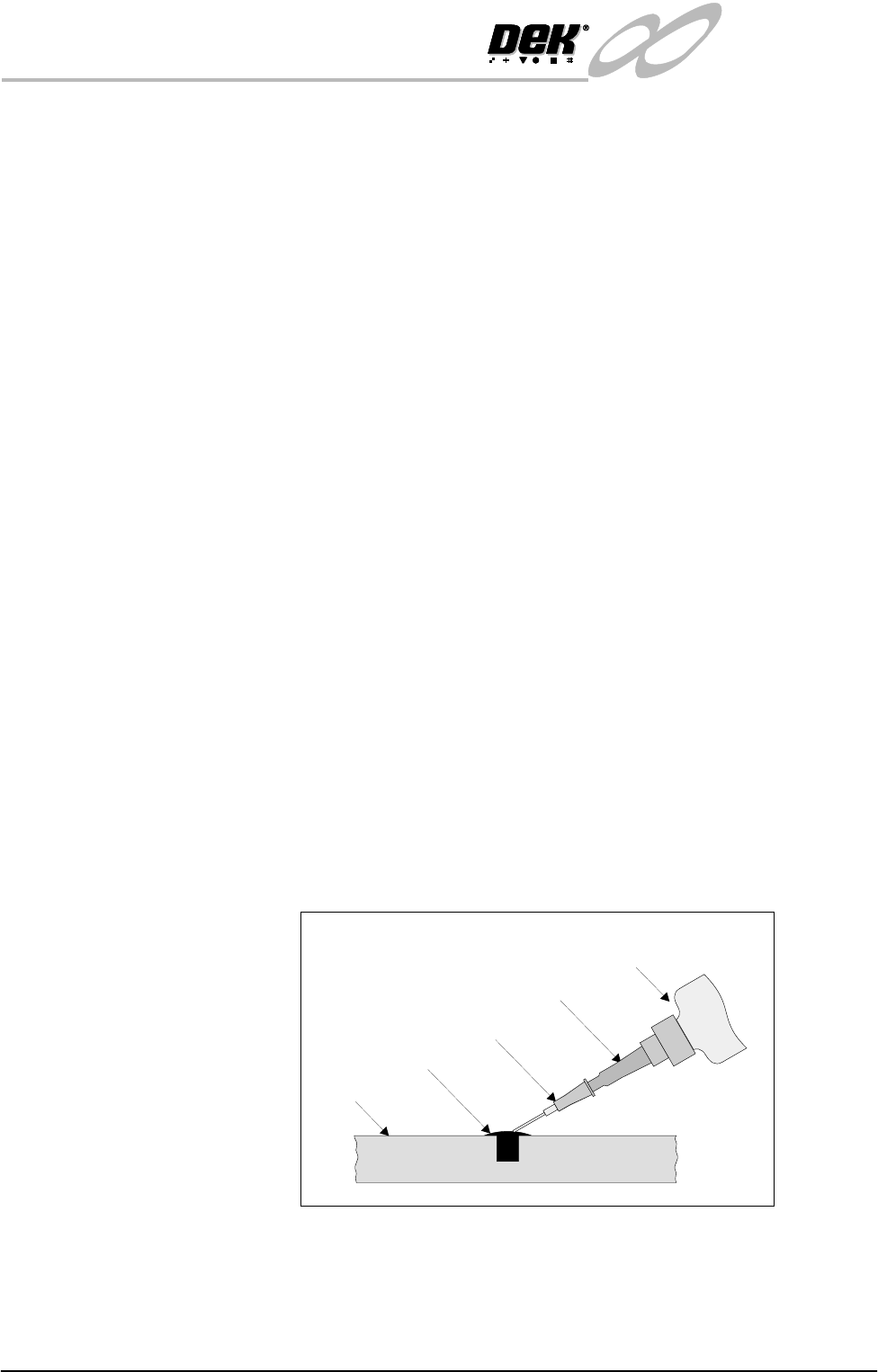
Fiducial Filling 1. Remove carefully any existing filler from the fiducials. This can be done
using a pin and a magnifying glass.
CAUTION
EXCESSIVE FORCE. As the screens are extremely delicate and the
fiducial is half etched, any excessive force causes damage to the screen by
creating a pip on the top side. Also ensure that no damage to the fiducial
perimeter occurs.
2. Remove any debris from the fiducial recess using a clean moisture free air
supply. Do not use any type of solvent to clean this area as a residue may be
left inside causing poor adhesion of the filler.
3. Fill the Fiducial recess with the filler using the applicator as shown below.
Due to the nature of the filler, complete all filling as the filler compound may
set in the applicator. Spray on the activator and allow to cure for 2-3 minutes.
4. Dispose of applicator with care and recap filler bottle immediately after use.
Figure 26-5 Fiducial Filler Application
Applicator
Stencil
Filler
Filler Nozzle
Black Tak
Filler Container