TK32279_Signal light lighting condition editing.pdf
2nd SMT Engineering Division Softw are Gro up IM Operation s Y AMAHA MOTOR CO., L TD MDOC-SOFT50453 1/8 Signal light light ing condition edit ing function Co n tent s Signal l ight lighting condition edit ing function …
2nd SMT Engineering Division Software Group
IM Operations
YAMAHA MOTOR CO., LTD
MDOC-SOFT50453
1/8
Signal light lighting condition editing function
Contents
Signal light lighting condition editing function..................................................................................................1
Contents..............................................................................................................................................................................1
1. Target models and supported versions..........................................................................................................2
2. Overview........................................................................................................................................................................2
3. Function Details.........................................................................................................................................................2
3.1 The editing screen for signal light lighting condition........................................................................2
3.2 Timing of reading and writing the signal light signal lighting condition file...........................6
4. Setting methods.........................................................................................................................................................7
4.1 For the case that this function is already used (SignalTowerOption.sts file exists)........7
4.2 For the case that this function is not used (SignalTowerOption.sts file doesn’t exist)...8
Rev. Version Chapter Contents of revision
00 V3.47STD R1.000 or later version
V4.52STD R1.000 or later version
All Created
本文書に含まれる技術内容は当社の秘密情報です。当社の許諾無く第三者への開示はできません。
The information contained in this message may be confidential and legally protected under
applicable law. The message is intended solely for the addressee(s).
If you are not the intended recipient, you are hereby notified that any use, forwarding,
dissemination, or reproduction of this message is strictly prohibited and maybe unlawful.
2nd SMT Engineering Division Software Group
IM Operations
YAMAHA MOTOR CO., LTD
MDOC-SOFT50453
2/8
1. Target models and supported versions
Target models and supported versions for this function are as the following table.
Table1 Target models and software, supported version
Target models, software Supported version Remarks
YS series mounter/printer,
YG300, YG12 series mounter
V3.47STD R1.000 or
later version
YSM40, YSM20, YSD, YCP10 V4.52STD R1.000 or
later version
2. Overview
This function enables you to change the lighting condition of signal lights and the sound
condition of buzzers on the screen.
You can change simultaneously the lighting condition for plural machines by saving a
signal light lighting condition file in server.
< Remarks >
(1) It is not allowed to use this function with some other special functions which can change
the lighting condition of signal lights. When these special functions are enabled, this
function becomes disabled.
(2) When you use the existing signal light lighting condition file (SignalTower.sts), disable
this function (Uncheck the ”Edit lighting condition of signal light” check box on the
“Signal Light Editor” screen). It is not allowed to edit the lighting condition on the
screen.
3. Function Details
3.1 The editing screen for signal light lighting condition
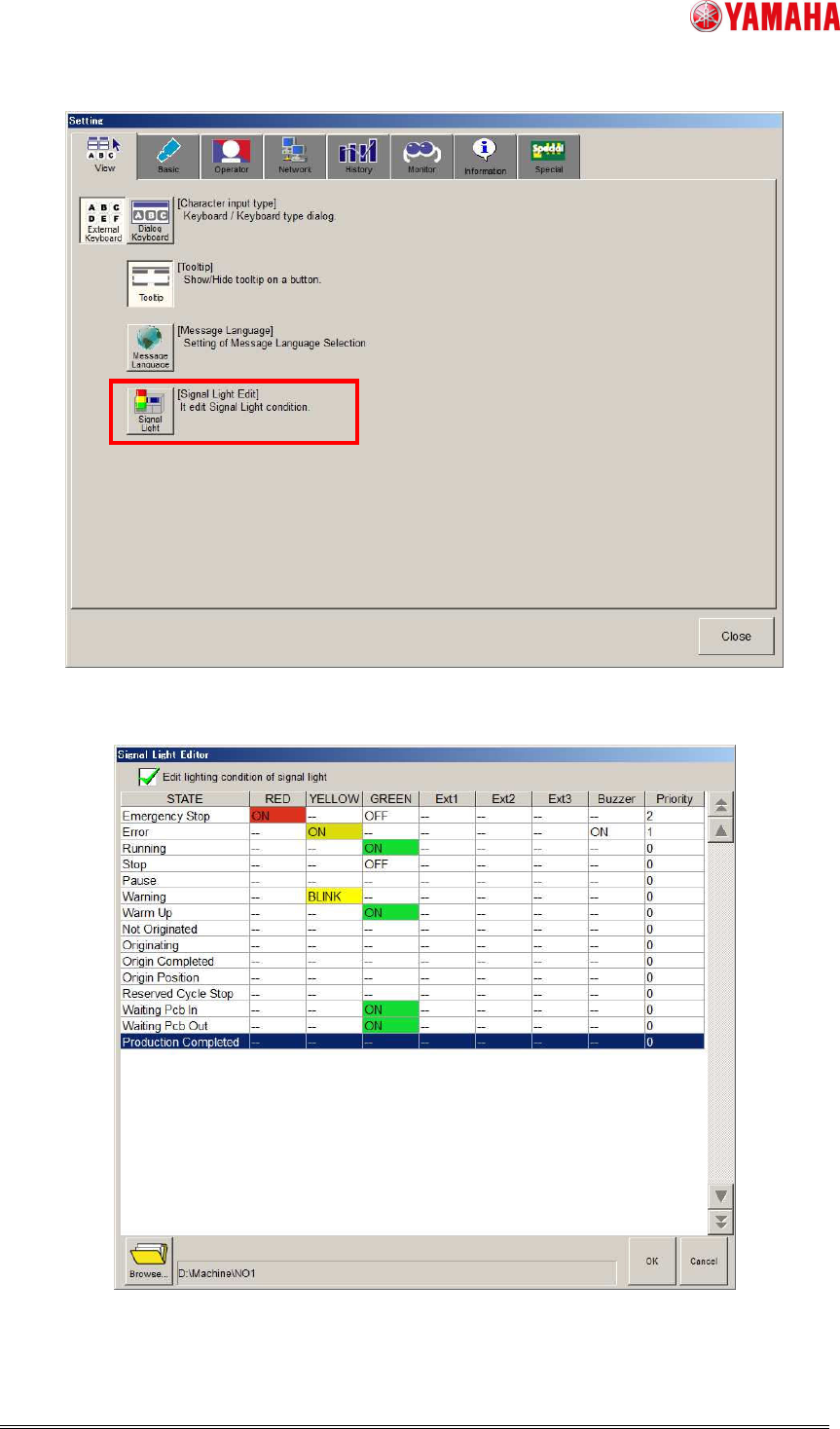
You can change signal light lighting condition on [Setup] - [Software Setting] - [View] -
[Signal Light Edit] - [Signal Light Editor] screen.
2nd SMT Engineering Division Software Group
IM Operations
YAMAHA MOTOR CO., LTD
MDOC-SOFT50453
3/8
Fig.1 [Setup] - [Software Setting] - [View] tab
Fig.2 “Signal Light Editor” screen