TK32279_Signal light lighting condition editing.pdf - 第4页
2nd SMT En gineering Division Software Group IM Operation s Y AMAHA MOTOR CO., L TD MDOC-SOFT50453 4/8 T abl e 2 Items display ed on the “Signal Light Editor” screen Items Functio n Edit lighting c ondition of signal l…
2nd SMT Engineering Division Software Group
IM Operations
YAMAHA MOTOR CO., LTD
MDOC-SOFT50453
3/8
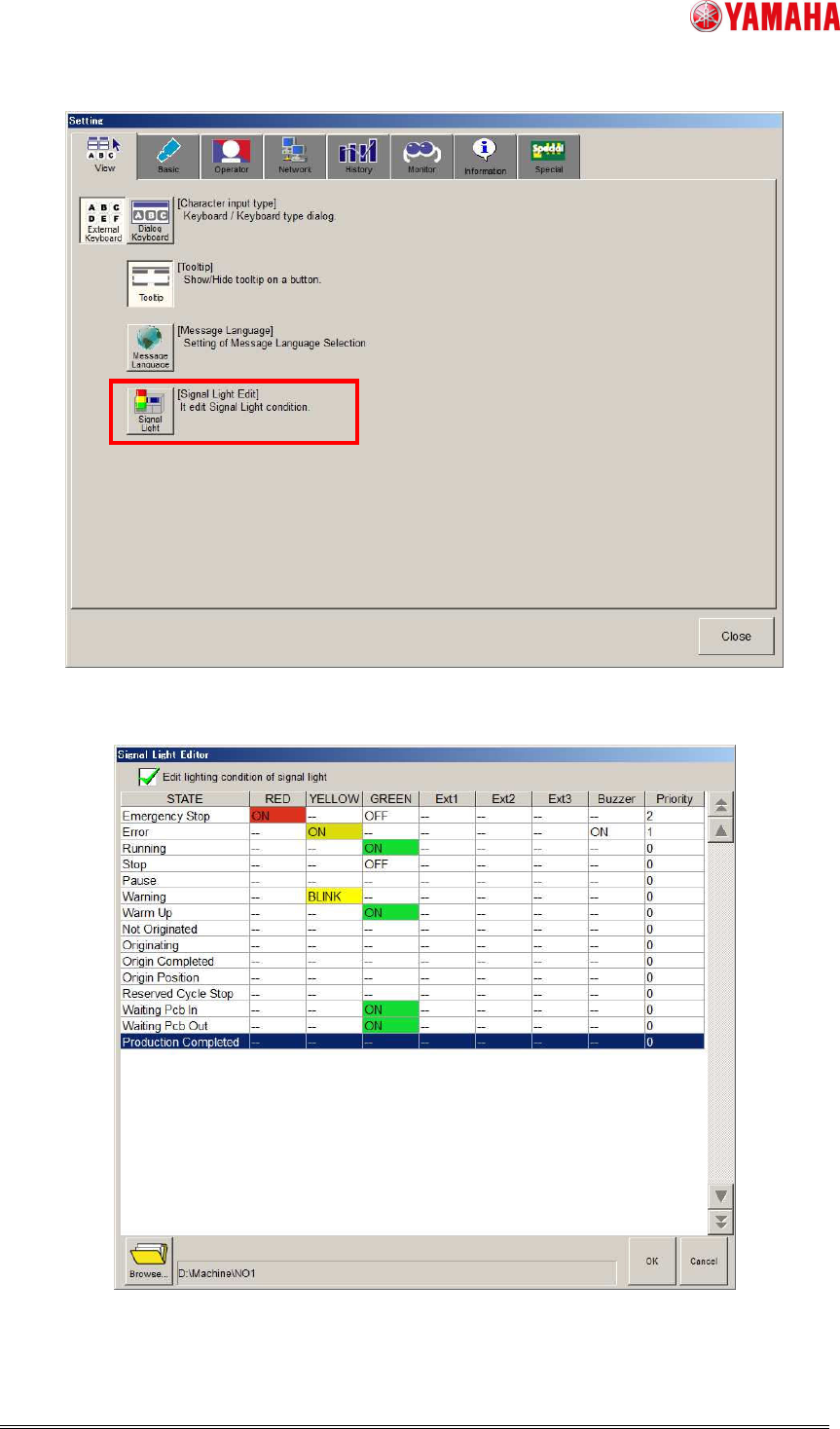
Fig.1 [Setup] - [Software Setting] - [View] tab
Fig.2 “Signal Light Editor” screen
2nd SMT Engineering Division Software Group
IM Operations
YAMAHA MOTOR CO., LTD
MDOC-SOFT50453
4/8
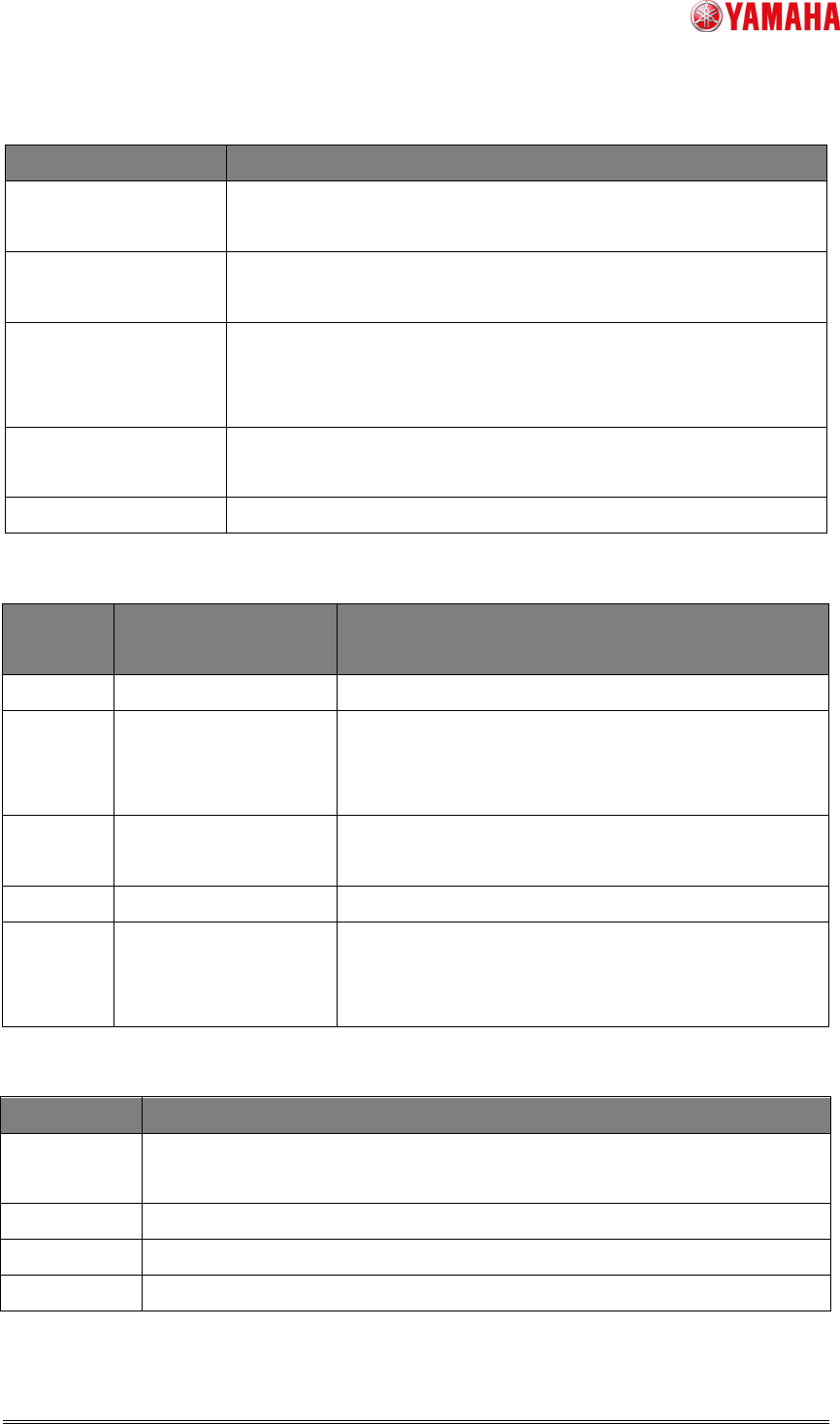
Table 2 Items displayed on the “Signal Light Editor” screen
Items Function
Edit lighting condition
of signal light
Switches the function to enable or disable.
Lighting condition
editing grid
Sets the lighting condition for each state. (For more details, refer
to the table 3 - 5)
Browse… Changes a save folder for the signal light lighting condition file
(SignalTowerOption.sts).
(The default:D:\Machine\No1)
OK Saves and updates the changed contents and closes the
window.
Cancel Cancels the changed contents and closes the window.
Table 3 The line for lighting condition editing grid
Line
name
Choices / range Contents
STATE
-
The state name to edit the lighting condition.
RED/
YELLOW/
GREEN
-- / ON / OFF / BLINK Set a color for the signal light.
Ext1/2/3 -- / ON / OFF / BLINK Not allowed to use.
Available for special function only.
Buzzer -- / ON / OFF / BLINK Set the sound condition for buzzers.
Priority 0~99 Set the priority when the states overlaps.
The priority becomes higher with larger value.
(Refer to the contents of [Priority] in the table 5)
Table 4 The choices in combo box for the lighting condition editing grid.
Items Contents
--
Takes over the lighting (sound) condition from the state just before.
*Sets OFF when the machine stops.
ON
Signal light turns on /Buzzer is set ON
OFF
Signal light turns off /Buzzer is set OFF
BLINK
Signal light is blinking /Buzzer makes sound intermittently.
2nd SMT Engineering Division Software Group
IM Operations
YAMAHA MOTOR CO., LTD
MDOC-SOFT50453
5/8
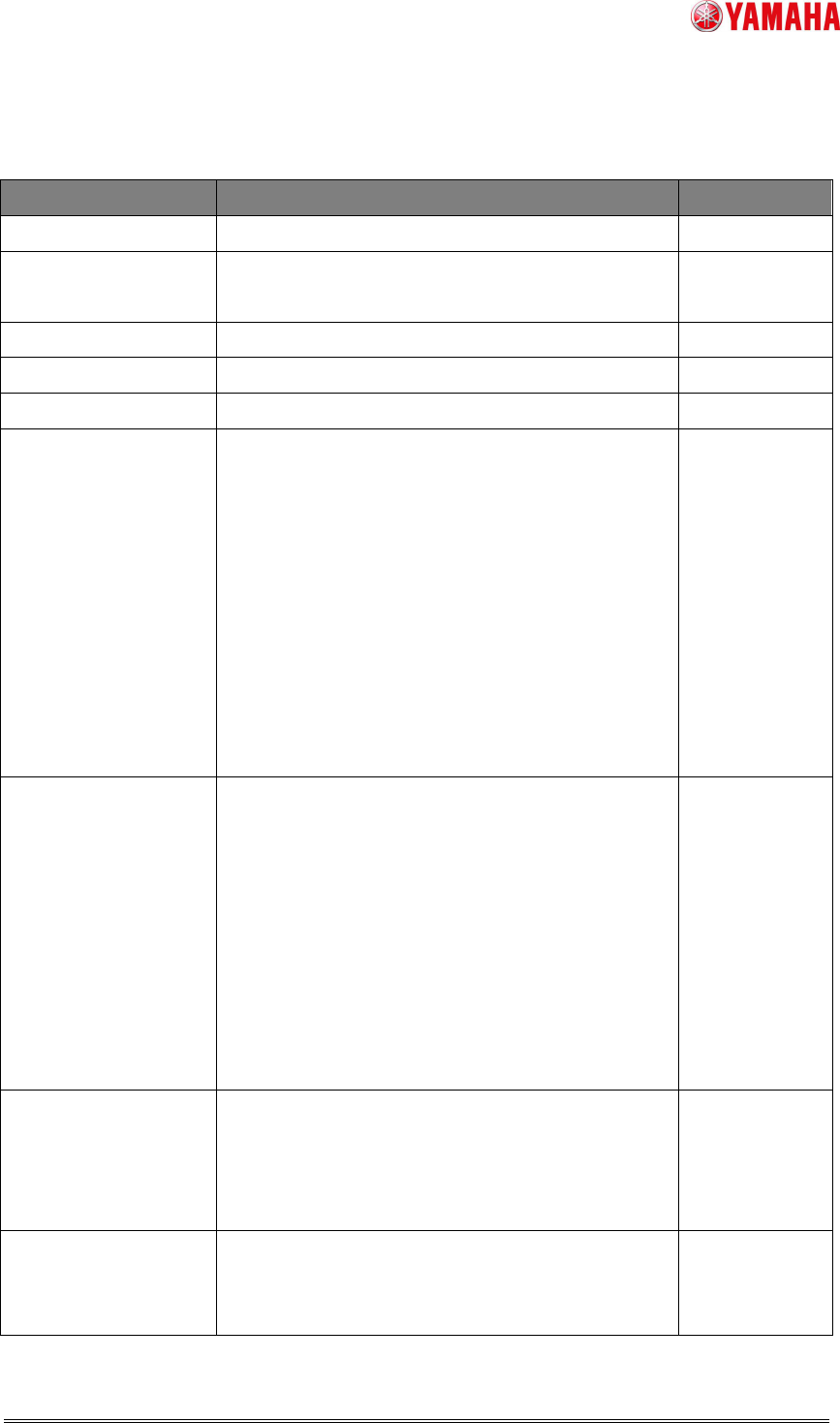
Table 5 A condition list for lighting condition editing grid
State Contents Priority
Emergency Stop
Emergency stop. -
Error
Error occurred.
After clearing the error, the state of stop.
Running
Auto-running. -
Stop
Stop or reset of operation. -
Pause
Auto-running is suspending. -
Warning
・Run out of parts.
・Remain Warning
・Run out of solder.
・ATS recovery pallet is full.
・Dump station is full.
・Dispenser paper or fluid run out or will run out
soon.
・The downstream conveyer is checked.(Available
only when the “Op003:
Auto Program
Change-Over” function is enabled.)
Running
Material Error
The following messages are displayed to inform
that the machine has run out of
Solder/Gauze/Solvent.
・Ea8103: SOLDER AMOUNT ERROR (Only for
the head with closed nozzle)
・Ea8280: GAUZE ROLLING FINISHED
・Ea8281: LACK OF SOLVENT
・Ea8400: SOLDER SUPPLY INTERVAL END
(For printers only.)
Error
Waiting First/Final
Board Check
The machine is waiting for finishing inspection of
the first/final board.(Available only when the
“Op003:
Auto Program Change-Over” function is
enabled.)
-
Auto Switching
Board
The board data is automatically switched.
(Available only when the “Op003:
Auto Program
Change-Over” function is enabled.)
-