manual-biron-100-precision-soldering-tool-jbc-0033098_ID-243824_EN.pdf - 第6页
T ool O N MENU 28174 24 W 1 0 0 % 18 W 1 0 0 % 12 W 1 0 0 % 6 W 1 0 0 % 0 W 1 0 0 % 1 0 seconds/div V1.2 CH ARGE 45 0 º C 35 0 º C 25 0 º C 15 0 º C 50 ºC JBC 210 34 8ºC 5 , 7 W 8 0 % 350ºC T ool O N MENU 2 4 W 1 00 % 1 …
Tool
ON
MENU
28174
24 W
100%
18 W
100%
12 W
100%
6 W
100%
0 W
100%
10 seconds/div
V1.2
CHARGE
450 ºC
350 ºC
250 ºC
150 ºC
50 ºC
JBC
210
348ºC
5,7 W
80%
350ºC
Tool
ON
MENU
24 W
100%
18 W
100%
12 W
100%
6 W
100%
0 W
100%
10 seconds/div
V1.2
WORK
450 ºC
350 ºC
250 ºC
150 ºC
50 ºC
80%
JBC
210
350ºC
Tool
ON
MENU
24 W
100%
18 W
100%
12 W
100%
6 W
100%
0 W
100%
10 seconds/div
V1.2
CHARGE
450 ºC
350 ºC
250 ºC
150 ºC
50 ºC
JBC
210
348ºC
5,7 W
80%
350ºC
JBC#1
Tool
ON
MENU
24 W
100%
18 W
100%
12 W
100%
6 W
100%
0 W
100%
10 seconds/div
V1.2
CHARGE
450 ºC
350 ºC
250 ºC
150 ºC
50 ºC
JBC
210
80%
350ºC
JBC#1
Tool1
Tool ID
28714
Hardware
Software
0028283
X886787
Update File
File
Hardware
Software
Select your Firmware
-
-
Update
MENU
JBC
210
Return to Work
JBC#1
B·IRON 100
B·IRON 500
User’s Manual
User’s Manual
Documents
MENU
JBC#1
JBC
210
Return to Work
2822
Work
Settings
Counters
Update
Documents
Light Theme
Dark Theme
Disconnect
Tool
ON
MENU
28174
24 W
100%
18 W
100%
12 W
100%
6 W
100%
0 W
100%
10 seconds/div
V1.2
CHARGE
450 ºC
350 ºC
250 ºC
150 ºC
50 ºC
JBC
210
348ºC
5,7 W
80%
350ºC
Work
Settings
Counters
Update
Documents
Light Theme
Dark Theme
Disconnect
JBC#1
348ºC
6 W
Work
JBC#1
MENU
Tool1
2822
Tool ID
Hibernation delay (seconds)
00:30
Sleep mode
Sleep temperature
150ºC
Minimum Temperature
100ºC
Maximum Temperature
400ºC
Working
Low battery
Power OFF
Charging
No cartridge
Tool Status
Temperature units
ºC
ºF
JBC
210
Lock Parameters
Locked
Unlocked
Work
JBC#1
MENU
Tool1
2822
Tool ID
Hibernation delay (seconds)
10
Sleep mode
Sleep temperature
150ºC
Minimum Temperature
100ºC
Maximum Temperature
400ºC
Working
Low battery
Power OFF
Charging
No cartridge
Tool Status
Temperature units
ºC
ºF
JBC
210
Lock Parameters
Locked
Unlocked
Work
JBC#1
MENU
Tool1
2822
Tool ID
Hibernation delay (seconds)
00:30
Sleep mode
Sleep temperature
150ºC
Minimum Temperature
100ºC
Maximum Temperature
400ºC
Working
Low battery
Power OFF
Charging
No cartridge
Tool Status
Temperature units
ºC
ºF
JBC
210
Lock Parameters
Locked
Unlocked
Work
Enter PIN
OK
MENU
450 ºC
350 ºC
250 ºC
150 ºC
50 ºC
80%
Work
Settings
Counters
Update
Documents
Light Theme
Dark Theme
Add device
Disconnect
MENU
450 ºC
350 ºC
250 ºC
150 ºC
50 ºC
JBC
80%
350ºC
Devices
Documents
Light Theme
Dark Theme
Work
Counters
1
6
7
6
8
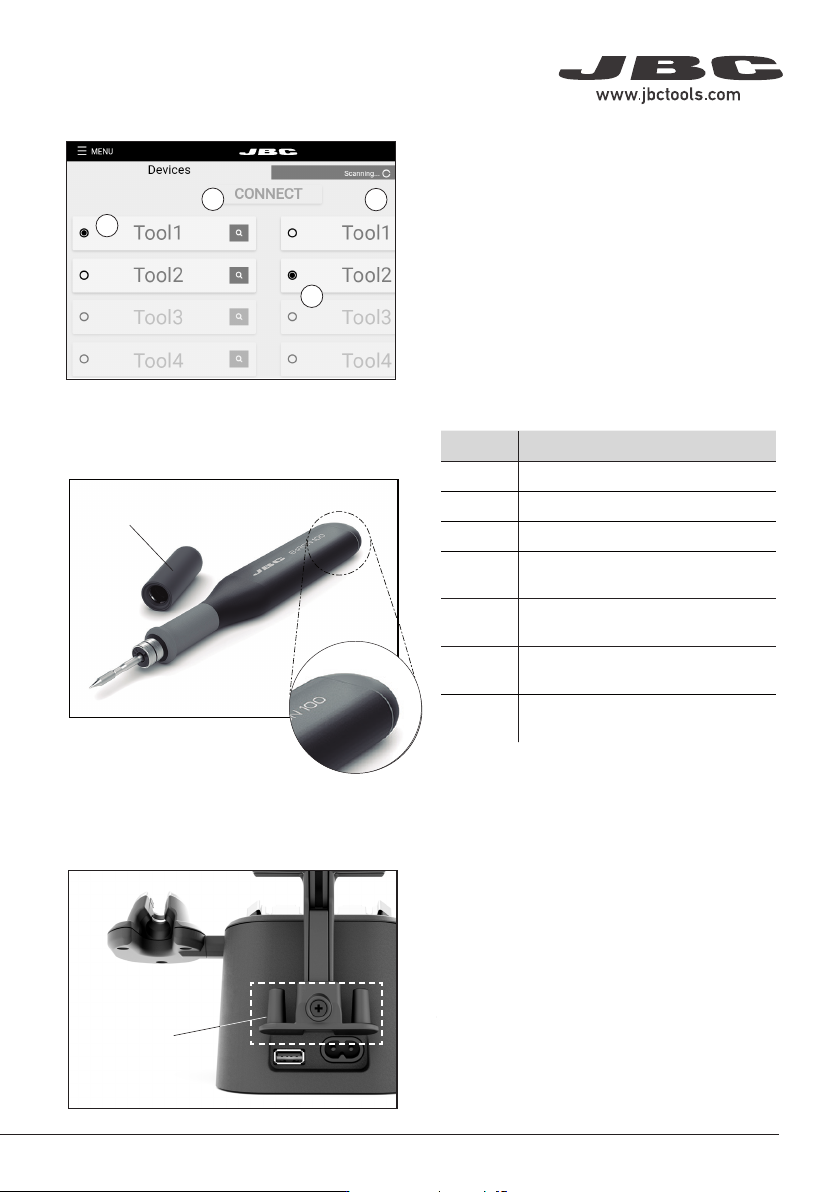
Status Lightband see table at the right
Safety Cap
Safety Cap and Cap Holder
Cap Holders
Status Lightband Detail
7. Tool Selection
Screw
Color Battery Status
green more than 50% charged
orange between 20% and 50% charged
red less than 20% charged
green
blinking
charging
(more than 50% charged)
orange
blinking
charging
(between 20% and 50% charged)
red
blinking
charging
(less than 20% charged)
no
color
safety cap on the handle
and/or power off
Thanks to the safety cap for B·IRON handles,
they can be safely transported even with a
cartridge inserted.
When the cap is placed onto the handle, the
cartridge stops heating immediately, data
transfer is cut off and the handle is disconnected
from the station. It turns off completely after 10
minutes of inactivity. This allows a greater saving
of the handles battery.
The charging base has a holder for two safety
caps on the back. This component can be
detached by loosening and removing the screw
in middle of the two holders (1).
While the tool is being used, the cap can be
stored on the cap holder.
Any tool that has been previously scanned and
is within the bluetooth range will be displayed on
screen. It is possible to connect up to two tools
at the same time.To work with two tools, select
one from the left column and one from the right
column (6). Then press the “CONNECT” button (7).
If the tool you would like to work with is not
displayed on screen, make sure that the cap is
off and the tool has some battery. Try scanning
again by tapping Scan (8) on the display.
Safety Cap
Holders
Fitting the safety cap to the handles, they can be
safely transported even with a cartridge inserted.
If so, the cartridge stops heating immediately, data
transfer is cut off and the handle is disconnected
from the station.
Handles turn off completely after 10 minutes of
inactivity and this allows a greater saving of the
handles battery.
While the handle is being used, the cap can be
stored on the safety cap holder at the back of the
charging base.
Tool Selection
Safety Cap
5
40 mm
50 mm
60 mm
80 mm
100 mm
130 mm
130 mm
para manuales - color gris
200 mm
300 mm
Tool
ON
MENU
28174
24 W
100%
18 W
100%
12 W
100%
6 W
100%
0 W
100%
10 seconds/div
V1.2
CHARGE
450 ºC
350 ºC
250 ºC
150 ºC
50 ºC
JBC
210
348ºC
5,7 W
80%
350ºC
Tool
ON
MENU
24 W
100%
18 W
100%
12 W
100%
6 W
100%
0 W
100%
10 seconds/div
V1.2
WORK
450 ºC
350 ºC
250 ºC
150 ºC
50 ºC
80%
JBC
210
350ºC
Tool
ON
MENU
24 W
100%
18 W
100%
12 W
100%
6 W
100%
0 W
100%
10 seconds/div
V1.2
CHARGE
450 ºC
350 ºC
250 ºC
150 ºC
50 ºC
JBC
210
348ºC
5,7 W
80%
350ºC
JBC#1
Tool
ON
MENU
24 W
100%
18 W
100%
12 W
100%
6 W
100%
0 W
100%
10 seconds/div
V1.2
CHARGE
450 ºC
350 ºC
250 ºC
150 ºC
50 ºC
JBC
210
80%
350ºC
JBC#1
Tool1
Tool ID
28714
Hardware
Software
0028283
X886787
Update File
File
Hardware
Software
Select your Firmware
-
-
Update
MENU
JBC
210
Return to Work
JBC#1
B·IRON 100
B·IRON 500
User’s Manual
User’s Manual
Documents
MENU
JBC#1
JBC
210
Return to Work
2822
Work
Settings
Counters
Update
Documents
Light Theme
Dark Theme
Disconnect
Tool
ON
MENU
28174
24 W
100%
18 W
100%
12 W
100%
6 W
100%
0 W
100%
10 seconds/div
V1.2
CHARGE
450 ºC
350 ºC
250 ºC
150 ºC
50 ºC
JBC
210
348ºC
5,7 W
80%
350ºC
Work
Settings
Counters
Update
Documents
Light Theme
Dark Theme
Disconnect
JBC#1
348ºC
6 W
Work
JBC#1
MENU
Tool1
2822
Tool ID
Hibernation delay (seconds)
00:30
Sleep mode
Sleep temperature
150ºC
Minimum Temperature
100ºC
Maximum Temperature
400ºC
Working
Low battery
Power OFF
Charging
No cartridge
Tool Status
Temperature units
ºC
ºF
JBC
210
Lock Parameters
Locked
Unlocked
Work
JBC#1
MENU
Tool1
2822
Tool ID
Hibernation delay (seconds)
10
Sleep mode
Sleep temperature
150ºC
Minimum Temperature
100ºC
Maximum Temperature
400ºC
Working
Low battery
Power OFF
Charging
No cartridge
Tool Status
Temperature units
ºC
ºF
JBC
210
Lock Parameters
Locked
Unlocked
Work
JBC#1
MENU
Tool1
2822
Tool ID
Hibernation delay (seconds)
00:30
Sleep mode
Sleep temperature
150ºC
Minimum Temperature
100ºC
Maximum Temperature
400ºC
Working
Low battery
Power OFF
Charging
No cartridge
Tool Status
Temperature units
ºC
ºF
JBC
210
Lock Parameters
Locked
Unlocked
Work
Enter PIN
OK
MENU
450 ºC
350 ºC
250 ºC
150 ºC
50 ºC
80%
Work
Settings
Counters
Update
Documents
Light Theme
Dark Theme
Add device
Disconnect
MENU
450 ºC
350 ºC
250 ºC
150 ºC
50 ºC
JBC
80%
350ºC
Devices
Documents
Light Theme
Dark Theme
Work
Counters
Operation
The JBC Most Efficient Soldering System
This revolutionary technology can recover tip temperature extremely quickly. This allows the user to
work at a lower temperature.
Inactive
5 mins.
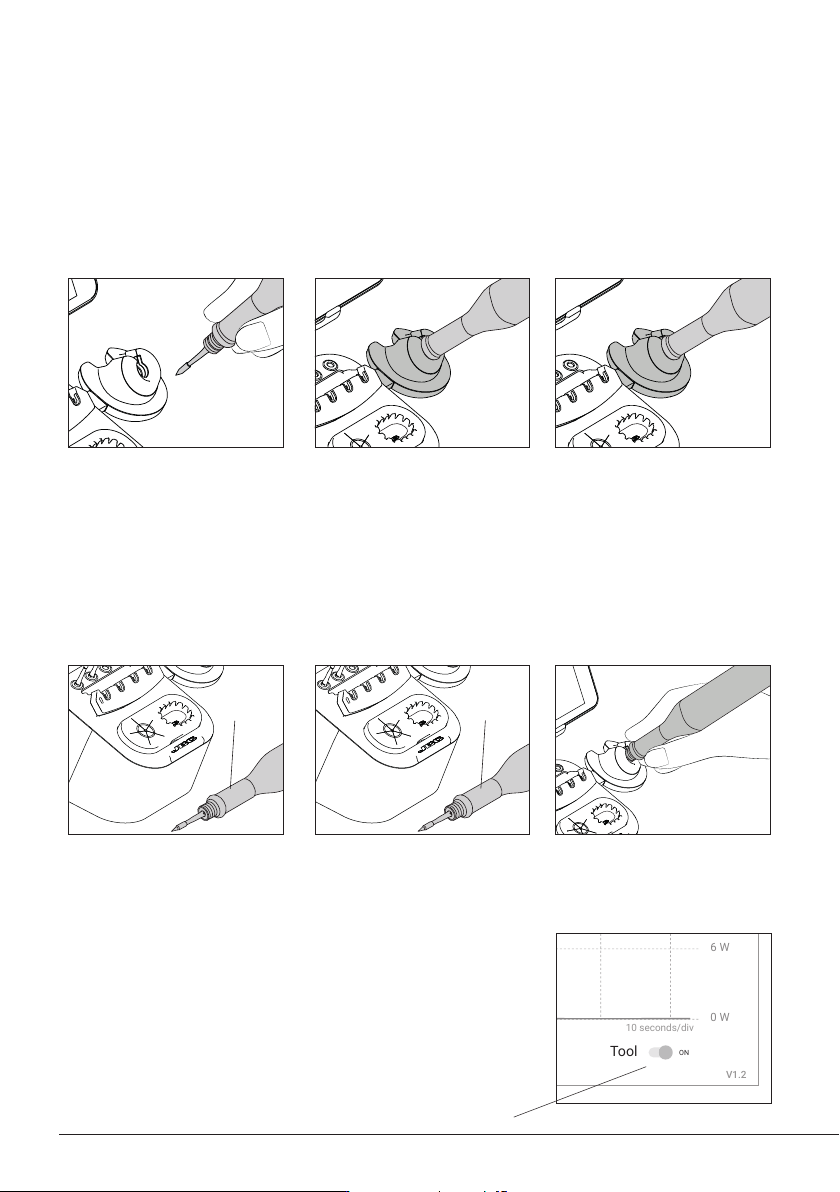
Tool Power Switch
Work
Charge Mode
When the tool is lifted from
the tool holder, the tip of the
assembled cartridge will heat
up to the selected working
temperature.
While the tool remains on the
tool holder, it charges and the
tip will gradually cool down to
room temperature.
Hibernation Mode
When the tool is away from
the tool holder and remains
inactive (no movement for at
least 10 seconds), the tool goes
into Hibernation Mode and the
tip temperature gradually cools
down to room temperature.
After automatically turning
off, put the tool back on the
tool holder to turn it on again.
If the tool has been inactive for
a longer period of time (at least
5 minutes), it automatically
turns off.
Automatic Turn Off Turning the Tool Back On
Sleep Mode
If Sleep Mode is activated
(see section “Settings”), upon
placing the tool on its holder,
besides charging it enters Sleep
Mode. The tip temperature will
drop down and remain at Sleep
temperature.
Note: The tool can also be switched off/on manually. Tap the
Tool power switch on the display (bottom right) to switch it off/
on (if the tool is turned off, it will remain connected up to 5
minutes to the station but will not heat up the cartridge).
Inactive
10 secs.
6
7
40 mm
50 mm
60 mm
80 mm
100 mm
130 mm
130 mm
para manuales - color gris
200 mm
300 mm
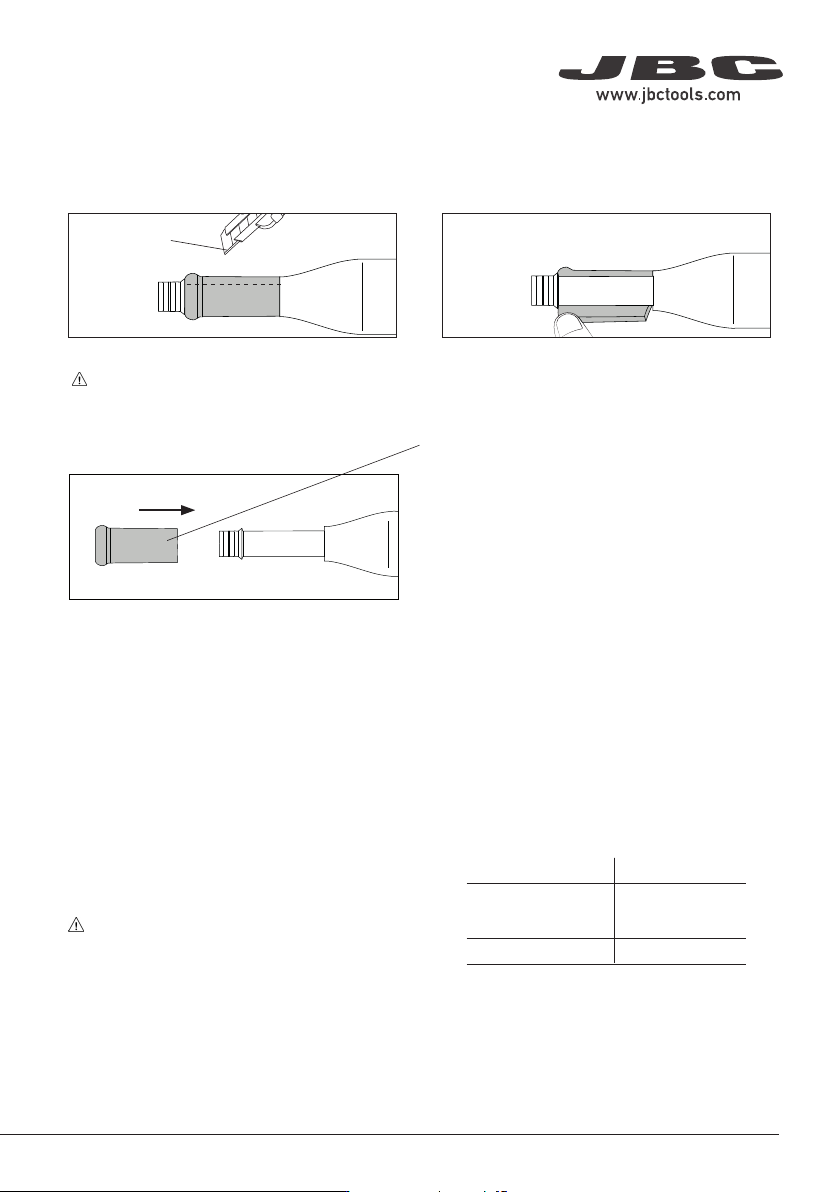
Replacing Sealing Plugs
Note: Depending on your handle model, two
different sealing plug references are available.
Before replacing the sealing plug, disconnect
the handle from the station and make sure the
device is not hot.
The sealing plug prevents undesirable flux vapors or particles from entering the handle. Its usage is
highly recommended for intensive applications when soldering is exposed to FOD environments or
for applications where the soldering iron works close to a vertical position.
1. Cutting 2. Removing
Replacing Grips
Make a length-ways cut on the worn grip.
Be careful not to damage the handle.
Remove the worn grip.
Cutter
B0001
Grips for B·IRON Handles
3. Assembling New Grips
Firmly slide the grip onto the handle until it
locks into place.
Handle Sealing Plug
B·IRON 100 TOOL
OB4000
B·IRON 500 TOOL
B·NANO TOOL OB5000