manual-biron-100-precision-soldering-tool-jbc-0033098_ID-243824_EN.pdf - 第9页
Safety - Do n ot use th e un its for a ny pu rp ose oth er th an s old er ing o r rewo rk. I nco rre ct u se may c au se a f ire. - Th e powe r cor d mus t be pl ugg ed i nto app roved b ase s. Wh en u npl ug gin g it, h…
Before carrying out maintenance, always extract the cartridge from the tool and disconnect the charging
stand from the mains. Allow the equipment to cool down.
- Use a damp cloth to clean the casing and the tool. Alcohol can only be used to clean the metal parts.
- Periodically check that the metal parts of the tool and tool holder are clean so that the charging
works properly.
- Maintain the tip surface clean and tinned prior to storage in order to avoid tip oxidation. Rusty and
dirty surfaces reduce heat transfer to the solder joint.
- Do not use liquids such as alcohol, thinner or benzene to clean the tablet.
- Repairs should only be performed by a JBC authorized technical service.
Maintenance
Safety
- Do not use the units for any purpose other than soldering or rework. Incorrect use may cause a fire.
- The power cord must be plugged into approved bases. When unplugging it, hold the plug, not the wire.
- Do not attempt to dismantle or open the housing of the tool as it may cause damage.
- Do not work on electrically live parts.
- The tool should be placed in the stand when not in use in order to charge the batteries.
- The soldering tip or nozzle, the metal part of the tool and the stand may still be hot even when the
station is turned off.
- Do not leave the tool unattended when it is on.
- Avoid flux coming into contact with skin or eyes to prevent irritation.
- Be careful with the fumes produced when soldering.
- Keep your workplace clean and tidy. Wear appropriate protection glasses and gloves when working
to avoid personal harm.
- Utmost care must be taken with liquid tin waste, which can cause burns.
- This appliance can be used by children over the age of eight and also persons with reduced physical,
sensory or mental capabilities or lack of experience provided that they have been given adequate
supervision or instruction concerning the use of the appliance and understand the hazards involved.
Children must not play with the appliance.
- Maintenance must not be carried out by children unless supervised.
- Do not expose the tablet to high temperatures, humidity or dust. Avoid direct sunlight.
- Do not drop the portable display or the tool, as it may cause damage or malfunction.
- Do not disconnect your device when it is in fi le transfer mode.
- Do not use the portable display in places where wireless communications are restricted.
It is imperative to follow safety guidelines to prevent electric shock, injury, fire
or explosion.
8
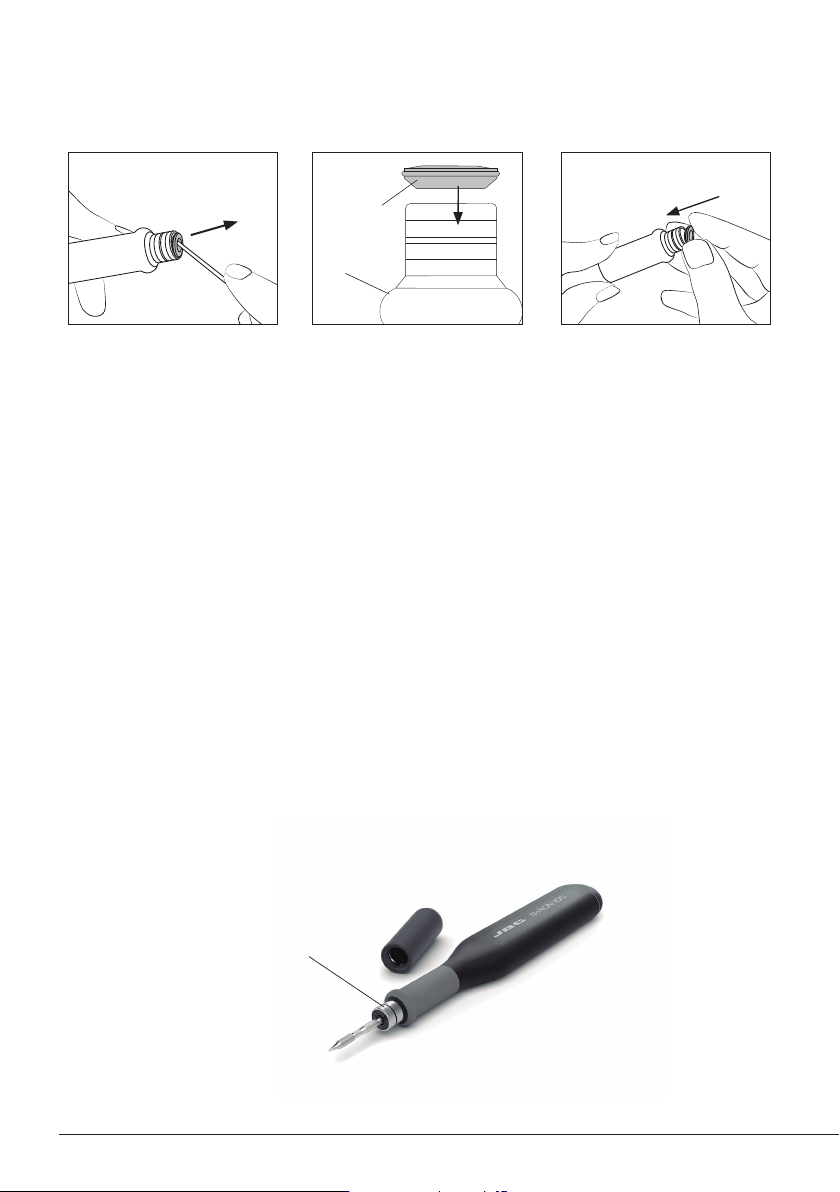
Handle
Chamfered
Side
Clean the contact
surfaces regularly to
ensure that the tool
gets charged correctly
2. Mounting Position 3. Inserting Sealing Plug1. Removing Sealing Plug
Note: The chamfered side has
to be positioned towards the
handle.
Push the sealing plug inside
the handle until the sealing
plug and handle edges are
aligned.
Introduce a small shaft or
screwdriver, not deeper than
8mm, lift and pull the sealing
plug. Never use a cartridge to
do this operation.
Safety
- Do not use the units for any purpose other than soldering or rework. Incorrect use may cause a fire.
- The power cord must be plugged into approved bases. When unplugging it, hold the plug, not the wire.
- Do not attempt to dismantle or open the housing of the tool as it may cause damage.
- Do not work on electrically live parts.
- The tool should be placed in the stand when not in use in order to charge the batteries.
- The soldering tip or nozzle, the metal part of the tool and the stand may still be hot even when the
station is turned off.
- Do not leave the tool unattended when it is on.
- Avoid flux coming into contact with skin or eyes to prevent irritation.
- Be careful with the fumes produced when soldering.
- Keep your workplace clean and tidy. Wear appropriate protection glasses and gloves when working
to avoid personal harm.
- Utmost care must be taken with liquid tin waste, which can cause burns.
- This appliance can be used by children over the age of eight and also persons with reduced physical,
sensory or mental capabilities or lack of experience provided that they have been given adequate
supervision or instruction concerning the use of the appliance and understand the hazards involved.
Children must not play with the appliance.
- Maintenance must not be carried out by children unless supervised.
- Do not expose the tablet to high temperatures, humidity or dust. Avoid direct sunlight.
- Do not drop the portable display or the tool, as it may cause damage or malfunction.
- Do not disconnect your device when it is in fi le transfer mode.
- Do not use the portable display in places where wireless communications are restricted.
It is imperative to follow safety guidelines to prevent electric shock, injury, fire
or explosion.
9
40 mm
50 mm
60 mm
80 mm
100 mm
130 mm
130 mm
para manuales - color gris
200 mm
300 mm
Safety - Battery
- Caution: This product contains lithium-ion batteries. Mishandling or improper use may result in fire,
explosion, or personal injury.
- Always use the provided charger. Do not use damaged chargers or batteries.
- Never attempt to disassemble or modify the batteries or the product. Doing so may lead to electric
shock, fire, or damage to the product.
- In the event of damage, leakage, or overheating of the batteries, discontinue use immediately and
contact customer support or JBC technical service facility.
- Dispose of devices with batteries inside, responsibly according to regulations. They must be disposed
of in accordance with local regulations so that they can be recycled.
- Do not throw devices with batteries into household waste and do not dispose of them in fire or water.
It is imperative to follow safety guidelines to prevent electric shock, injury, fire
or explosion.
10