00196478-08_MM_SX12DX12_en.pdf - 第55页
Major Maintenance 5.3.2 Performing Maintenance Task s Ma intenance Tasks for the Com ponent Feed D evice Maintenance Manual SIPLACE SX1/SX2/DX1/DX2 55 5.3.2.6 5 . 3 . 2 . 6 G r e a s in g t h e C e n t e r in g S t r ip …
Major Maintenance
Maintenance Tasks for the Component Feed Device 5.3.2 Performing Maintenance Tasks
54 Maintenance Manual SIPLACE SX1/SX2/DX1/DX2
5.3.2.4
5.3.2.4 Greasing the COT Insert
Greasing the COT Insert
5.3.2.5
5.3.2.5 Greasing the Locator Bearing on the Component Trolley for X Feeders
Greasing the Locator Bearing on the Component Trolley for X Feeders
NOTICE
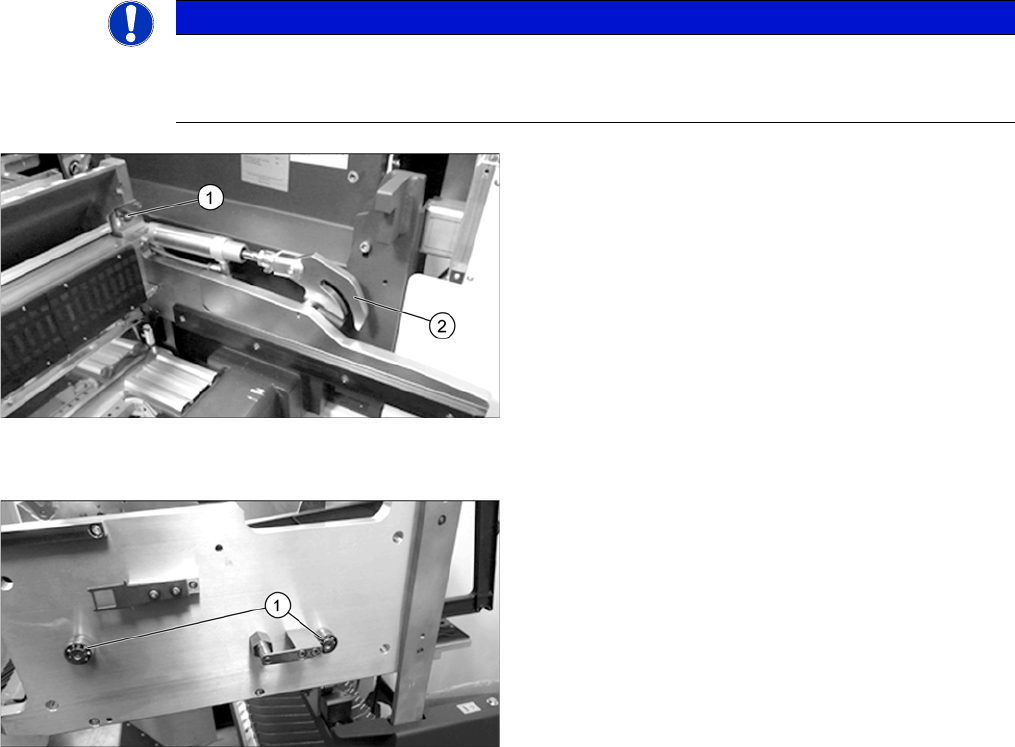
Grease the engaging pins
If the component trolley is frequently undocked, we recommend that you grease the engaging
pins.
► Grease the engaging pin (1) with a SIPLACE
cleaning tissue.
► Grease the hooks (2) on the left and right of the com-
ponent docking unit with a SIPLACE cleaning tissue.
► Repeat these tasks at all locations.
► Grease the rollers (1) (2 per side) on the changeover
table with a SIPLACE cleaning tissue.
► Repeat these tasks at all component trolleys.
Major Maintenance
5.3.2 Performing Maintenance Tasks Maintenance Tasks for the Component Feed Device
Maintenance Manual SIPLACE SX1/SX2/DX1/DX2 55
5.3.2.6
5.3.2.6 Greasing the Centering Strip on the Component Trolley/Feeder Table for X Feeders
Greasing the Centering Strip on the Component Trolley/Feeder Table for X Feeders
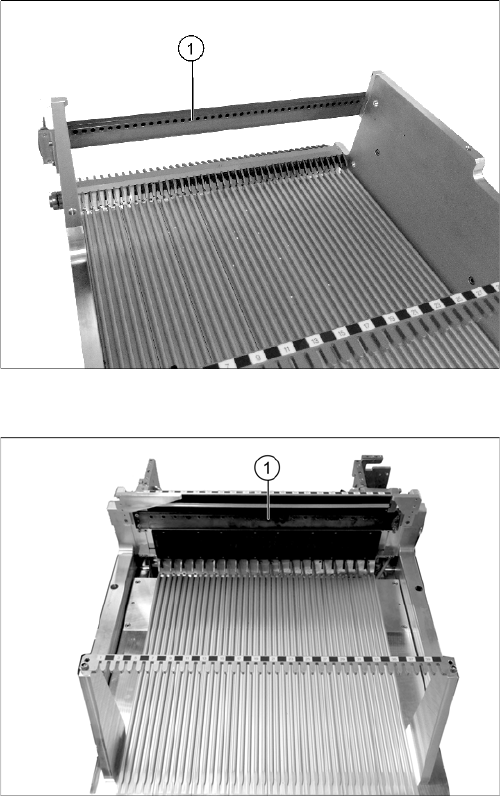
Centering guide rail at the component trolley (SX4 as ex
-
ample)
Centering guide rail at the manual table (DX4 as exam
-
ple)
► Apply "Surface Shield oil spray" [00328575-xx] to a
lint-free cloth and then thinly oil the centering strip (1).
Pay particular attention to the centering holes.
Alternatively you can also use a SIPLACE cleaning
tissue.
► Then wipe the centering strip with a lint-free cloth.
► Repeat these steps for all component trolleys and
manual tables.
Major Maintenance
Maintenance Tasks for Optical Systems 5.4.1 Tools, Consumables, Spare and Wear Parts
56 Maintenance Manual SIPLACE SX1/SX2/DX1/DX2
5.4
5.4 Maintenance Tasks for Optical Systems
Maintenance Tasks for Optical Systems
5.4.1
5.4.1 Tools, Consumables, Spare and Wear Parts
Tools, Consumables, Spare and Wear Parts
▪ Microfiber cloth for cleaning optical assemblies
▪ ESD wristband [00320279-xx]
▪ Cotton gloves [00359087-xx]
▪ Vacuum cleaner
5.4.2
5.4.2 Preparatory Steps
Preparatory Steps
► Undock the component trolleys and move them out of the machine.
► Switch off the machine and secure it to prevent unauthorized reactivation. Observe the instructions
in section "1.2 Preparatory Work..." [ ➙ 12].
5.4.3
5.4.3 Performing Maintenance Tasks
Performing Maintenance Tasks
5.4.3.1
5.4.3.1 Cleaning the IC and FC Cameras
Cleaning the IC and FC Cameras
CAUTION
Risk of cutting yourself on the glass disk!
► There is a risk of cutting your fingers along the edges of the glass disk.
► Wear cotton gloves as protection and avoid touching the edges. The cotton gloves are also
required for effective cleaning (to avoid fingerprints!).
CAUTION
Electrical components
Make sure that the electrical components are not live!
NOTICE
IC, FC camera
This cleaning procedure is the same for IC (type 33) and FC cameras (type 25).
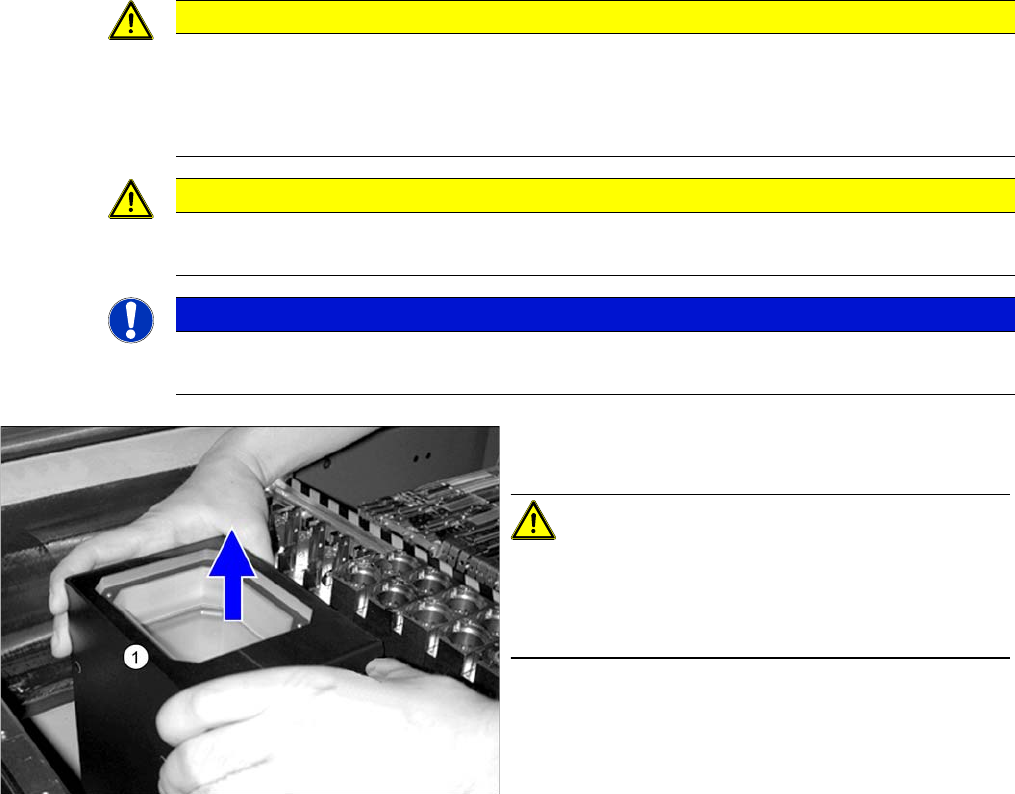
► Carefully lift the upper section (1) of the IC camera up
and off.
CAUTION!
Do not get the upper sections mixed up.
The upper sections of the different cameras are coordi-
nated with the specific lower sections and may not be
mixed up.