00198503-02_IM_SIPLACE_Pro_15.1_R18-1_EN.pdf - 第45页
SIPLACE Pro 15.1 (R18 - 1) / Installat ion Manual 05/2018 Edition 45 SIPLACE Pro Upgrade is compatible with the installed langua ge pack The SIPLACE P ro version that has been currently inst alled is compatible wit h the…
SIPLACE Pro 15.1 (R18-1) / Installation Manual 05/2018 Edition
44
6.3.1 Compatibility of SIPLACE Language Packs
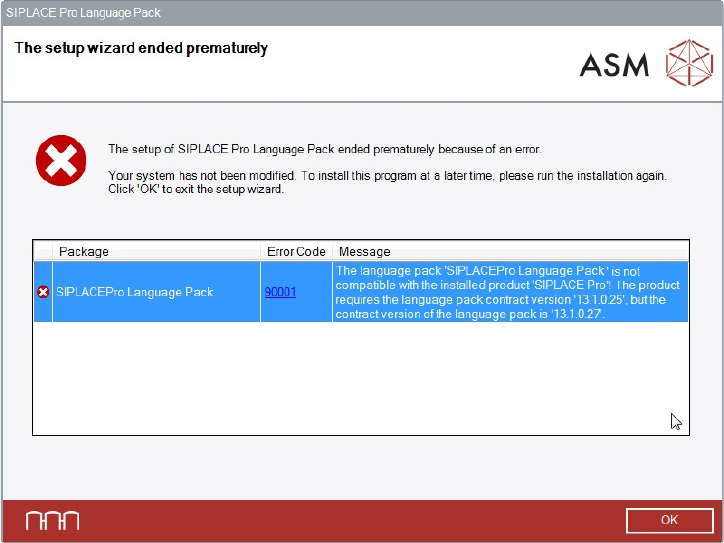
Before installing the Language Pack, SIPLACE Pro checks if the language pack version and the
SIPLACE Pro basic version are compatible. If not, the following dialog is displayed.
Figure 6-43: Language pack not compatible
The following use cases are possible.
Language Pack version is not compatible to the basic SIPLACE Pro installation
► Make sure that you have installed the compatible basic SIPLACE Pro version or that you install
the language pack version that is compatible to the basic product version.
No SIPLACE Pro installed at all
► Make sure that you have installed the compatible basic SIPLACE Pro version or that you install
the language pack version that is compatible to the basic product version.
During an SIPLACE Pro upgrade - the newly upgraded SIPLACE Pro basic version is not
compatible with the already installed Language Pack version
► Perform the SIPLACE Pro upgrade as usual.
The incompatible language pack will be automatically uninstalled. After the upgrade only the
standard languages English, German and Simplified Chinese are available.
► Install the language pack that is compatible to the new SIPLACE Pro version (if available).
SIPLACE Pro 15.1 (R18-1) / Installation Manual 05/2018 Edition
45
SIPLACE Pro Upgrade is compatible with the installed language pack
The SIPLACE Pro version that has been currently installed is compatible with the already installed
language pack.
► Perform the SIPLACE Pro upgrade as usual without changing the language pack.
After the upgrade all languages installed with the language pack are available.

SIPLACE Pro 15.1 (R18-1) / Installation Manual 05/2018 Edition
46
7 First Booting after Installation
After a new installation of the database, it is necessary to import the standard shape library. This
step is required to use SIPLACE Pro and it ensures that data is available to be used for reporting.
► In SIPLACE Pro Desk, select Tools – Import – Standard Shape Library...
Two import variants are available:
– Component shape numbers
– Component shape names
► Do not import the two variants parallel or mixed.
After having upgraded the database from a previous version (see chapter 3) it is not necessary to
import data from the component shape library.
7.1 Troubleshooting after Installation
7.1.1 SystemFeeder Inventory
It might happen that the SystemFeeder import does not work directly after installation. You will get
an appropriate warning message at the end of the installation. In this case:
► Reboot the computer.
► Start the SystemFeeder import manually by clicking the appropriate start menu shortcut.
7.1.2 COM+ Installation Problems
If you did not close all applications and services using SIPLACE Pro (like ASM OIB), you may get
COM+ installation error messages during the installation of SIPLACE Pro. In this case:
► Reboot the computer.
► If still installed, uninstall SIPLACE Pro completely as described in the appropriate chapter.
CAUTION
► Ensure you stop all applications and services that might use the SIPLACE Pro
Interface – especially ASM OIB Services.