Printer 710_810 v8 Squeegee Module.pdf - 第12页
SQUEEGEE M ODULE REP LAC EMEN T PR OCE DURE S 9.12 Technical Reference Manual Chapter Issue 8 O ct 06 1 1. If the Squeeg ee Calibration Readi ngs Setting has not previously been carrie d out thi s must be complet ed prio…
SQUEEGEE MODULE
REPLACEMENT PROCEDURES
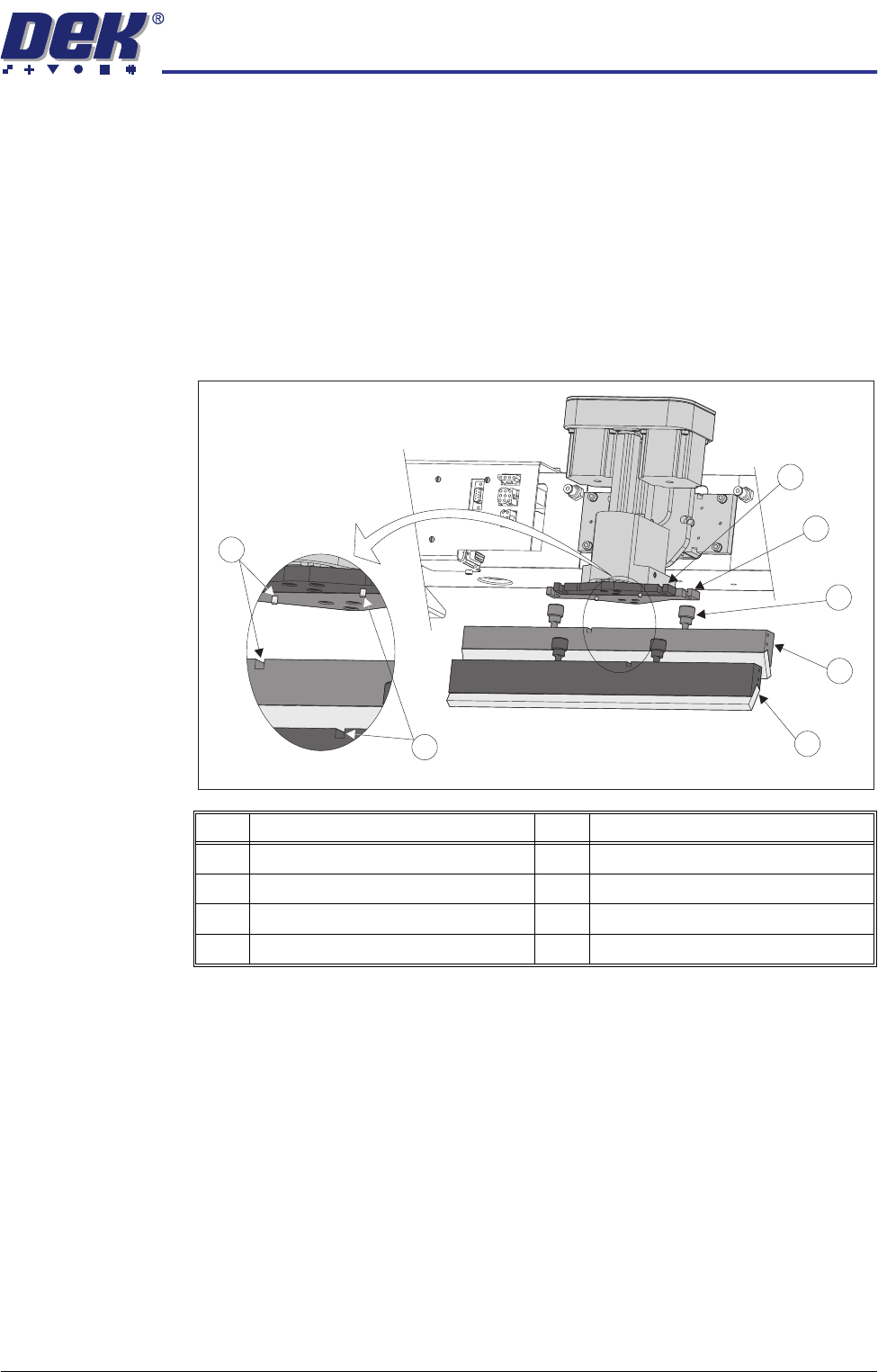
Chapter Issue 8 Oct 06 Technical Reference Manual 9.11
2. From the Modal Commands panel select Change Squeegees. The mes-
sage ‘Open cover and change squeegees’ is displayed.
3. Raise the front printhead cover/shutter to gain access to the printhead
mounting assembly.
4. Fit the rear squeegee to the rear squeegee mount tightening the thumb-
screws finger tight.
NOTE
The locking thumbscrews on the rear squeegee are positioned wider apart
than those fitted to the front squeegee and the keyway slot is positioned on
the left hand side of the rear squeegee.
5. Fit the front squeegee to the front squeegee mount ensuring the thumb-
screws are tightened finger tight.
NOTE
The locking thumbscrews on the front squeegee are positioned closer
together than those fitted to the rear squeegee and the keyway slot is
positioned on the right hand side of the front squeegee.
6. If fitted remove the stencil.
7. Lower the front printhead cover/shutter.
8. Press the System button.
9. Select Finish.
10. If the initial Squeegee Calibration Readings Setting has been completed
previously on the machine, carry out Squeegee Reference Height calibra-
tion (refer to Calibrations section later in this chapter).
Item Description Item Description
1 Front Squeegee Mount 5 Front Squeegee
2 Rear Squeegee Mount 6 Front Squeegee Key and Keyway Slot
3 Locking Thumbscrew (in 4 positions) 7 Rear Squeegee Key and Keyway Slot
4 Rear Squeegee
1
2
3
4
5
6
7
Fitting Squeegees

SQUEEGEE MODULE
REPLACEMENT PROCEDURES
9.12 Technical Reference Manual Chapter Issue 8 Oct 06
11. If the Squeegee Calibration Readings Setting has not previously been
carried out this must be completed prior to carrying out Step 10 (refer to
Calibrations section later in this chapter).
SQUEEGEE MODULE
CALIBRATIONS
Chapter Issue 8 Oct 06 Technical Reference Manual 9.13
CALIBRATIONS
Squeegee
Pressure
Calibration
Squeegee pressure calibration is carried out on machines fitted with the Pres-
sure H/W option after the following circumstances:
• The squeegee mechanism is replaced
• The strain gauge bridge in the squeegee mechanism is replaced
• The rising table sensors have been replaced or adjusted
A force meter calibration jig and squeegee pressure plate are required to
perform the squeegee pressure calibration.
NOTE
1. Ensure that the rising table print reference height is set correctly before
commencing, (the calibration relies upon accurate positioning of the table to
make a reference).
2. Ensure that the Pressure H/W parameter in Setup Machine - Options
Parameters is set to FITTED.
Use the following procedure to calibrate the squeegee pressure:
WARNING
BOARD CLAMPS. EXTREME CARE MUST BE EXERCISED WHEN WORKING IN
THE TOOLING AREA OF THE MACHINE TO AVOID INJURY. THE FOILS ON THE
FRONT AND REAR BOARD CLAMPS ARE VERY SHARP.
1. Ensure the machine has initialised, if not switch power OFF and ON to allow
the machine to initialise.
2. Remove the screen from the machine.
3. Remove the tooling from the manual tooling plate.
4. Select Maint..
5. Select Calib Machine.
6. Select Pressure.
7. Select Calibrat Readings. The message ‘Initialising Table and Rail for
Pressure Calibration’ is highlighted. The print carriage moves to the
calibration position, the rear rail moves to home position, the table homes
and the board clamps are closed.
8. The machine cover is unlocked and the message ‘Fit Pressure Calibration
Jig’ is highlighted, the following window is displayed:
9. Open the front printhead cover/shutter.
CALIBRATION DATA
Gain Factor
1.02