Printer 710_810 v8 Squeegee Module.pdf - 第15页
SQUEE GEE M ODULE CALIBR ATIONS Chapter Issue 8 Oct 06 Technical Reference Manual 9.15 12. Fit the squeegee pressur e plate to the rising t able ensuring that the l ocating dowels insert the holes of the r ising t able. …
SQUEEGEE MODULE
CALIBRATIONS
9.14 Technical Reference Manual Chapter Issue 8 Oct 06
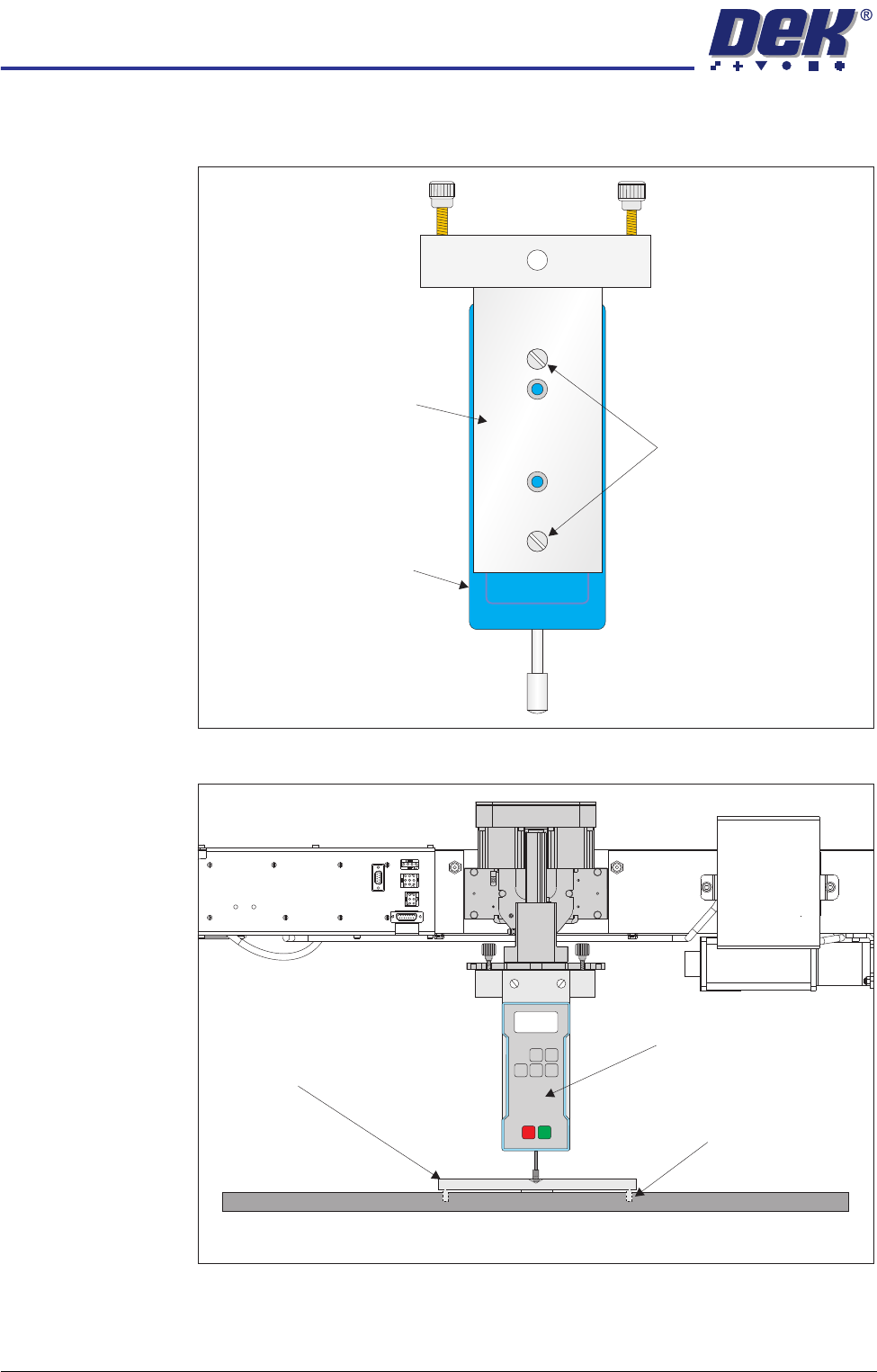
10. Ensure that the calibration jig is secured to the mounting plate as shown in
the following graphic:
11. Fit the calibration jig to the front squeegee position.
Mounting Plate
Mounting Holes
Calibration Jig
A
A
S
S
View on Front of Rising Table and Squeegee Mechanism
Squeegee Pressure Plate
Locating Dowel
(in 2 positions)
O
OFF
I
ON
UNITS
Zero
MAX TXD
RESET
00.00
Portable Force Gauge
(Calibration Jig)

SQUEEGEE MODULE
CALIBRATIONS
Chapter Issue 8 Oct 06 Technical Reference Manual 9.15
12. Fit the squeegee pressure plate to the rising table ensuring that the locating
dowels insert the holes of the rising table.
NOTE
During the squeegee pressure calibration the dwell height of the rear
squeegee is 15mm regardless of the set up value. This height is set during
calibration only.
13. Switch the force meter ON and check the reading is 0kg, (ensure the force
meter is not in contact with the squeegee pressure plate).
14. At the MMI select Continue. The front squeegee mechanism steps down
until a change in pressure is detected and continues stepping down until the
pressure value stored on the machine is reached. If the calibration jig
displays 10kg, go to Step 16.
15. On the MMI, select Jog Rig.
16. Use the left and right jog buttons to move the front squeegee mechanism up
or down until the calibration jig displays 10kg.
NOTE
Achieving exactly 10kg may not be possible as some calibration jigs display
down to three decimal places.
17. Select Set Calib.. The message ‘Printer configuration data file saved’ is
highlighted.
18. On completion of calibration select Exit button, the front squeegee mecha-
nism moves to the home position. The message ‘Confirm that the pres-
sure calibration jig has been removed.’ is highlighted.
19. Remove the calibration jig and the squeegee pressure plate from the
machine. On completion select Yes, the table resets, the print carriage
moves to home position, board clamps open and the rear rail moves to the
board width setting.
20. Carry out the Squeegee Reference Height (Pressure Feedback) calibration.
Squeegee
Reference Height
(Pressure
Feedback)
Squeegee reference height is carried out on machines fitted with the Pressure
H/W option after the following circumstances:
• Squeegee pressure calibration
• Squeegee change
Use the following procedure to set the squeegee reference height:
NOTE
If a Ptest.dat file is required, Data Logging must be set to On. To achieve this
select Maint., select Test Cycles and select Data Log On.
1. Remove the screen from the machine.
2. Select Maint..
3. Select Calib Machine.
4. Select Pressure.
5. Select Calibrat Heights. The message ‘Ensure that the correct squee-
gees are fitted!’ is highlighted.

SQUEEGEE MODULE
CALIBRATIONS
9.16 Technical Reference Manual Chapter Issue 8 Oct 06
6. Fit the required squeegees to the front and rear squeegee mounts as
detailed in the Replacement Procedures section of this chapter.
7. Select Continue, the following machine sequence is carried out:
a. The rails are checked for the presence of a board.
b. The rising table is driven to print height.
c. The board clamps are closed.
d. The print carriage drives the front squeegee over the front rail.
e. The rear squeegee is driven down to dwell height.
f. The front squeegee is driven down by the stepper motor until contact with
the board clamp is made.
g. The front squeegee continues to be driven down until a 2kg pressure
difference is detected, the motor pauses.
h. The amount of steps (the stepper motor took to get to this position) and
the pressure are recorded.
i. The stepper motor drives downwards another 15 steps, this is recorded
with the pressure detected. This is repeated a further 18 times to achieve
a total of 20 results.
8. The rear squeegee is calibrated in a similar manner.
9. Select Exit button on completion of the reference height calibration.
10. Select Exit.
11. Select Exit.
The squeegee reference height calibration is now complete.
Ptest.dat File NOTE
For a Ptest.dat file to be generated, Data Logging must be set to On. To achieve
this select Maint., select Test Cycles and select Data Log On.
The Ptest.dat file is located on the hard drive of the machine PC. To view the
file carry out the following procedure:
1. From the Windows start menu, select Programs - Accessories - Windows
Explorer.
2. Under My Computer, locate and open the E:\Log\Ptest.dat file.
The file displays 20 front squeegee readings followed by 20 rear squeegee
readings, showing the relationship between steps (displacement) and pressure
applied. From the readings taken, the front and rear pressure factors and
squeegee reference heights are calculated. At the end of the file, 5 readings of
flood pressure and reference height readings are displayed (these are also
listed in the Config.txt file).