SOM-1804-001.pdf - 第7页
6 AIZ01EGP When this function is used to replace all the tape feeders, it may not be applied that "W arning Display (Fig. 3)" equals to "Reconfirmation of T ape Feeder Replacement". Example: When the …
5 AIZ01EGP
2. Warning Display in "Start Protection" Mode
2.1 Warning Display at Start of Automatic Operation
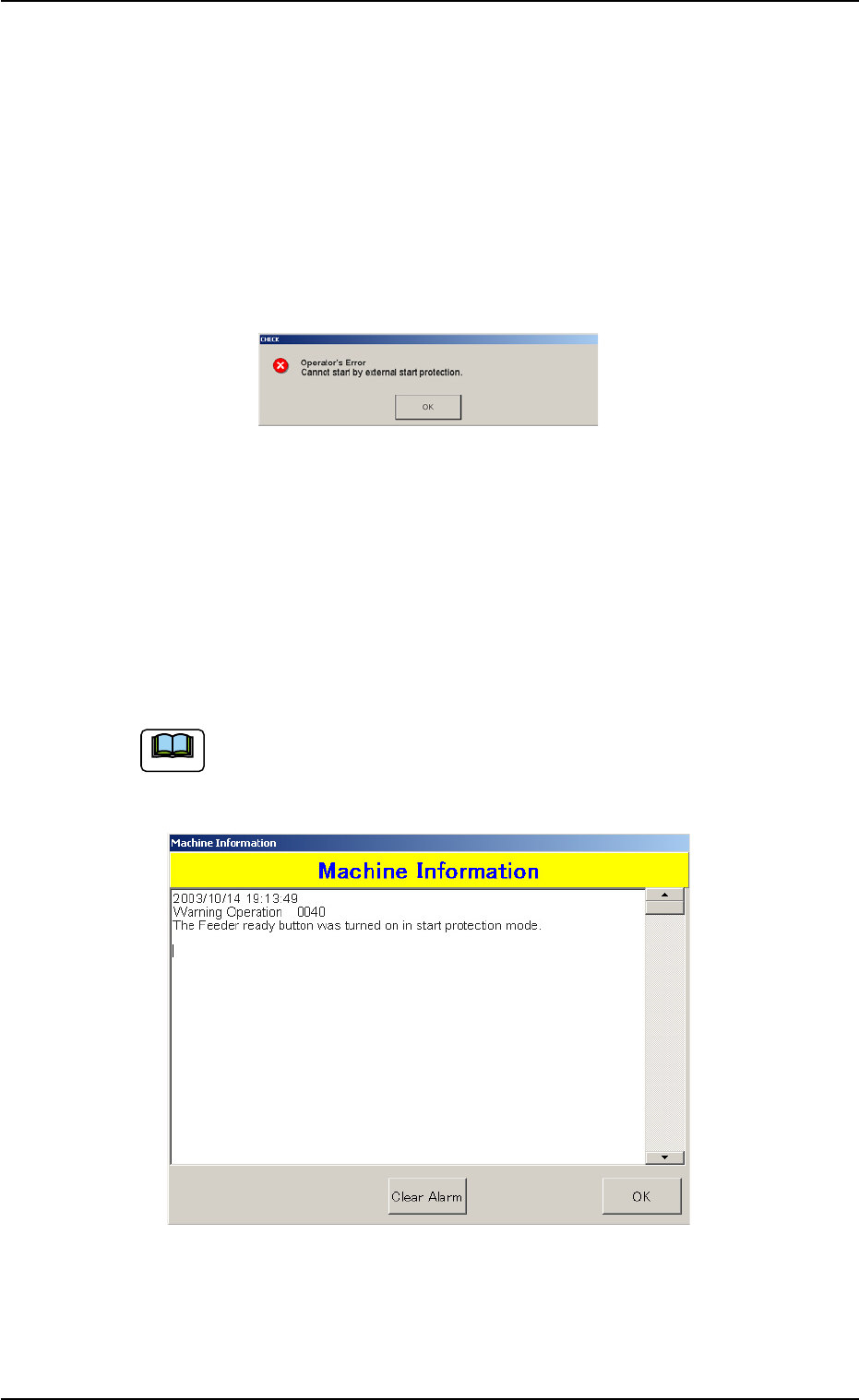
When the "Start Protection ON" status is detected at the start of auto-
matic operation on the main machine side, the "CHECK" window opens,
making it impossible to start the automatic operation.
The operator must reconfirm that the tape feeder has been replaced for
component replenishment with the external host computer.
Fig. 2
2.2 Warning Display in "STOP" and "PAUSE" Mode
When the "Start Protection ON" status is detected after the [READY]
button of the F axis is pressed on the main machine side, a warning
message is displayed in the "Machine Information" window.
In this case, the operator must reconfirm that the pertinent tape feeder
has been replaced for component replenishment.
The operator must also perform the reconfirmation when the
[READY] button is pressed through interface navigation (menu
selection).
Fig. 3
Note
0409-001
2. Warning Display in "Start Protection" Mode
6 AIZ01EGP
When this function is used to replace all the tape feeders, it
may not be applied that "Warning Display (Fig. 3)" equals to
"Reconfirmation of Tape Feeder Replacement".
Example: When the setup operations for all tape feeder re-
placement should be performed for Feeder Carriages
#1, #2, #3, #4, and so on in this order at the "STOP"
mode, the "Start Protected" status continues until
the bar codes on the component shortage lanes
(feeders) are completely checked by the external host
computer.
Ref.: When a warning message is issued in the
"CHECK" window at the start of automatic op-
eration after the last tape feeder is set up, it is
required to reconfirm that the pertinent tape
feeder has been replaced for component re-
plenishment.
2.3 Warning Display in Continuous Operation
When a tape feeder must be replaced for component replenishment
while the main machine is running continuously (continuous operation)
during the automatic operation in the "ALTERNATE FDR. AXIS/CAR-
RIAGE" mode, a warning message is displayed in the "Machine Infor-
mation" window, indicating that the automatic operation cannot be started
after an alternate function is activated because the "Start Protection ON"
status is detected.
The tower lamps and buzzer sounds cannot be set for warning
messages to be issued in the "Machine Information" window.
Note
Note
0409-001
2.3 Warning Display in Continuous Operation
7 AIZ01EGP
2.3.1 Cancellation of Alternate Mode for Feeder Carriage
Unavailability in Automatic Operation
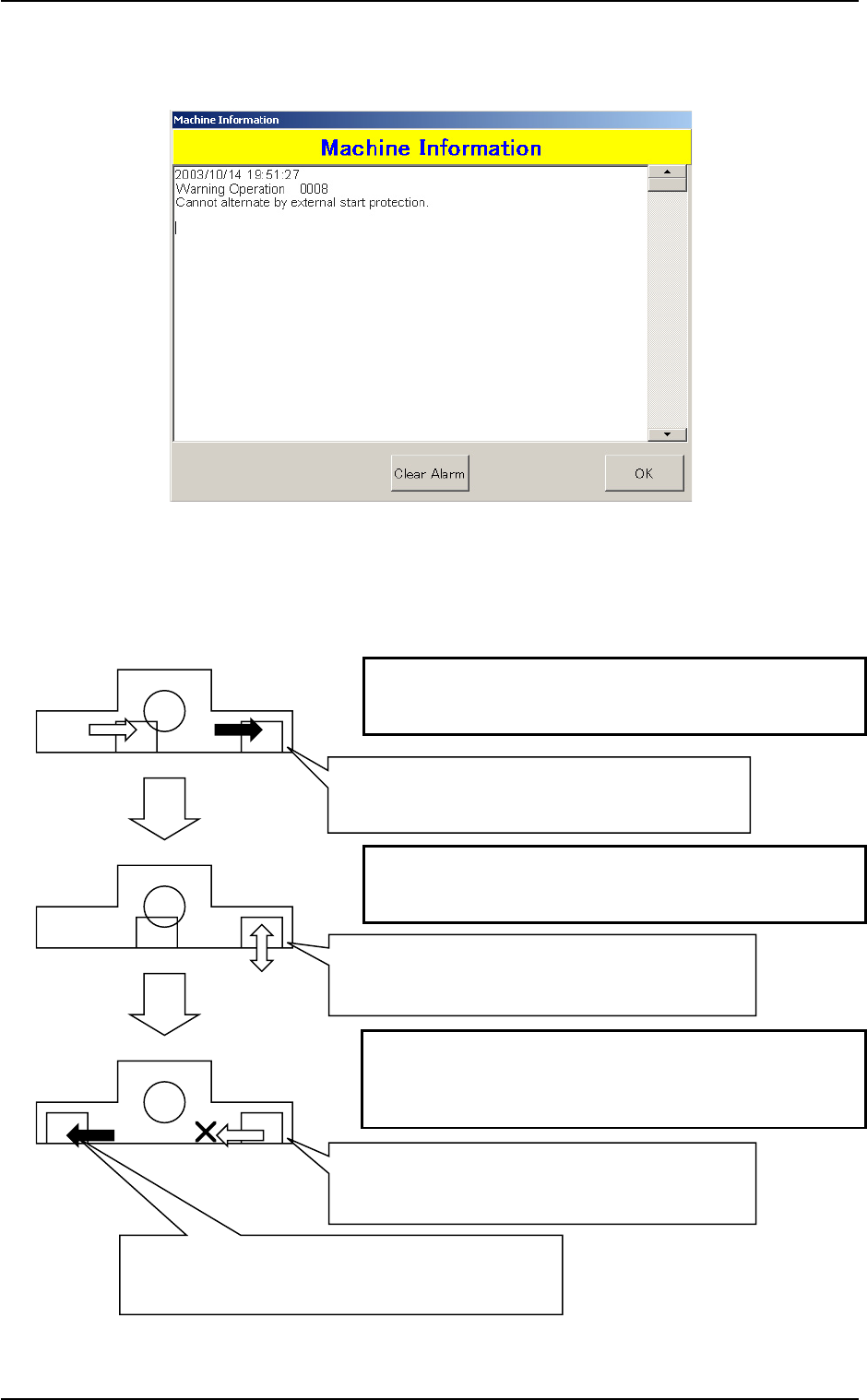
Fig. 4
Example of Warning Display Timing
Fig. 5
(Status 1)
(Status 2)
(Status 3)
Feeder Carriages #1 and #2 return to the component
replenishment position due to component shortage.
Feeder Carriages #3 and #4 are used in the alternate mode.
The component replenishment is completed for Feeder
Carriages #1 and #2.
The operator must press the [READY] button.
When the warning message in the "Machine Information"
window is ignored or kept unnoticed, the "Machine Informa-
tion" window (Fig. 4) opens, indicating the starting timing of
the object feeder carriage's movement.
The component shortage data is outputted and the
pertinent tape feeder must be replaced for com-
ponent replenishment.
When the tape feeder is not replaced correctly for
component replenishment, a warning message is
issued in the "Machine Information" window (Fig. 3).
When the tape feeder is not replaced correctly for
component replenishment, a warning message is
issued in the "Machine Information" window (Fig. 4).
Feeder Carriages #3 and #4 return to the component
replenishment position due to component shortage.
A component shortage error is displayed.
0409-001
2.3 Warning Display in Continuous Operation