00197191-02_IM_SIPLACE_Pro_10.1_EN.pdf - 第17页
2 System components and configuratio ns Installation Manual Edition 09/2012 SIPLACE Pro 10.1 15 2.3 S t and-alone Configuration Install all so ftware compo nents on one computer . This computer then functions as both ser…
Installation Manual 2 System components and configurations
SIPLACE Pro 10.1 Edition 09/2012
14
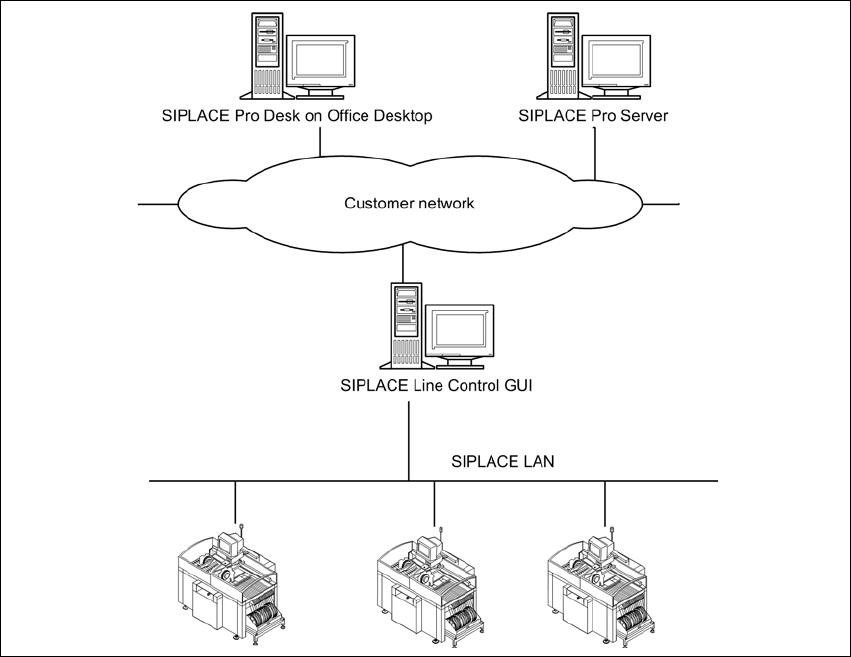
2.2.1.2 Physical Layout
2
Fig. 2.2 - 2 Standard Configuration - Physical Layout
2.2.2 Characteristics
– SIPLACE Pro Server will be installed on Windows Server Version.
– SIPLACE Pro Server will be migrated into customer domain configuration.
– SIPLACE Pro Client machines can be connected, if they are either in the same domain or in
a domain with a trust relation to the domain where the server resides.
– The SIPLACE Pro server must be part of the customer network.
– A WINS or DNS Server from the customer network infrastructure is necessary.
– If the customer network is segmented by routers, it must be possible to integrate the routing
device into customer routing configuration.
– Security inside SIPLACE Pro is possible.
– Operation of the SIPLACE Pro systems depends on the customer infrastructure.
– Using a router of a Windows PC as a routing device to separate network traffic from the SI-
PLACE LAN from the customer LAN.
2 System components and configurations Installation Manual
Edition 09/2012 SIPLACE Pro 10.1
15
2.3 Stand-alone Configuration
Install all software components on one computer. This computer then functions as both server and
client. Optionally a second connection to the customer's network can be established via a second
network card.
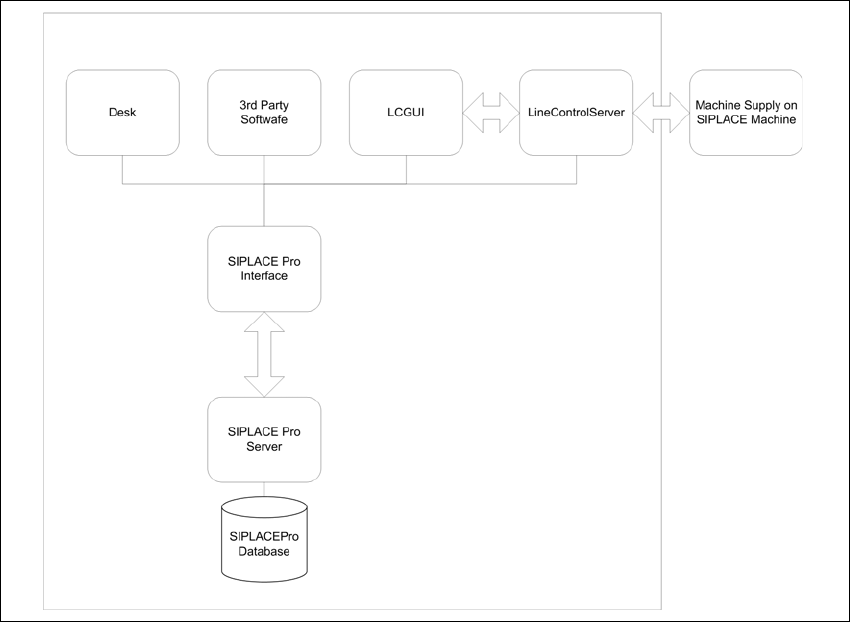
2.3.1 Logical Layout
2
Fig. 2.3 - 1 Stand-alone Configuration - Logical Layout
Installation Manual 2 System components and configurations
SIPLACE Pro 10.1 Edition 09/2012
16
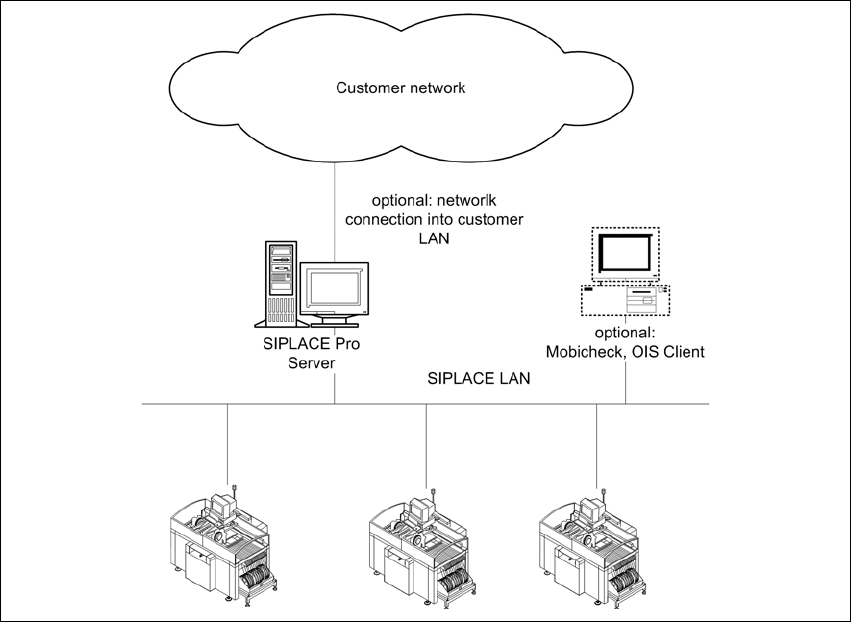
2.3.2 Physical Layout
2
Fig. 2.3 - 2 Stand-alone Configuration - Physical Layout
2.3.3 Characteristics
– The SIPLACE Pro Server is a Windows Workstation Version.
– Up to 7 SIPLACE Machines are supported.
– SIPLACE Pro Server is configured in Workgroup mode.
– SIPLACE Pro Client machines can be connected, if they are in Workgroup mode and share
a shadow account with the server (like plr/plr)
– One Option is to connect the SIPLACE Pro server to the customer network to exchange data
with customer computer.
– No WINS or DNS Server is necessary, if all computer are connected to one network segment.
If the customer network is segmented by routers the optional network connection to the cus-
tomer network must be configured by the customer.
– Security settings for different user levels (operator, programmer etc.) inside SIPLACE Pro is
possible.