Printer 710_810 v8 Safety Features.pdf - 第11页
SAFETY FE ATURES HIGH VOLTAGE PRO TECTION Chapter Issue 6 Oct 06 Technical Reference Manual 2.11 HIGH VOL T AGE PROTECTION Access Where incoming suppl y voltages are pr esent, protec tion is af forded by control- ling ac…

SAFETY FEATURES
PRINTHEAD COVER/SHUTTER
2.10 Technical Reference Manual Chapter Issue 6 Oct 06
PRINTHEAD COVER/SHUTTER
Raising the printhead cover/shutter allows access to the following areas:
• Printhead
• Paste Dispenser
• Squeegee/ProFlow
• Stencil/Screen
• Under Screen Cleaner
•Tooling
The printhead cover(s)/shutter is accessible to the operator and a cam interlock
safety switch protects personnel from the mechanisms during normal line
operations. Lifting the cover(s)/shutter cuts power to all motors and selected
actuators, via the E Stop module, to all machine modules.
Pneumatically operated lid bolt(s) prevents the cover/shutter being raised
during the print cycle. The lid bolt(s) is withdrawn and the cover/shutter may be
raised:
• On completion of a cycle in single and step mode
• When pause or stop is selected in auto mode
• When the E Stop is pressed
Recovery When the printhead cover(s)/shutter is closed, normal working condition is
restored and the line may be restarted. Pressing the system button enables
resumption of operations, where this is allowed by the control system.

SAFETY FEATURES
HIGH VOLTAGE PROTECTION
Chapter Issue 6 Oct 06 Technical Reference Manual 2.11
HIGH VOLTAGE PROTECTION
Access Where incoming supply voltages are present, protection is afforded by control-
ling access to the enclosures that house the supply. The machine is fitted with
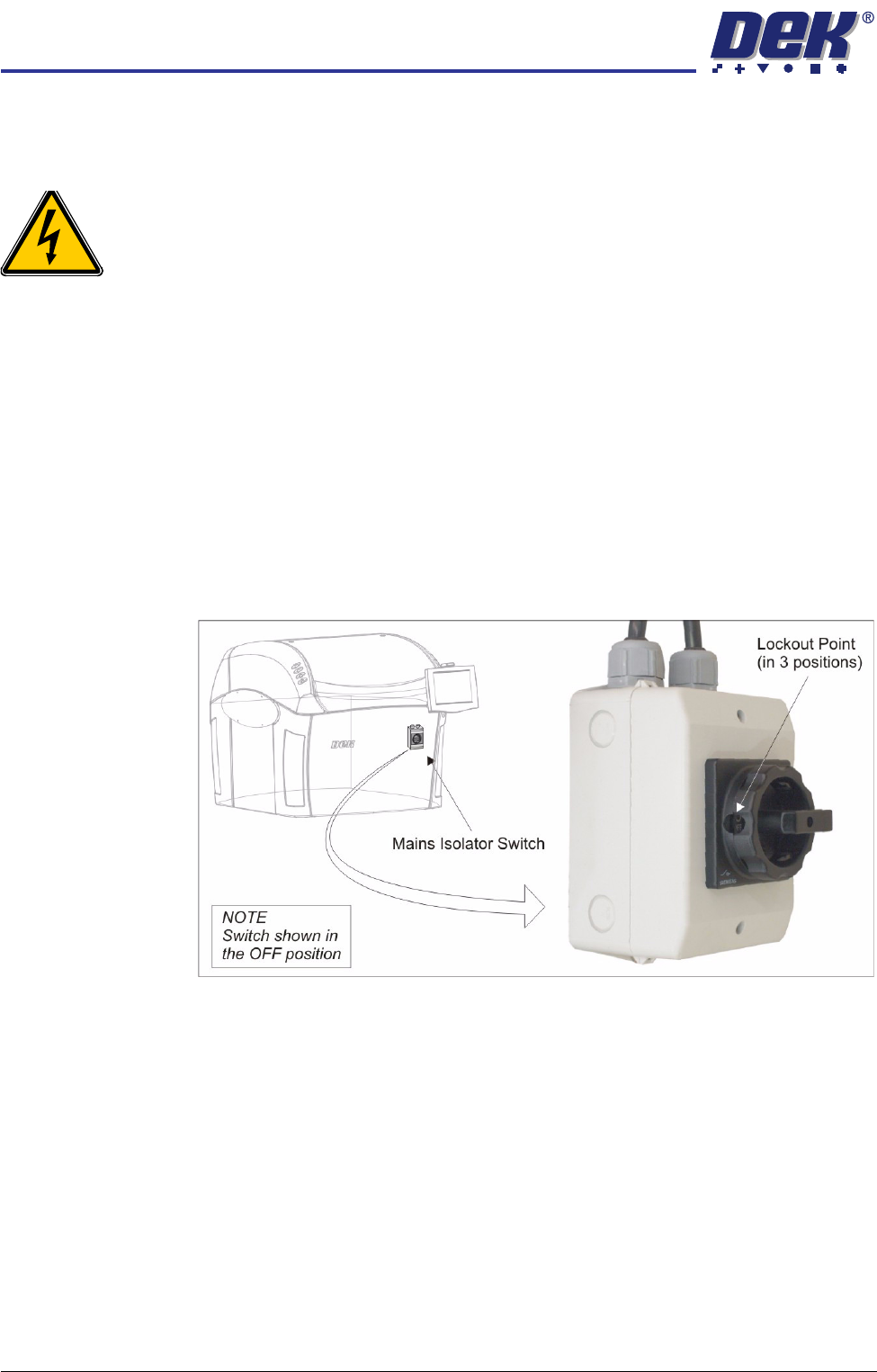
a mains isolator switch that cuts power to all circuits located beyond the switch.
Hazard Warning
Labels
Hazard warning labels are placed on the outside of enclosures where danger-
ous voltage (100V-240V) terminations are present within.
Earth Bonding Apart from metal covers machines, all external metal surfaces are mechanically
and electrically bonded to the machine earth point. The bonding wire used is
identified by its green and yellow insulation and is commonly used to earth bond
throughout. Care should be taken when removing these links that when they
are replaced they are secured tightly and cleanly.
SAFETY FEATURES
LOCKOUT
2.12 Technical Reference Manual Chapter Issue 6 Oct 06
LOCKOUT
Electrical Lockout
WARNING
LETHAL VOLTAGE. DANGEROUS VOLTAGES EXIST IN THIS EQUIPMENT.
ENSURE ALL ELECTRONIC COVERS AND MAIN MACHINE COVERS ARE
FITTED BEFORE OPERATING THIS EQUIPMENT.
Electrical lockout of the machine is achieved by applying a padlock, or any other
suitable locking device, through the body and the switch shroud of the mains
isolator switch. This can only be achieved when the mains isolator switch is in
the OFF position.
To electrically lockout the machine, carry out the following procedure:
1. Close down the machine software.
2. Switch the mains isolator to the OFF position.
3. Open the printhead cover.
4. Remove the front panel.
5. Fit a padlock or suitable locking device through one of the three lockout
points.
NOTE
Dependant on the cover package, the isolator switch may be rotated 90°
clockwise.
6. This completes the electrical lockout.