Galaxy EX Blue Under Screen Cleaner Module.pdf - 第6页
BLUE UNDE R SCREEN C LEANER M ODULE ADJUSTMENTS AND SETTINGS 18. 6 Te chni cal Ref ere nce Ma nual Ch apte r Issue 5, May 15 ADJUSTMENTS AND S ETTINGS CAUTION SOLDER P ASTE AND SOL VENT S. WHE N USING OR HANDLING ANY SOL…
BLUE UNDER SCREEN CLEANER MODULE
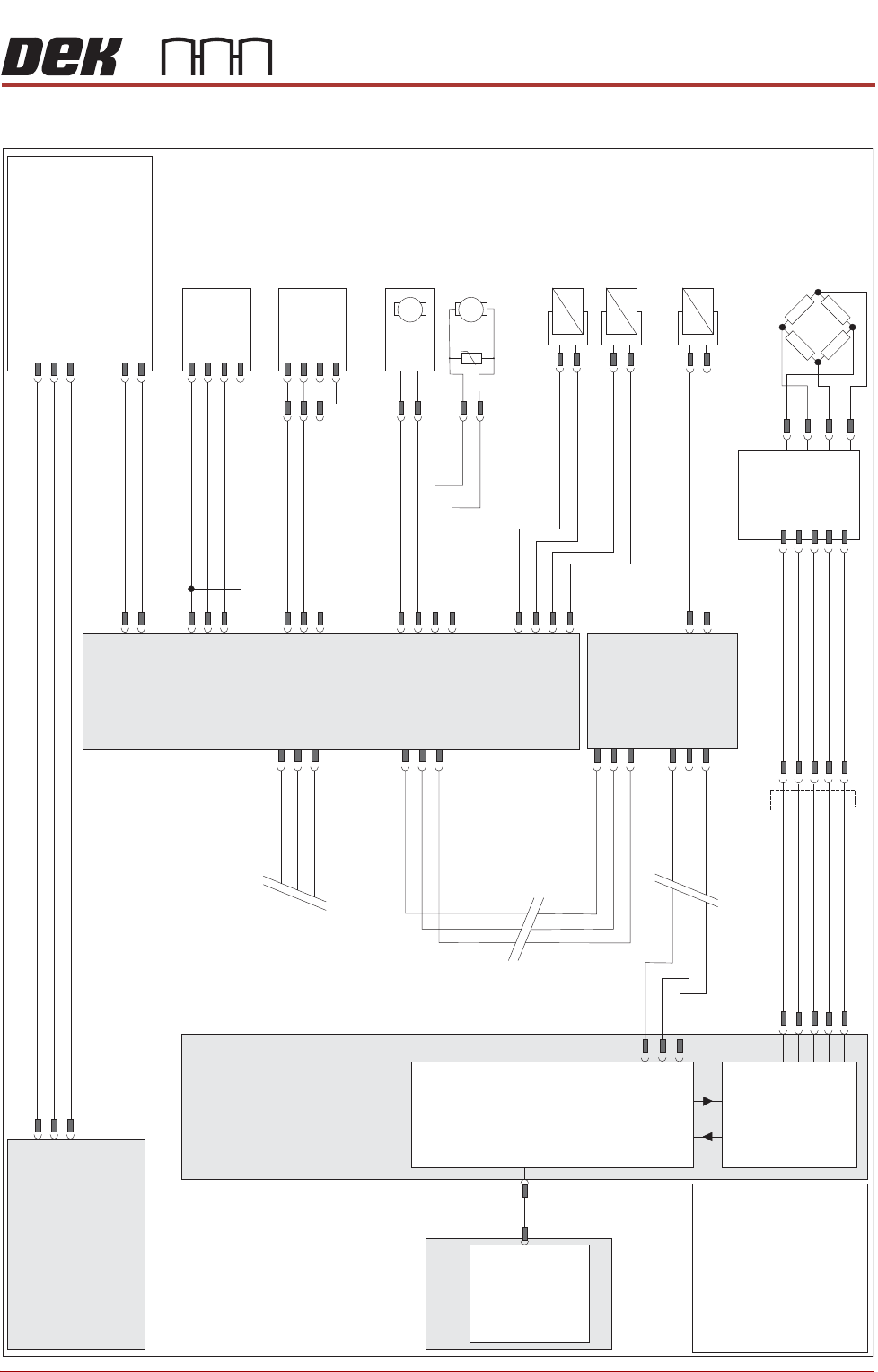
ELECTRICAL SCHEMATIC
Chapter Issue 5, May 15 Technical Reference Manual 18.5
ELECTRICAL SCHEMATIC
M36 Machine
Control Enclosure
PC
Motherboard
USB
NextMove ES
(I/O Node
1)
1
2
4
CAN_H
CAN_L
CAN GND
M36PL35
16SK08
Cleaner
Squeegee Bar
16SOL08
DIG OUT 14
0V
I/Ps
CAN Bus
O/Ps
9SK63
1
4
3
6
7
9PL64
Solvent
Load Cell
9SE26
NextMove
Interface
M36PL09
1
2
10
12
14
8
7
5
1
AN IN0 -
AN IN0 +
0V USR
+12V
-12V
M37 Power Supply Module
Solvent
Level Amp
-V
+V
-IN
+IN
Vacuum Filtration Unit
L
N
E
Vac
Pump
Supply
Main Machine
I/O Node 2
N2SK2
CAN In
N2PL4
7
2
3
9
21
L
N
E
M37PL35
M35SK02
M35SK01
1
2
Screen Clean
I/O Node 4
N2SK3
7
2
3
9PL69
1
4
3
6
7
Level +
Ext Service Panel
AGND
0V USR
+12V
-12V
CAN Out
N4SK3
7
2
3
CAN Out
N4SK2
7
2
3
CAN In
1
2
N4PL6
8SK13
R/H Clean
Home Clamp
8SOL20
N4PL2
DIG OUT 0
0V
1
2
3
4
1
2
8SK11
L/H Clean
Home Clamp
8SOL19
1
2
DIG OUT 0
0V
N4PL5
1
2
3
4
DIG OUT 3
0V
+12V
Sig
0V
(L)
N4PL4
4
5
6
Screen Cleaner
Home
8SE10
DIG IN
2
DIG OUT 1
8SK76
8SK71
1
2
N4PL1
4
5
6
DIG IN
1
Paper Low/
Paper Usage
8SE18
Solvent
Pump
8M14
0V
24V
M
M
Paper Feed
Motor
8M5
8SK72
1
2
DIG OUT 2
0V
NOTE
The breaks in the CAN
Bus chain reflect that
additional I/O Nodes
may be fitted, refer to
Machine Control
chapter for the
complete CAN Bus
chain.
+12V
Sig
0V
(L)
N/C
8R1
20R
BLUE UNDER SCREEN CLEANER MODULE
ADJUSTMENTS AND SETTINGS
18.6 Technical Reference Manual Chapter Issue 5, May 15
ADJUSTMENTS AND SETTINGS
CAUTION
SOLDER PASTE AND SOLVENTS. WHEN USING OR HANDLING ANY SOLDER
PASTE OR SOLVENT FORMULATION THE MANUFACTURERS’ SAFETY DATA
SHEETS MUST BE STRICTLY ADHERED TO.
MANDATORY
TOXIC CHEMICALS MAY BE PRESENT. SAFETY GLOVES MUST BE WORN.
MANDATORY
TOXIC CHEMICALS MAY BE PRESENT. EYE PROTECTION MUST BE WORN.
Screen Cleaner
Home
1. Select Maintenance.
2. Select Diagnostics.
3. Use Next or Previous to highlight Screen Cleaner.
4. Select Select Module.
5. Use Next or Previous to highlight Toggle Screen Cleaner Home Clamp.
6. Select Run Diagnost to release the electromagnetic clamps.
7. Move the cleaner by hand towards the rear of the machine until the error
message ‘Screen Cleaner Out Of Position’ is displayed.
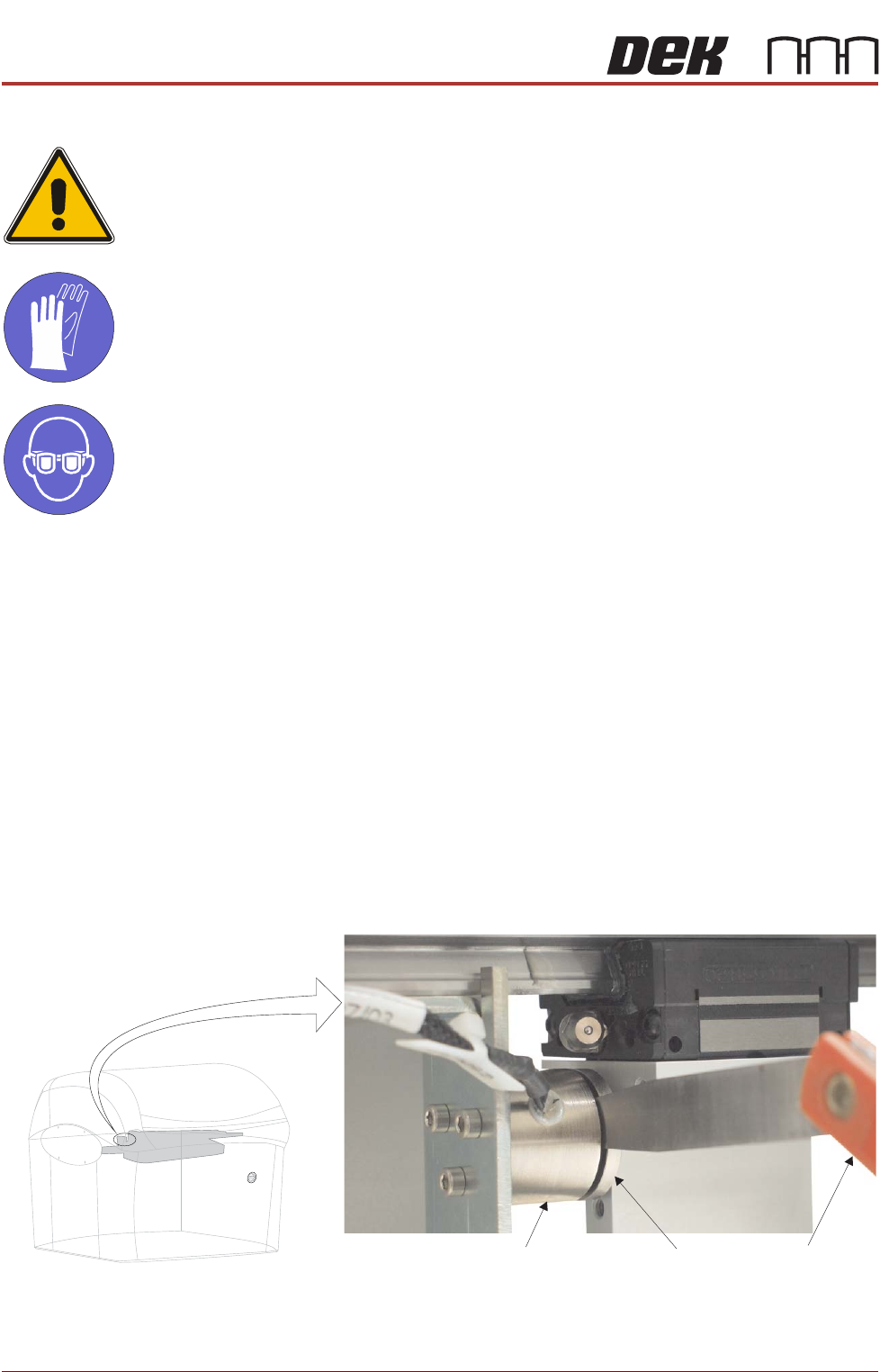
8. Using a 2.0mm feeler gauge positioned between the left hand screen
cleaner home electromagnetic clamp (8SOL19) and the clamp plate, pull
the cleaner towards the front of the machine. With the clamp plate held
lightly against the feeler gauge, ensure that the error message remains
displayed.
9. Repeat Step 8 using a 1.5mm feeler gauge, ensure the error message has
extinguished.
View on Front of Machine
Feeler GaugesElectromagnetic Clamp
Clamp Plate
BLUE UNDER SCREEN CLEANER MODULE
ADJUSTMENTS AND SETTINGS
Chapter Issue 5, May 15 Technical Reference Manual 18.7
10. If adjustment is not required, go to Step 14.
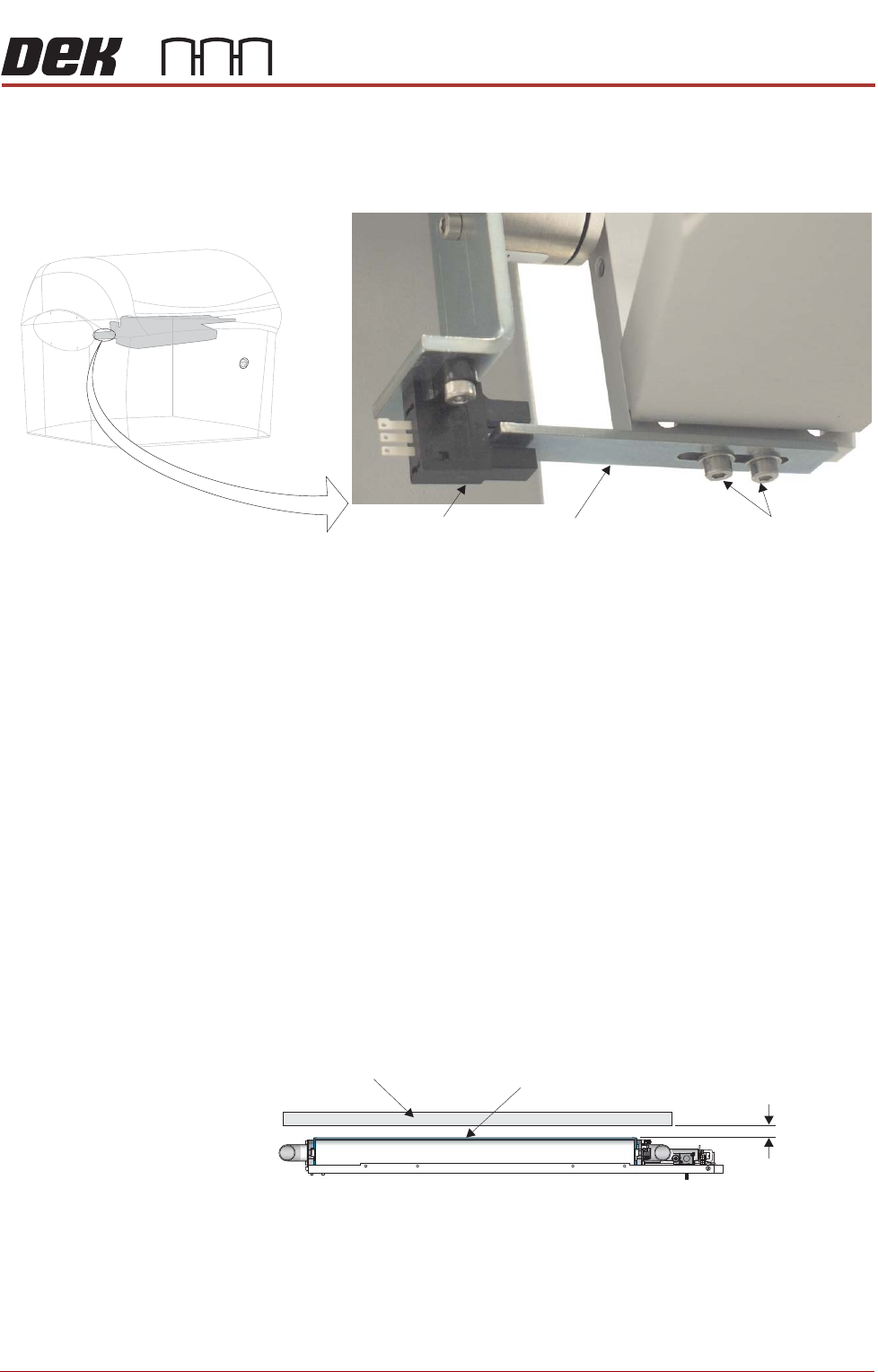
11. Move the cleaner towards the rear of the machine until the vane securing
screws are accessible.
12. Loosen the vane securing screws, adjust the vane and re-tighten the
securing screws.
13. Repeat Steps 8 to 10.
14. Select Run Diagnost to energise the electromagnetic clamps.
15. Select Exit.
16. Select Exit.
17. Select Back.
Screen Cleaner Height Adjustment
1. Select Unload Screen.
2. Open the front printhead cover.
3. Remove the screen from the machine.
4. Using the calibration screen, position the front edge of the screen frame
over the under screen cleaner wipers.
5. Using feeler gauges ensure the gap between squeegee wipers and the
screen frame is 3.25mm ±0.25mm.
6. If adjustment is not required, go to Step 11.
7. To gain access to cleaner securing screws move the underscreen cleaner
away from its home position.
View on Front of Machine
Vane Securing Screws
Home Sensor
Vane
Screen Frame
3.25mm
±0.25mm
Squeegee Wiper Assembly
View on Front of Machine