00197202-02_VB_Traceability_3.5_de_en.pdf - 第32页
Traceability System Components and Features SIPLACE Trace Service User Interf ace Traceability Option for SIP LACE Explorer 32 SIPLACE Traceability 3.5 5.1.4 Traceability Option for SIPLACE Explorer The traceability opti…
Traceability System Components and Features
Trace Service Server System Components
SIPLACE Traceability 3.5 31
5 Traceability System Components and Features
5.1 System Components
SIPLACE Trace Service processes traceability data. This data is imported from station and line software
and then stored in the traceability database, before being exported as XML files or made available via
the OIB interface. The traceability database can be visualized via the Trace Monitor.
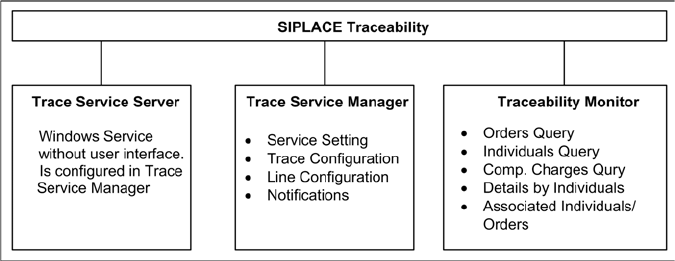
SIPLACE Traceability consists of three components:
▪ Trace Service server:
for generation and export of data
▪ Trace Service Manager:
for configuration of the Trace Service server
▪ Trace Monitor:
For displaying and searching for recorded traceability data
All SIPLACE Trace Service components are automatically installed on the same computer during instal-
lation. The Trace Monitor web application is generated with the help of the Trace Monitor configuration
tool, which can be separately installed on any computer.
In addition to Trace Monitor, you can also install the traceability option for SIPLACE Explorer. Before this
installation, make sure that SIPLACE Explorer has been installed and activated. This is required for dis-
playing and searching for recorded traceability data.
5.1.1 Trace Service Server
When using machine-based traceability, the Trace Service server imports the traceability data from the
stations. The traceability data are exported:
▪ into the Trace database (which is configured in the Trace Service Manager)
▪ to the OIB interface (see the OIB SDK for details)
▪ into the file system (as XML files)
All settings or configurations are performed via the SIPLACE Trace Service Manager.
5.1.2 Trace Service Manager
The line-specific configuration and other options are set via the user interface of the Trace Service Man-
ager.
▪ Configuring the database connection to SIS and Setup Center
▪ Export method for configuring traceability data
▪ Configuring traceability database (create, update, backup and restore)
▪ Configuring lines and their traceability operating modes
5.1.3 Trace Monitor
The Trace Monitor is used to display the recorded and invoked data.
The user can search for specific data using the Trace Monitor. In doing so, it is possible to filter the
search according to various criteria, e.g. according to produced boards, placed components etc. The
data displayed can be saved as a CSV file for further processing in MS Excel.
Traceability System Components and Features
SIPLACE Trace Service User Interface Traceability Option for SIPLACE Explorer
32 SIPLACE Traceability 3.5
5.1.4 Traceability Option for SIPLACE Explorer
The traceability option for SIPLACE Explorer provides the SIPLACE Explorer users with the traceability
data recorded by Trace Service.
For this purpose, the traceability option must be installed on the SIPLACE Explorer. During the installa-
tion a new tab for "Traceability" is added to the SIPLACE Explorer factory website. This tab provides the
user with the Trace Monitor user interface. The user can search for specific data.
5.2 SIPLACE Trace Service User Interface

Fixed Defects
SIPLACE Traceability 3.5 33
6 Fixed Defects
Fixed defects in other systems
Information about fixed defects in other systems affecting traceability can be found in the relevant soft-
ware version descriptions:
Fixed defects in Traceability
Error number Description
D1-68175811 No connection between Traceability Service and X4 - X4 - SX2.
D1-69390701 DATA_LOST in TraceData data - not all attributes match the produced board
D1-69399201 Missing Linebased TRC Data from Table 2 at F5HM
D1-69721013 Trace 3.3 does not deliver xml from Sirio line.
D1-70144974 Trace 3.3.0.31 SQL Exception Object not set to reference......
D1-71572701 Trace Data Incomplete, many production stops
D1-74527701 Last machine in line has the same MID as previous one in line in case of soft-
ware version 505.
D1-76711601 TraceService cannot connect to Sirio Stations