TM1794_Auto Cleaning Detail Setting.pdf - 第5页
SMT Software Engineering Group IM Operations YAMAHA MOTOR CO. , LTD MDOC-SOFT5007 1 5 W hen “Dry A uto Interv al (Board)”, “Wet A uto Int erval (Board)” or “Man ual Interval (Board)” is s et in [Print] – [Cleaner] tab, t…
SMT Software Engineering Group
IM Operations
YAMAHA MOTOR CO., LTD
MDOC-SOFT50071
4
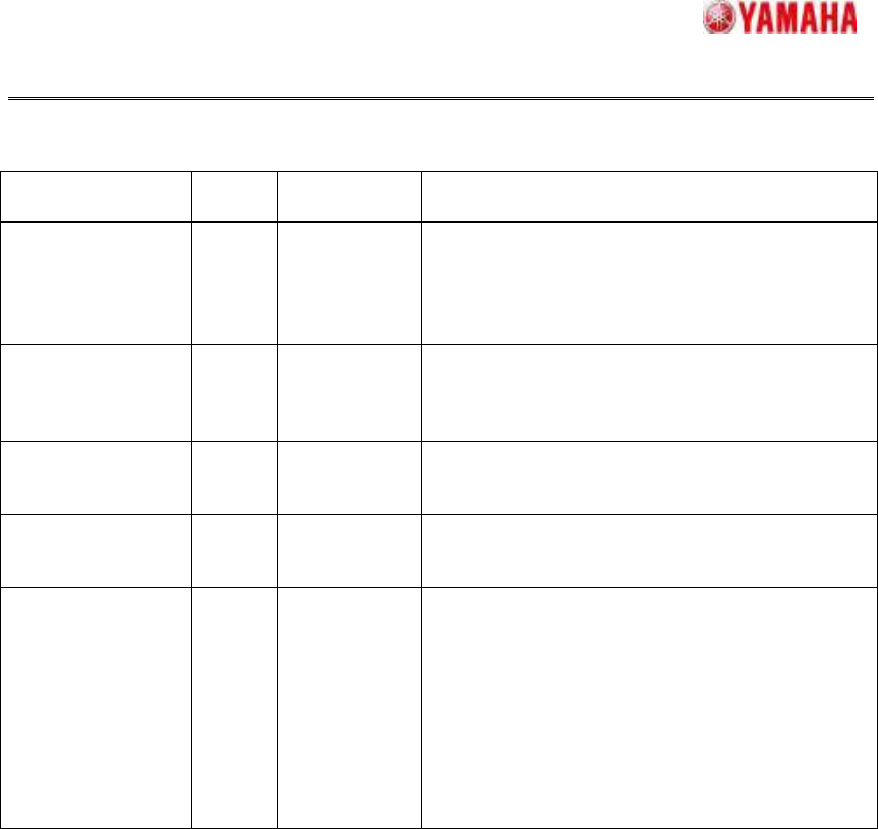
Table3.1 Setting items in “Cleaning Detail Setting” window
Item Default
value
Input range Content
Detail Auto
Interval (Board)
0 0 - 9999 (Setting only for “Controlled in the Board”)
Set the cleaning frequency by the number of
board.
When “0” is set, the following “Controlled in the
Board” tabs are invalid.
Cleaning Type Dry Dry/
Wet/
None
“Dry”: Clean only with gauze
“Wet”: Clean with gauze and solvent
“None”: The following cleaning sequence is not
executed.
Speed (%) 100 1 - 100 Set the speed of cleaning unit at the cleaning.
(Following “Speed (mm/sec)” is linked with this
value)
Speed (mm/sec) 225 1 - 225 Set the speed of cleaning unit at the cleaning.
(Above “Speed (%/sec)” is linked with this
value)
Vacuum Use Use/
Not Use
“Use”: At the cleaning, mask is vacuumed
while cleaning unit moves.
“Not Use”: At the cleaning, mask is not
vacuumed while cleaning unit moves.
[Warning]
When vacuum is used in wet cleaning, solvent
spitted out dries. In this case, [Ea8816: DATA
CHECK WARNING] is displayed after selecting
a board data. Then change the settings.
SMT Software Engineering Group
IM Operations
YAMAHA MOTOR CO., LTD
MDOC-SOFT50071
5
When “Dry Auto Interval (Board)”, “Wet Auto Interval (Board)” or “Manual Interval
(Board)” is set in [Print] – [Cleaner] tab, these cleaning are enabled with detail settings. In
this case, each auto interval and manual interval value must satisfy the following relation.
Dry < Wet < Controlled in the Board 1 < Controlled in the Board 2 < Controlled in the
Board 3 < Controlled in the Board 4 < Manual
When the execution timing of two or more cleanings is simultaneous, larger interval
cleaning takes precedence. At this time, the cleaning counter of smaller interval cleaning is
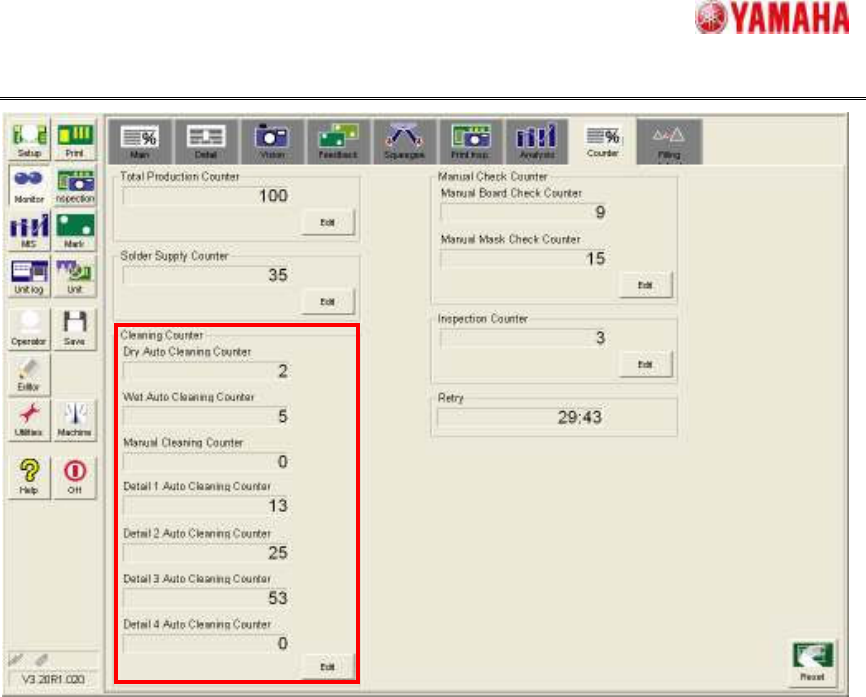
cleared. (Values of cleaning counter can be displayed on [Monitor] – [Counter] tab. See
Fig.3.2)
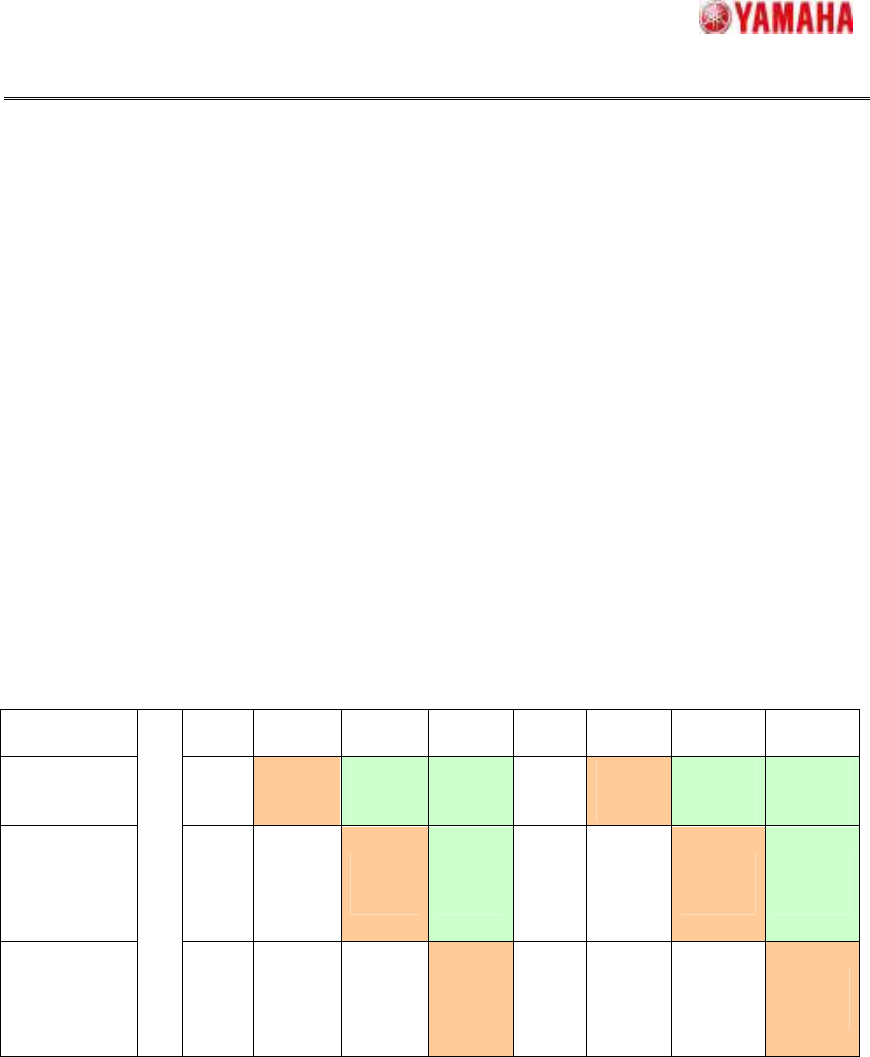
For example, when “Dry Auto Interval (Board)” is “2”, “Detail Auto Interval” of “Controlled
in the Board 1” is “3” and “Detail Auto Interval” of “Controlled in the Board 2” is “4”, cleaning
is executed as Table 3.2 shows. (The value of the parentheses means the cleaning
counter.)
Table3.2 Example of “Controlled in the Board” cleaning
First
board
Second
board
Third
board
Forth
board
Fifth
board
Sixth
board
Seventh
board
Eighth
board
Dry cleaning
(1)
Execute
(2)
Cleared
counter
(0)
Cleared
counter
(0)
(1)
Execute
(2)
Cleared
counter
(0)
Cleared
counter
(0)
Detail
cleaning of
“Controlled
in the Board
1”
(1)
(2)
Execute
(3)
Cleared
counter
(0)
(1)
(2)
Execute
(3)
Cleared
counter
(0)
Detail
cleaning of
“Controlled
in the Board
2”
START
(1)
(2)
(3)
Execute
(4)
(1)
(2)
(3)
Execute
(4)
Both cleaning are executed, when the execution timing of “Controlled in the Board”
cleaning and “Controlled in the Time” cleaning is simultaneous.
SMT Software Engineering Group
IM Operations
YAMAHA MOTOR CO., LTD
MDOC-SOFT50071
6
Fig.3.2 [Monitor] - [Counter] tab
3.2. In the case of “Controlled in the Time”
In [Print] – [Cleaner] – [Controlled in the Time], set “Cleaning Method” to “Auto” and “Auto
Cleaning Type” to “Detail”, and enter the interval time of cleaning execution in “Interval
(min)”. (Fig.3.3) Then, tap “Detail Setting” button and open “Cleaning Detail Setting” window,
and set “Cleaning Type”, “Speed” and “Vacuum” of each sequence in [Controlled in the
Time] tab. (Fig3.4)
There is not “Detail Auto Interval” in this setting, so only one kind of setting can be
registered.