00197386-02_VD_OIS_SIS_11.2.DE_EN.pdf - 第6页
SIPLACE O IS V11. 2 / Sof tware V ersion Des cript ion Ausgabe 05/2014 Ed ition 6 1.1.1 OI S functionalit y The OI S server rec ords t he operat ing d ata in a r elation al data base and c onve ys th is data to the OIS c…
SIPLACE OIS V11.2 / Software Version Description Ausgabe 05/2014 Edition
5
1 General
1.1 OIS/SIS functionality
As of the 7.1 software version, the functionality of the SIPLACE® Operator Information System
(OIS) and the SIPLACE Setup Information System (SIS) has been integrated into the Monitoring
Service. Additionally, the Monitoring Service provides OIB related functionality. This additional
Monitoring functionality is only relevant in combination with the OIB Monitoring Adapter.
The public OIS and SIS databases interfaces have not been changed. The tables and views can be
used as before.
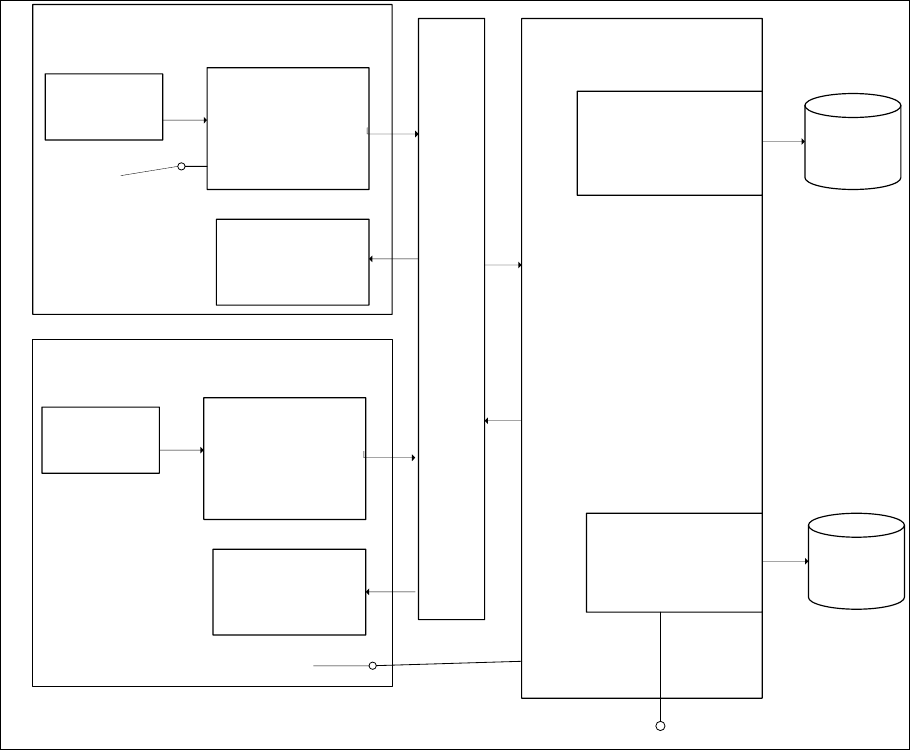
Station 1 to n with SC 70x
Station 1 to n
OIS Database
OISBuffer
OISClient
OISClient
OISBuffer
OIS-Terminal
OIS-Terminal
Operating
Data
MonitoringService.exe
OIS Functionality
SIS Functionality
OISServer.exe
SIS Database
Operation
Data
SIPLACE Pro
(SpiXML adapter)
Figure 1-1: Overview Monitoring Service
SIPLACE OIS V11.2 / Software Version Description Ausgabe 05/2014 Edition
6
1.1.1 OIS functionality
The OIS server records the operating data in a relational database and conveys this data to the
OIS client. The OIS client provides a graphical user interface to display this data.
1.1.2 SIS functionality
SIS records recipe and setup specific data received from SIPLACE Pro via the SpiXML adapter in
a relational database.

SIPLACE OIS V11.2 / Software Version Description Ausgabe 05/2014 Edition
7
2 Scope of delivery
SIPLACE OIS Application V11.2, item no. [00392168-xx] is included in "SIPLACE Pro Media
Package V11.2", Item no. [00116531-xx] and contains:
Quantity Item
1 CD-ROM with V11.2 of the OIS and SIS software
1 Installation Manual, item no. [00197392-xx]
1 DVD Support Media
NOTICE
To Support Media DVD:
Please use the Navigation Guide button of the Support Media Launcher to navigate
through the documentation.
The navigation guide and all related documents are available on the Support Media DVD
that is shipped with the SIPLACE Pro /OIS package.