00198356-01_AI_Input-Extension_SX12_DE_EN_web.pdf - 第65页
Assembly Instructions / Montageanleitung SIPLACE SX1/SX2 V2 Option Input Conveyor Extension 05/2017 4 Appendix 4.1 Excerpts from the Service Manual 65 4.1.3 Replacing the conveyor drive [03092345-xx] Parts, equipment and…
4 Appendix
4.1 Excerpts from the Service Manual
Assembly Instructions / Montageanleitung SIPLACE SX1/SX2 V2
Option Input Conveyor Extension 05/2017
64
NOTICE!
Many tasks on the conveyor require to simply
move the hexagonal shafts instead of removing
them. In most of these cases, you do not need to
dismantle the end of the hexagonal shafts.
.
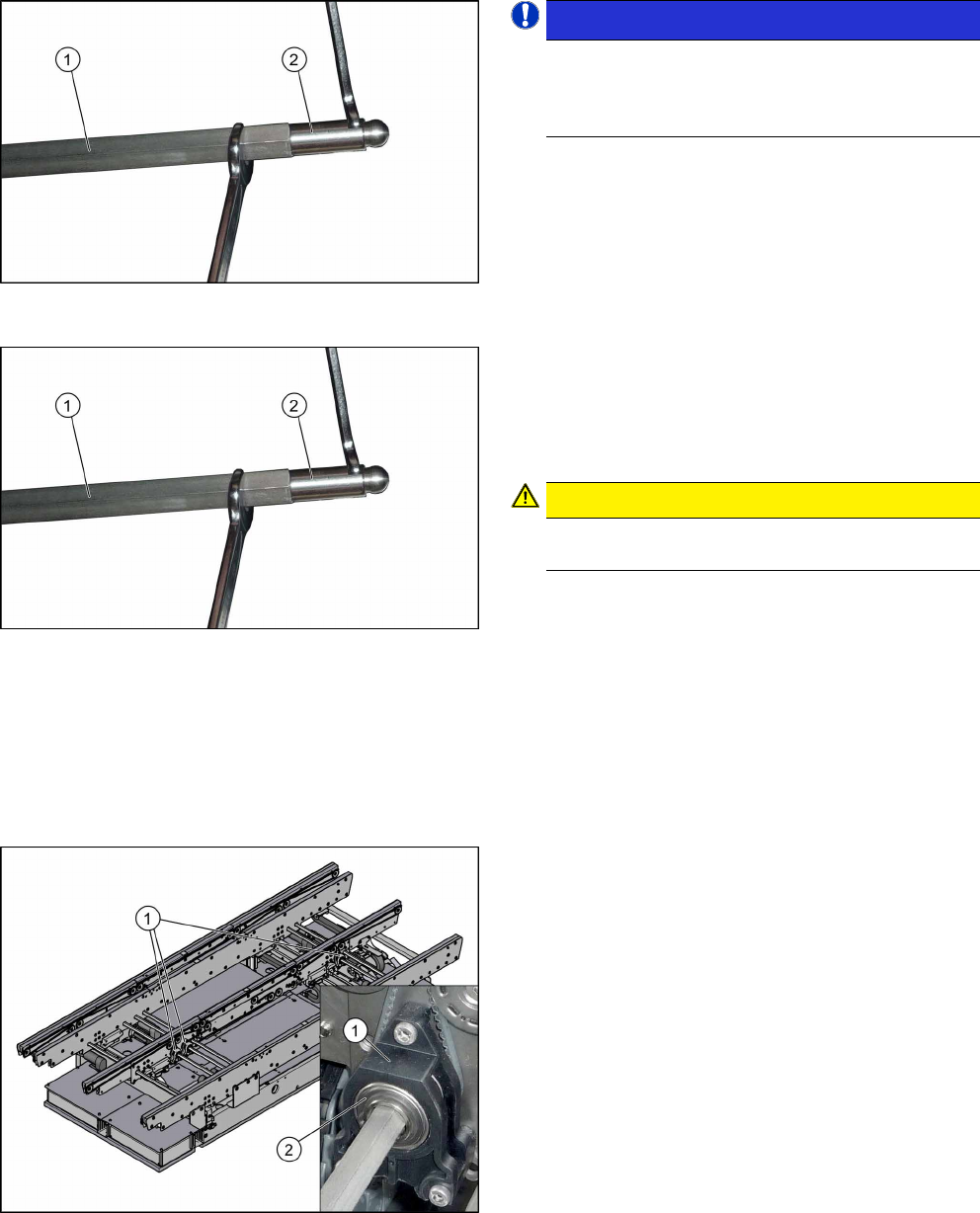
► Unscrew the two ends (2) of the hexagonal shaft
(1). This shortens the shaft and makes it easier to
handle.
► Unthread the hexagonal shaft.
Installation
► Follow the removal instructions in reverse order
for installation.
► Once you have loosened the ball studs (2) of the
hexagonal shafts (1), tighten these with a torque
of 14 Nm.
CAUTION!
Be careful not to damage the hexagonal shafts
with the tool.
.
4.1.2 Replacing the Tape Drive [03092315-xx]
Parts, equipment and tools
●
Belt drive assembly SXa [03092315-xx]
●
Bearing for hexagonal shaft SXa (plastic bearing) – pack of 10 [03092024-xx]
Overview
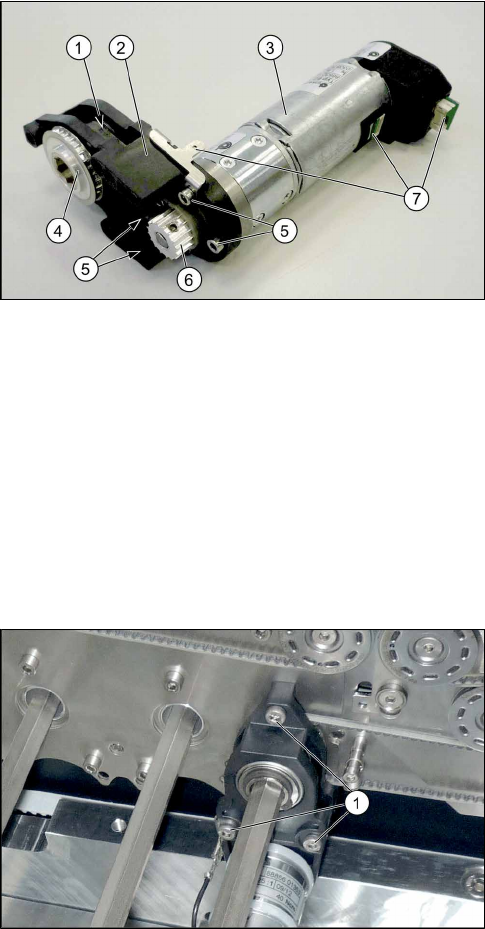
1. Tape drive
2. Drive shaft on belt drive
Removal/installation
► Replacement of the belt drive is identical to replacement of the conveyor drive. For more in-
formation about this, read section 4.1.3 "Replacing the conveyor drive [03092345-xx]" [}65].
Assembly Instructions / Montageanleitung SIPLACE SX1/SX2 V2
Option Input Conveyor Extension 05/2017
4 Appendix
4.1 Excerpts from the Service Manual
65
4.1.3 Replacing the conveyor drive [03092345-xx]
Parts, equipment and tools
●
Drive unit SXa complete [03092345-xx]
●
Bearing for hexagonal shaft SXa (plastic bearing) – pack of 10 [03092024-xx]
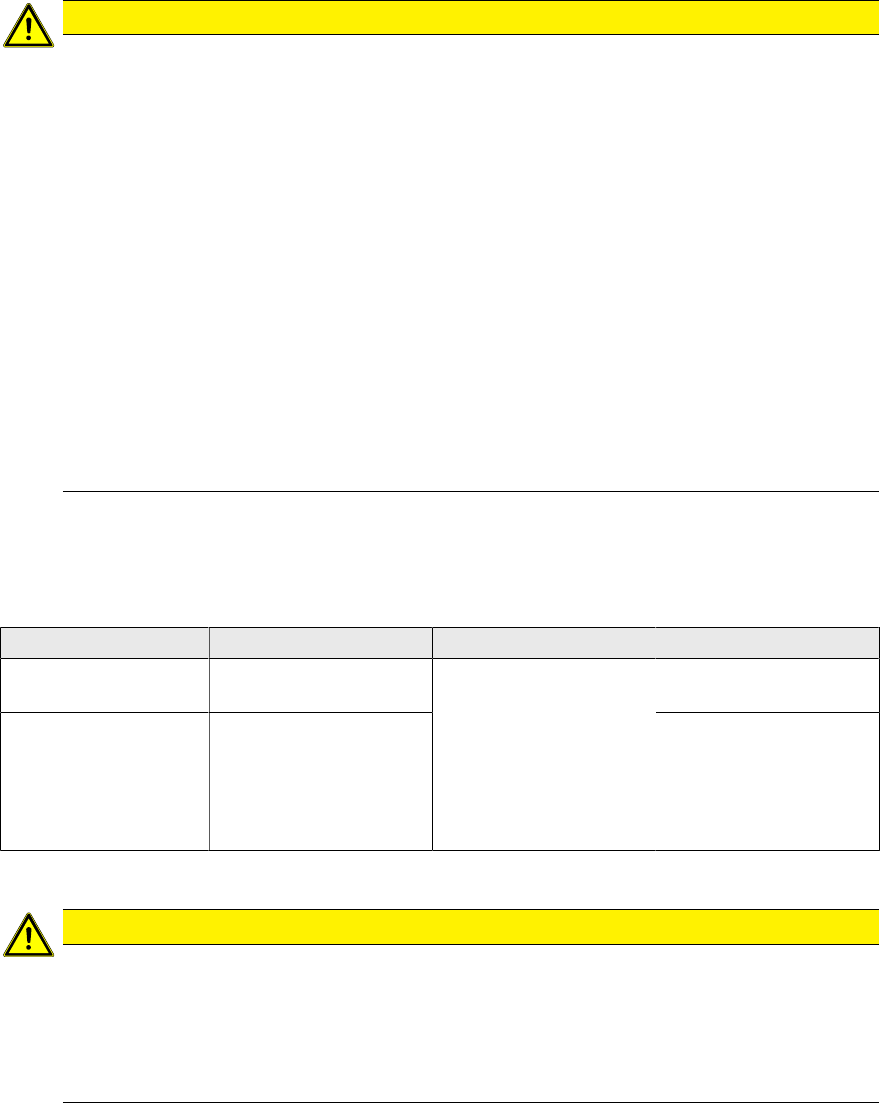
Overview
1. Toothed belt on conveyor drive
2. Drive bracket
3. Motor
4. Drive shaft
5. Four motor fastening screws in the drive bracket
6. Motor shaft
7. Electrical connections (incl. shield connection)
Removal
► Use the software to move the conveyor rails into a position which allows you best access. Al-
ternatively, you can also loosen the conveyor rail clamps on the dual conveyor.
► Switch off the machine, disconnect it from the power supply and secure it to prevent unauthor-
ized reactivation. Observe the instructions in section 1.2 "Preparatory Work..." [}46].
► Loosen the hexagonal shaft on the belt drive or conveyor drive (motor), so that you can move
the shaft freely. To do this, dismantle the hexagonal shaft fixture on one side and the corres-
ponding plastic bearing on both sides (see also 4.1.1 "Replacing the Hexagonal Shaft
[03094006-xx]" [}63]).
► Loosen the movable idler pulley (see also 4.1.6.1 "Setting the Tension of the Conveyor
Toothed Belt" [}69]).
► Remove the three screws (1) fastening the con-
veyor drive. While doing this, carefully unthread
the conveyor drive from the conveyor belt. Ob-
serve the washers used.
If needed, make a note of the number of washers
and their positions.
► Remove the two screws fastening the cover plate
above the connectors of the conveyor drive and
remove the cover plate.
► Disconnect the conveyor drive from the power
supply. Loosen the corresponding cable ties, if
required.
► Remove the conveyor drive from the machine.
4 Appendix
4.1 Excerpts from the Service Manual
Assembly Instructions / Montageanleitung SIPLACE SX1/SX2 V2
Option Input Conveyor Extension 05/2017
66
Installation
► Follow the removal instructions in reverse order for installation. Also observe the following in-
structions:
CAUTION
Installation instructions
► Make sure that the toothed belt is not folded or damaged otherwise.
► Make sure that the toothed belt is accurately positioned in the guidance on the motor
shaft.
► While tightening the movable idler pulley, set the tension of the toothed belt correctly
(see 4.1.6.1 "Setting the Tension of the Conveyor Toothed Belt" [}69]).
► Check if the belt drive and the drive unit are correctly aligned to each other.
To do so, push the conveyor rails together until a gap is left that is wide enough so
you can still just reach the fastening screws.
Check the conveyor drive for ease of movement by turning the hexagonal shaft. You
may need to loosen the conveyor drive again and then reset it.
► Use cable ties to fix the cables to the motor.
Make sure that the cables are not dragged along during operation.
Make sure that the cables are not being damaged on edges or rubbed against any-
thing when you adjust the conveyor rails.
► Make sure you tighten the fastening screws with a torque of 1.7Nm.
► Make sure the washers are in the correct position.
4.1.4 Replacing the clamping rail and belt guide
Parts, equipment and tools
Select the required belt guide or clamping rail.
Input area Placement area Output area
Conveyor rails
A and C
Belt guide A/C IC SX1a
[03094979‑xx]
Default:
Clamping rail PA SX1
complete
[03093199‑xx]
For Thick Board option:
Clamping rail for thick
board SX1a complete
[03099567‑xx]
Belt guide A/C AB
SX1a [03094510‑xx]
Conveyor rails
B and D
Belt guide B/D EB
SX1a [03095033‑xx]
Belt guide B/D AB
SX1a [03094630‑xx]
Removal
CAUTION
Carefully move the conveyor rails!
Without the clamping rail and the belt guides, the conveyor rails lack significant support ele-
ments.
► Move the opened conveyor rails only very carefully.
Make sure you always push both the left and the right conveyor rail equally.
Also make sure that you do not distort the conveyor rails.
► Use the software to move the conveyor rails into a position which allows you best access. Al-
ternatively, you can also loosen the conveyor rail clamps on the dual conveyor.
► Switch off the machine, disconnect it from the power supply and secure it to prevent
unauthorized reactivation. Observe the instructions in section 1.2 "Preparatory Work..." [}46].
► Only in the input and output areas: Loosen the movable idler pulley of the conveyor belt (see
also 4.1.6.1 "Setting the Tension of the Conveyor Toothed Belt" [}69]).