00197726-12_VB_SE3.11_DE_EN.pdf - 第31页
SIPLACE Explorer ab 3. 11 (R 20 -2) Ausgabe 11/20 20 Edition 31 of 44 System DB System DB Web Browser applets SMA / Line 1 ... Web Browser applets SMA / Line 5 servlets , JSP Tomcat Web Server SIPLACE Explorer Host SIPLA…
SIPLACE Explorer ab 3.11 (R20-2) Ausgabe 11/2020 Edition
30 of 44
3 Systemkomponenten und -Konfigurationen
SIPLACE Explorer kann entweder nur im SIPLACE LAN oder verteilt über SIPLACE und Kunden
LAN installiert werden. SIPLACE Explorer kann entweder komplett auf einem Rechner installiert
werden oder es können die einzelnen Komponenten des SIPLACE Explorer verteilt auf mehreren
Rechnern installiert werden. Bei Aufteilung der einzelnen Komponenten ist ein Teil der Applikation
des SIPLACE Explorer auf dem Linien-Host-PC installiert und enthält die nachfolgend
beschriebenen Komponenten.
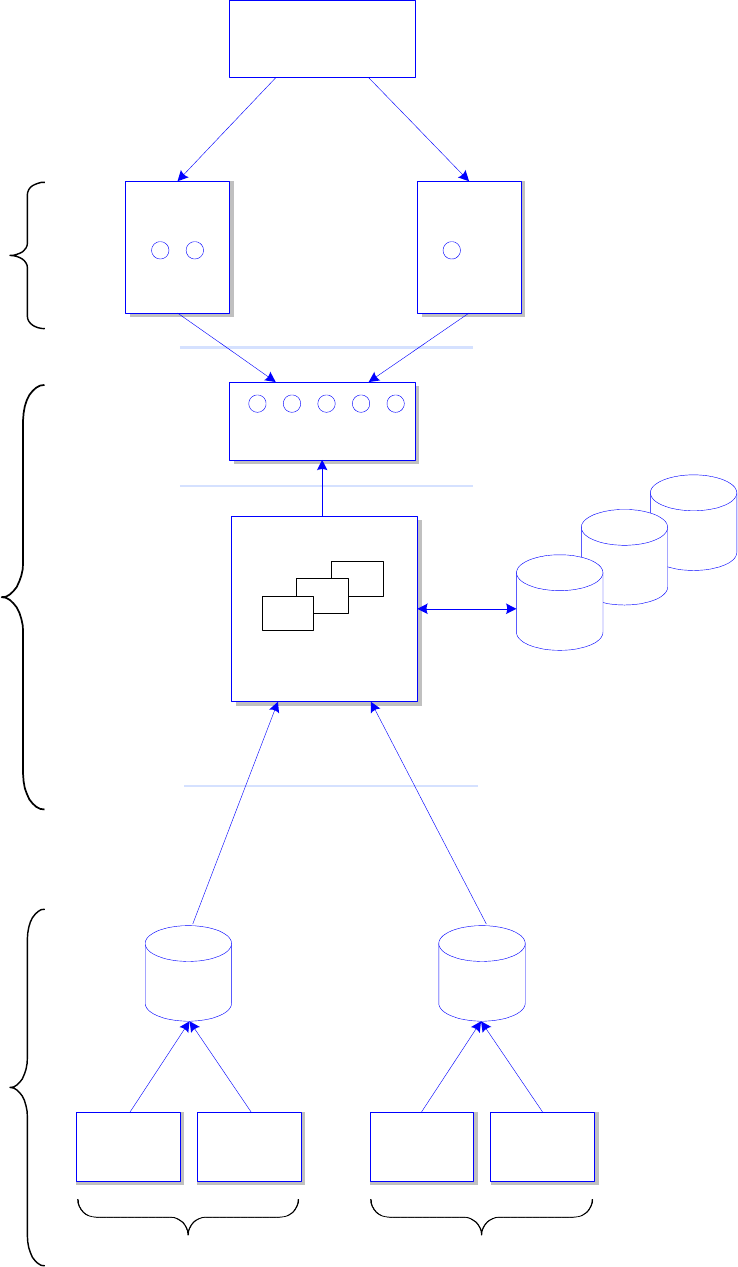
Es könnte wie folgt aussehen: 2
● div. Treiber:
Einsatz dieser Treiber für Geräte, welche nicht GEM-fähig sind (SAFI, SIPLACE OIS).
● Server für SIPLACE Explorer Runtime Environment.
● Web-Server:
zur Verwaltung der Java Servlets.
Allerdings müssen der Web-Server und die SIPLACE Explorer-Datenbanken nicht auf dem Linien-
Host-PC installiert sein.
Die Architektur des SIPLACE Explorer ist in nachstehendem Diagramm abgebildet:
SIPLACE Explorer ab 3.11 (R20-2) Ausgabe 11/2020 Edition
31 of 44
System
DB
System
DB
Web
Browser
applets
SMA / Line 1
...
Web
Browser
applets
SMA / Line 5
servlets, JSP
Tomcat Web Server
SIPLACE Explorer Host
SIPLACE Explorer
Applications 1.. 5
Web Clients
Software
Architecture
One or several NT Servers
SIPLACE
Station 1
SIPLACE
Station N
SIPLACE
Station 1
SIPLACE
Station N
Production Line 1 Production Line 5
...
OIS/SIS
DB
OIS/SIS
DB
...
SIPLACE OIS / SIS
compliant machines
Line 1 ... 5
System
DB
Factory Website
"Single Entry Point"
SIPLACE Explorer ab 3.11 (R20-2) Ausgabe 11/2020 Edition
32 of 44
Je nachdem welche Installationsoption Sie ausgewählt haben, besteht das Software-Paket des
SIPLACE Explorer Servers aus verschiedenen Komponenten und Stand-alone Tools.
● Runtime Environment:
● Archiv-Browser-Utility
● Konsole
● Linien-Konfiguration
● Performance-Analyser
● SE Manager
● Dokumentation
● Standard Monitoring Application (Überwachungs-Anwendung)
● Werks-Konfigurations-Utility
● Development Environment:
● DB-Wartungs-Utility
● Mail-Konfigurations-Utility
● Template Builder
● SE Developer Studio:
● Linien-Konfigurations-Editor
● Betriebsmittel-Editor
● System-Datenbank
● Anwendungslogik
● Bean Factory
● Benutzermanager
● Website Builder
● Ereigniswiedergabe
● Standard Monitoring Application (Überwachungs-Anwendung)