00193903-02.pdf - 第21页
SIPLACE HF-series / D3 8 External power supply for SIPLACE HF-Series / D3 component trolley 06/2006 Edition 21 5.2 Preventive maintenance 5.2.1 Compressed air filter The microf ilter (see figu re below) s hould be replac…
8 External power supply for SIPLACE HF-Series / D3 component trolley SIPLACE HF-series / D3
06/2006 Edition
20
5.1 Commissioning
: Use the enclosed power cable (03006765-01) to connect the component trolley to the external
power supply.
: Then lock both the multi-function plug on the power supply and the connector on the compo-
nent trolley with the relevant locking clips.
DANGER
The air outlet opening of the integral fan and the ventilation slots on the side of the unit must not
be covered.
This could cause overheating, which would damage the power supply. 5
: Optional: Plug the cable into the CAN bus connector (Fig. 3).
: If this has not already been done, fix the quick-release coupling correctly to the compressed
air hose.
: Connect the compressed air hose to the compressed air connector (Fig. 3).
: First switch off the power switch (Fig. 3) and then plug the power cable into the unit.
DANGER
Make sure that no one is working on the connected component table when you switch on the po-
wer supply. 5
: Switch on at the power switch (Fig. 3).
: There is a pilot lamp on the front panel (Fig. 2). The power supply is only guaranteed when this
lamp lights up.
: Lift the cap of the pressure-reducing valve (Fig. 5 and turn it until the manometer (Fig. 5) reads
250 kPa (turn clockwise to increase the pressure).
SIPLACE HF-series / D3 8 External power supply for SIPLACE HF-Series / D3 component trolley
06/2006 Edition
21
5.2 Preventive maintenance
5.2.1 Compressed air filter
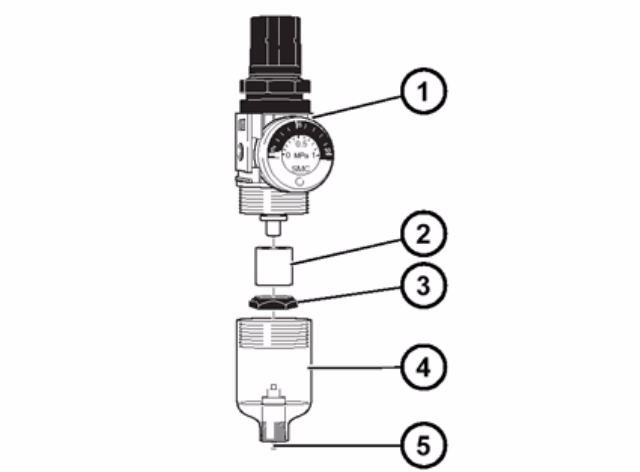
The microfilter (see figure below) should be replaced if the flow rate drops sharply. 5
Release the coupling and remove it from the compressed air connector (Fig. 3). Then unscrew the
condensate tank from the pressure-reducing valve (1), and press down on the separating cap (3)
to remove the microfilter (2). 5
Reverse the above sequence to insert the new microfilter. 5
5
Fig. 6 Compressed air filter unit
a Pressure-reducing valve
s Microfilter
d Separating cap
f Condensate tank
g Manual drain valve
6.0.1 Condensate
The transparent condensate tank (see figure above) must be emptied before the condensate level
reaches the separating cap (3). To do this, press the manual drain valve (5) up. 6
8 External power supply for SIPLACE HF-Series / D3 component trolley SIPLACE HF-series / D3
06/2006 Edition
22
6.0.2 Changing the fuse
6
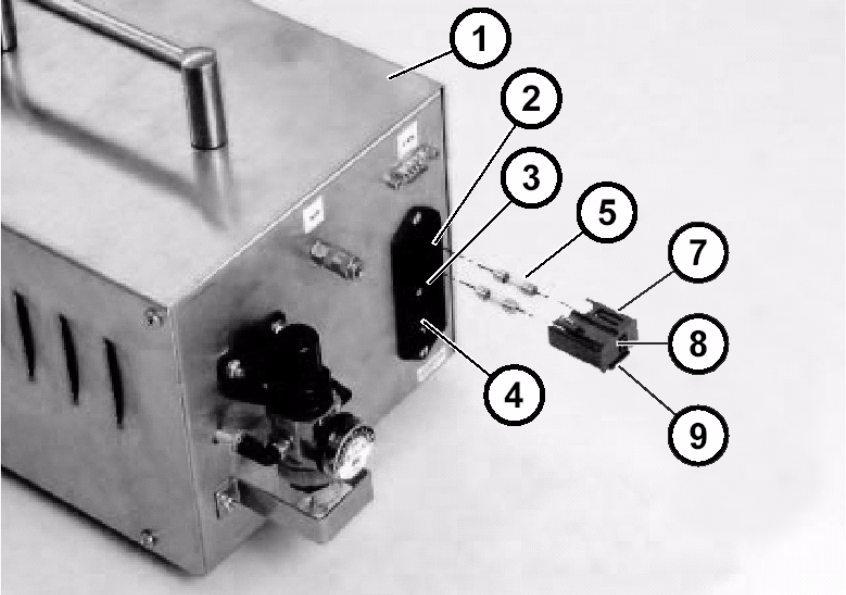
Fig. 7 Power switch with fuses
7
: Switch the power switch (3) to OFF and make sure that the mains plug is not plugged in the
unit.
: Push up the snap-fit closure (9) to release and pull out the black plastic insert (7) with the fuses.
: Remove and check the two fuses (5) and replace them if necessary.
: Only use type 5x20 mm / medium time-lag 6.3 Amp fuses (e.g. 03011614-01).
: Push the black plastic insert (7) with the fuses back into the unit until the snap-fit closure lat-
ches into place.
7