46230811.pdf - 第37页
Page 35 DH P ositioning System Assembly , Non P/T T46230811 Rev . J This Document Supports Assembly 46230811 Rev J 15. In the Zero - DH Span Axis dialog screen select Default then OK The Manual Diagnostics screen is disp…
Page 34
T46230811 Rev. J DH Positioning System Assembly, Non P/T
This Document Supports Assembly 46230811 Rev J
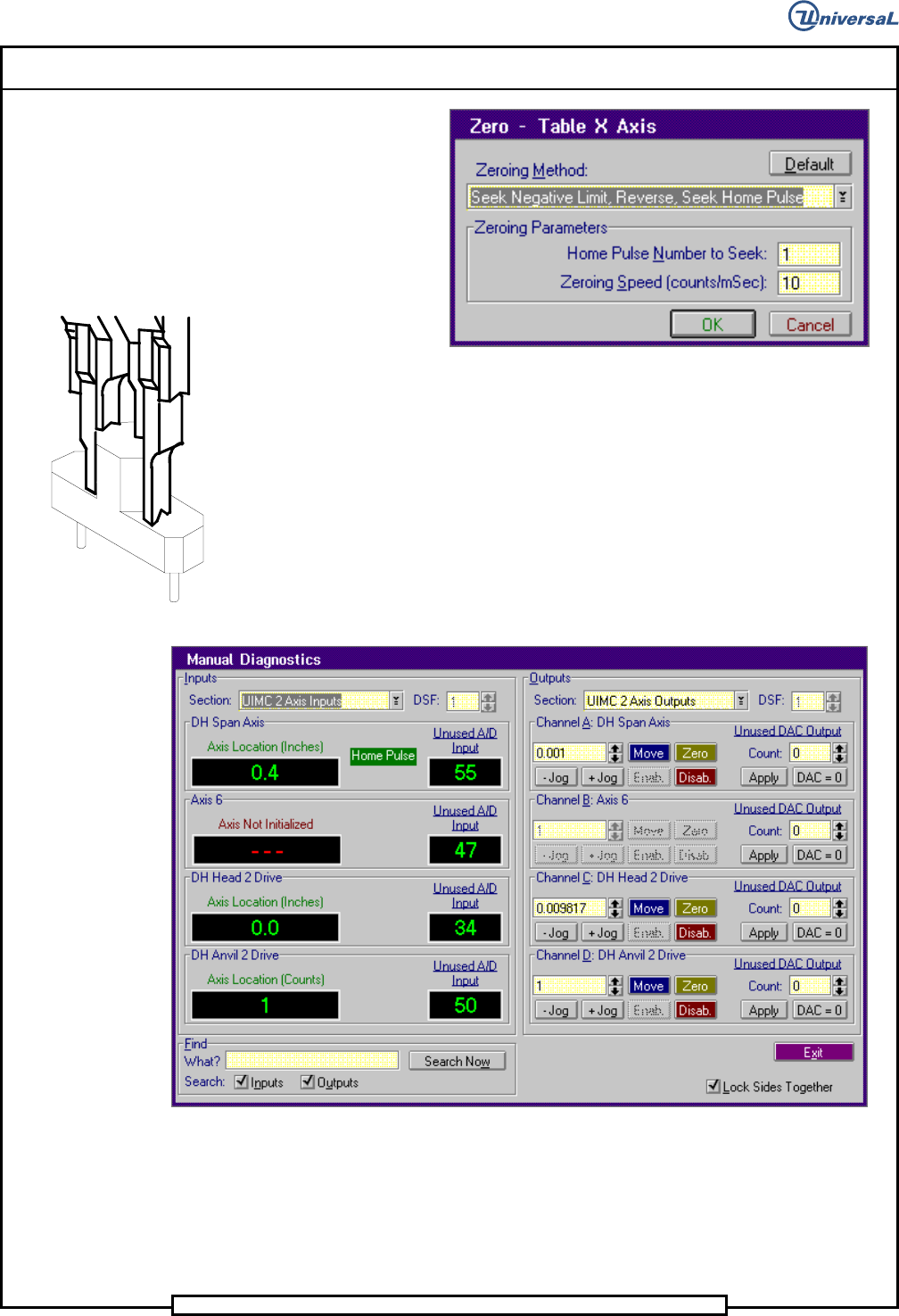
12. In the Zero - DH X Axis dialog screen select Default then OK
Set up Tool in Outside Formers
The Manual Diagnostics screen is displayed.
- In the Channel A: Table X Axis increment box, click on the up
↑↑
↑↑
↑
or down
↓↓
↓↓
↓ arrows until 1.0 appears in the increment box.
- Click on the + Jog button until the Axis Location for the
Table X Axis indicator in the Input side of the screen reads 9.0.
13. In the Outputs side of the Manual Diagnostics screen, select the
following. Section>UIMC 2 Axis Outputs
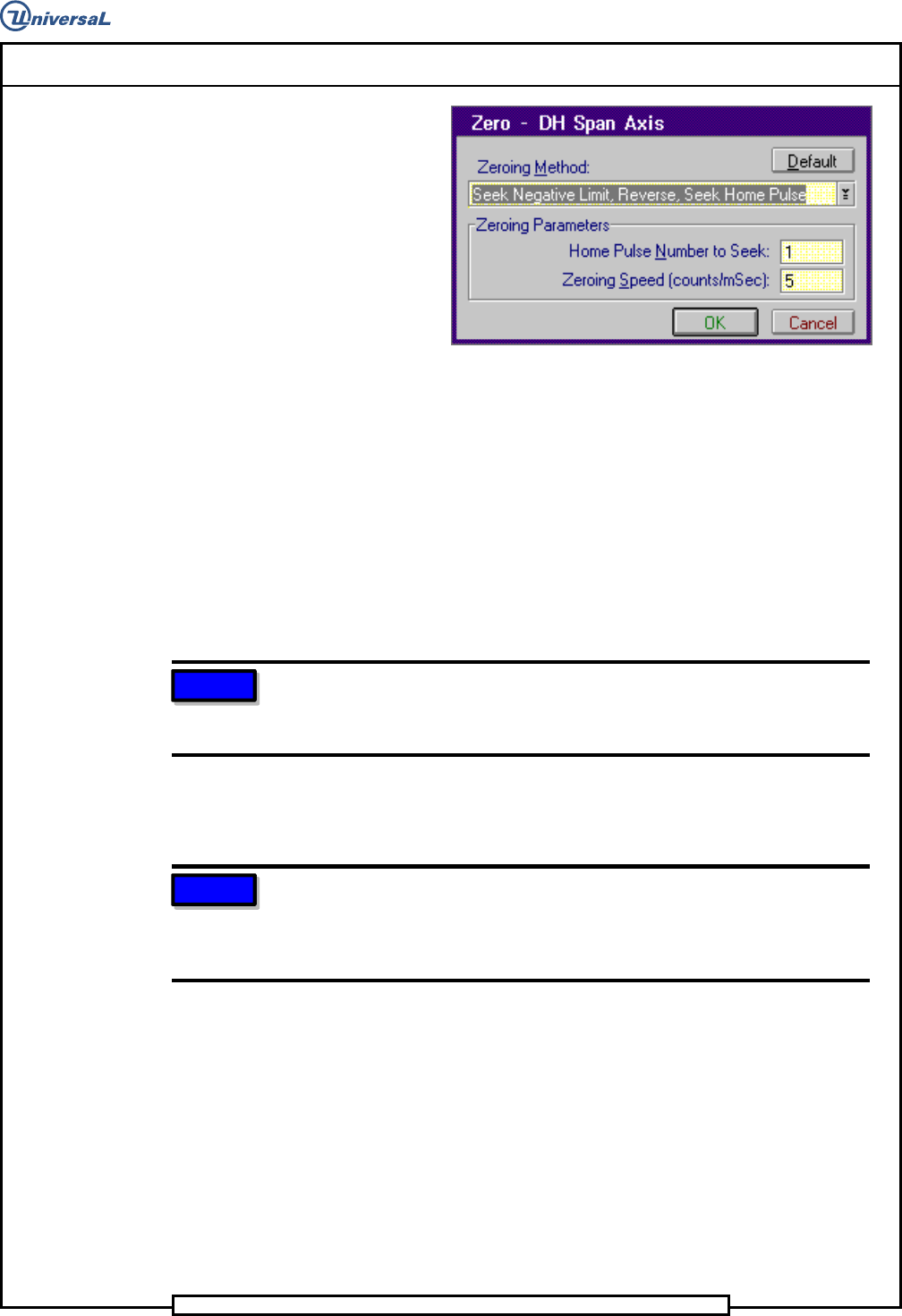
14. Select Channel A: DH Span Axis>Zero
The Zero - DH Span Axis dialog screen is displayed.
Page 35
DH Positioning System Assembly, Non P/T T46230811 Rev. J
This Document Supports Assembly 46230811 Rev J
15. In the Zero - DH Span Axis dialog screen select Default then OK
The Manual Diagnostics screen is displayed.
- In the Channel A: DH Span Axis increment box, click on the up
↑↑
↑↑
↑ or down
↓↓
↓↓
↓ arrows until 0.001 appears in the increment box.
- Click on the + Jog button until the Axis Location for the
Table Y Axis indicator in the Input side of the screen reads
0.397.
16. Insert the set up tool into the outside formers.
NOTE
The tooling should be set so the tool can be removed from the formers
and inserted back into the formers and held in position. If the tool does
not fit, perform the Span axis mechanical adjustment.
17. Using the head service wrench, manually lower the insertion head so
the set up tool is just above the set up template.
NOTE
The center of the set up tool should be no more than 0.5 inches (12,7mm)
away from the holes in the template. If it is more than 0.5 inches, remove
the set up tool, adjust the negative limit switch actuator and return to step
7.
18. In the increment box for both the X and Y axis select 0.001 inch
increments and jog the axes until the set up tool extends into the holes
in the template without deflecting the pins or striking the template.
19. Click on the Disab. button for both the X and Y axes.
Page 36
T46230811 Rev. J DH Positioning System Assembly, Non P/T
This Document Supports Assembly 46230811 Rev J
20. For each axis, the Axis Location should read 9.0 inches. If the set up
tool does not fit into the template, jog the appropriate axis in .001 inch
increments until it does. At this point, disable the axis, rotate the
encoders until the Axis Location display reads 9.0, 9.0 and the Home
Pulse display appears. Tighten the encoder securing hardware.
21. Manually raise the insertion head to the tool safe position and remove
the set up tool from the outside formers.
22. Repeat step 7 through 12 to zero and position the X and Y axes.
23. Install the set up tool in the outside formers then check the adjustment
by manually lowering the insertion head until the set up tool extends
into the holes in the template.
NOTE
Ensure set up tool pins do not flex or bend the template as they enter the
holes.
24. Manually raise the insertion tooling then remove the set up tool from
the outside formers and the set up template from the rotary table.
25. Exit out of the IM Diagnostics function.
X-Y Axes Limit Switch Adjustments
When activated, the X and Y limit switches prevent the tables from being
driven into their mechanical limits. The Y limit switches and X limits
switches are all made by separate actuators.
Prerequisite
X and Y Axes Encoder Adjustments
Machine palmed down
1. Manually position the head tooling on the insertion head to the up
position to prevent damage to the insertion tooling during positioning
system movements.
2. Palm the machine up and push the INTLK RESET push button.
3. Activate the IM Diagnostics as follows. Refer to the IM-UPS and IM
Diagnostics documentation for specific details relating to the
operation of the machine terminal.
Select the IM Diagnostics icon.