Setup Center mit Setup Center Interface.pdf - 第22页
3 Application progra m interface (API) description SIPLACE Ausgabe 05/2007 22 3.1.5 Restrictions All restrictions described in the V ersion Descri ption (item-no: 00195466-02) a lso concern th is SOKO. 3 3.1.5.1 Setup Ce…
SIPLACE 3 Application program interface (API) description
Ausgabe 05/2007
21
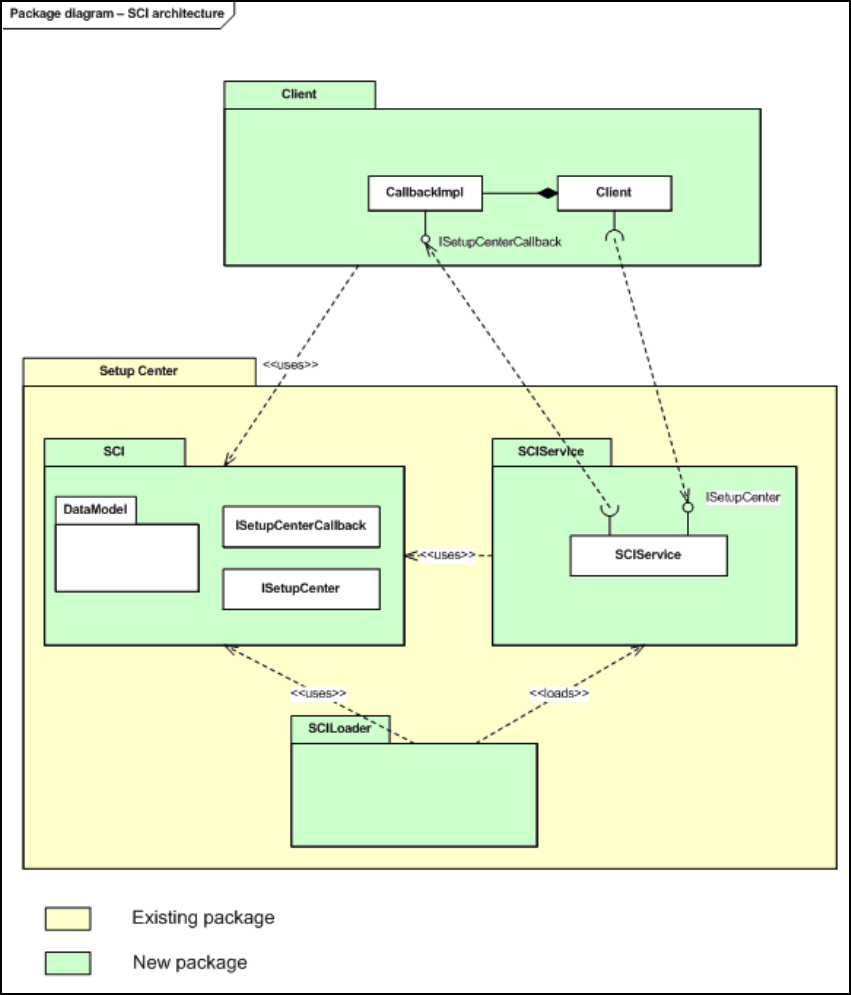
3.1.4 Architecture overview
3
Fig. 3.14 - 3 SCI architecture overview
3
3
3
3 Application program interface (API) description SIPLACE
Ausgabe 05/2007
22
3.1.5 Restrictions
All restrictions described in the Version Description (item-no: 00195466-02) also concern this
SOKO. 3
3.1.5.1 Setup Center in general
This chapter describes restrictions concerning the whole Setup Center application. 3
– This interface is only compatible with SIPLACE X-series.
– This interface is only compatible with SIPLACE Pro 4.1, as Setup Center is bound to a specific
SPI version.
– For all used components, “verification” has to be activated in SIPLACE Pro.
– -The setting “Setup Verification System” of a used setup has to be set to “External … System”
in SIPLACE Pro.
– There has to be configured a line in Setup Center.
– Setup Center only works in unique ID mode, ICL mode is not supported by SCI. Therefore the
barcode definitions have to define a barcode with barcode fragment “UniqueId”.
– Table management has to be disabled.
– Splice monitoring has to be disabled.
– Quantity printout for ICL mode has to be disabled.
– Towers and carriers will be always set fully and always with one packaging unit. Each level has
to get an own packaging unique ID. Splice chains are not possible.
– -XML import has to be disabled.
3.1.5.2 Setup Center interface
This chapter describes restrictions concerning the whole functionality of the interface. 3
– The usage of SCI requires online verification.
– The SCI doesn’t support offline verification. Therefore the following methods and events only
concern online verification. From this follows, that docking station isn’t supported, too.
– New interface calls should only be executed, if Setup Center is in steady state. Disdain may
result in failures of command execution because Setup Center interacts with the machine,
which has a certain response time.
– -Splice chains have to be inserted into the interface always completely. If only one packaging
unit of an existing splice chain is used, the splice association will be deleted.
– The SCI doesn’t throw exceptions. Any exception, which occurs within Setup Center, will be
sent as string message.

SIPLACE 3 Application program interface (API) description
Ausgabe 05/2007
23
– Barcode rules won’t be executed.
– Component reorder won’t be supported.
– The following matrix shows invalid combinations for packaging unit quantity and original quan-
tity:
3
3
3.1.6 Interface ISetupCenter
3.1.6.1 Public Instance Methods
3
3
3
3
3
3
Condition Result
Quantity==Int32.MinValue && OriginalQuantity==Int32.MinValue
Denied
Quantity != Int32.MinValue && Quantity < 0
Denied
OriginalQuantity != Int32.MinValue && OriginalQuantity < 0
Denied
Quantity > 0 && OriginalQuantity==0
Denied
Quantity > OriginalQuantity
Denied
Member name Description
Create
Creates new packaging units
Delete
Deletes the packaging units with the corresponding UID
Get
Gets the first packaging unit of the splice chain, which contains the corre-
sponding UID
GetReducedActu-
alSetup
Method delivers the actual physical setup filtered by the target setup for the
specified machine
Refill
Refill packaging unit(s) in online verification
Set
Put packaging unit(s) in online verification. A mixed mode between Unique
ID mode and ICL mode within one setup is invalid
TearDown
Tear down the packaging unit(s) on the location from the actual setup
Update
Adjust the total quantity of packaging unit(s)