Apollo1_Operators_Manuel.pdf - 第31页
31 cab - Produkttechnik GmbH / Tharo Systems, Inc. 6 Media Loading Loading Labels 1 2 3 4 5 6 7 8 9 10 11 Fig. 6 a Media Loading Apollo 1 1. Lift the printhead by rotating the lever ( 1 ) clockwise until it stops. With A…
30 cab - Produkttechnik GmbH / Tharo Systems, Inc.
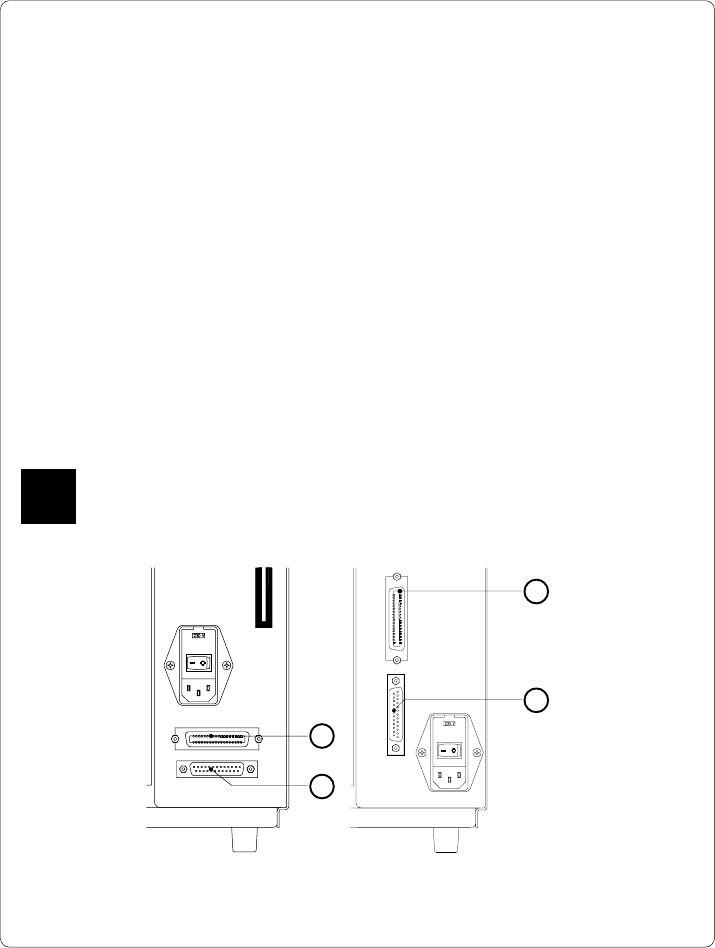
Fig. 5 b Interface ports (detailed view/ rear of the printer)
Apollo 1/2 Apollo 3
1
2
1
2
1 - Parallel interface port
2 - Serial interface port
Connection to a Computer
The Apollo is equipped with three serial interfaces, these are RS-232, RS-422,
and RS-485, all of them using the 25 pin interface connector (2) at the back.
In most cases, you can use the RS-232 interface for the connection to the
computer. If your computer is located more than 50 ft (15m) away from the
printer you should use the RS-422 interface.
The RS-485 interface is provided for using the Apollo as part of a networked
system.
In addition to the serial port, the Apollo also provides a parallel (Centronics)
interface which offers a faster transfer of data than the serial interfaces.
Therefore, we recommend you use the parallel interface for those applications
where a large number of loadable fonts or complex graphics have to be printed.
For the Centronics interface use the 36 pin interface connector (1).
Select the required interface settings using the Setup procedure (
see Chapter 9
)
and connect the printer to the computer by a suitable interface cable. You will find
a list of typical cables as well as a description of the pin assignment of the interface
connectors in Appendix B.
Make sure that all connected computers and their connecting cables are
correctly grounded.
F
31cab - Produkttechnik GmbH / Tharo Systems, Inc.
6 Media Loading
Loading Labels
1 2 3 4 5
6789 1011
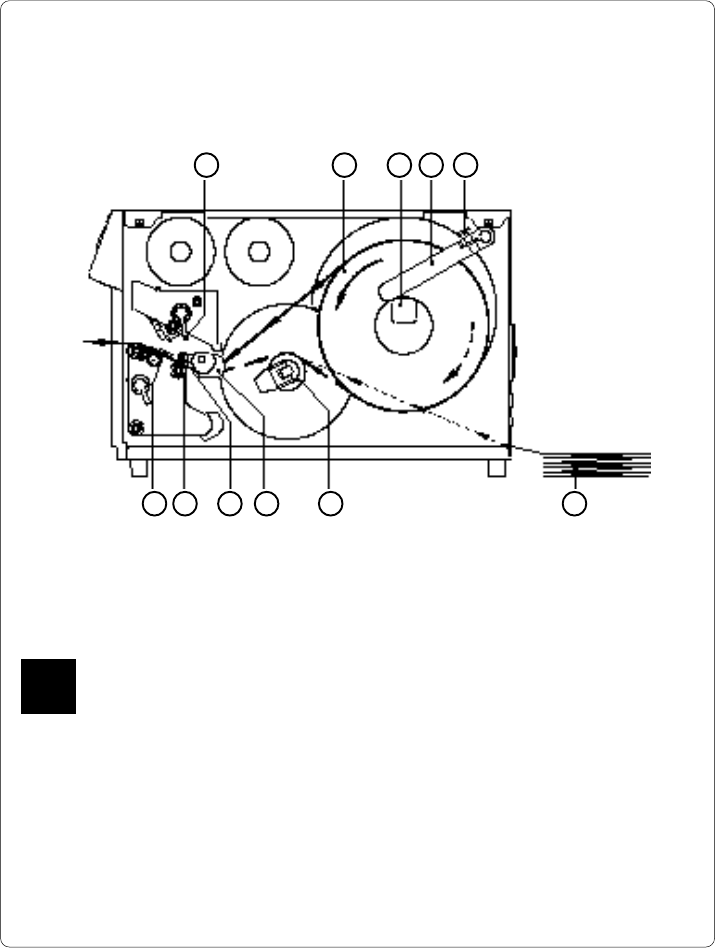
Fig. 6 a Media Loading Apollo 1
1. Lift the printhead by rotating the lever (1) clockwise until it stops.
With Apollo 1, the printhead lever (1) has to be rotated by approximately 260°.
Only if the swing movement has been completed will the upper pinch roller (10)
be removed from the lower pinch roller (11), and the entire area is opened for
loading the media.
2. Loosen the media retainer knurled screw (5) and swing the media retainer
(4) upwards.
3. Place the label roll (2) onto the media hub (3).
The solid line represents the feed path of outside-rolled labels, the broken line
of inside-rolled labels. The broken-dotted line shows the media path of fanfold
paper (6). For printers with internal rewinder, pay special attention that the
media is properly fed above the internal rewind hub (7) when loading.
F
32 cab - Produkttechnik GmbH / Tharo Systems, Inc.
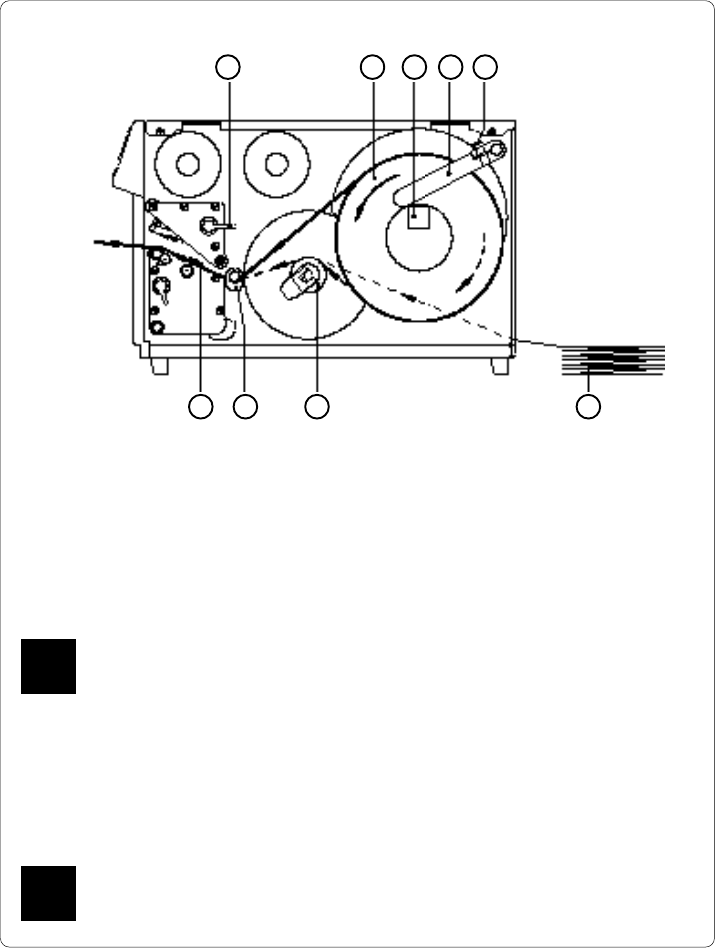
Fig. 6 b Media loading Apollo 2/3
4. Swing the media retainer (4) downwards to the media hub (3) and push it
inwards until it rests against the side of the label roll.
Tighten the knurled screw (5).
5. Slide the media guide (8) into its outermost position.
6. Unroll a length of label stock from the media roll and feed it through as
shown in Figure 6 a/b.
It is particularly important to ensure that the media strip slides properly
between the fittings of the adjustable photocell assembly (9).
7. Slide the media strip right through the space between the print roller and
the printhead until it comes out of the Apollo.
8. Slide the media guide (8) back towards the edge of the media strip.
9. Turn the lever (1) counter-clockwise until it stops and, thereby, lock the
printhead.
If you do not use the printer for an extended period of time, lift the
printhead to avoid possible flattening of the print roller.
1 2 3 4 5
9 78 6
F
F