Apollo1_Operators_Manuel.pdf - 第92页
92 cab - Produkttechnik GmbH / Tharo Systems, Inc. Installation of the Memory Card Fig. 13 p Installation of the memory card Fig. 13 q Connecting side 1 2 34 The front side of the memory card ( 1 ) is usually marked by t…
91
cab - Produkttechnik GmbH / Tharo Systems, Inc.
Memory Cards
The printers of the Apollo series provide an option for using memory cards to
permanently save graphics, fonts, complete label formats, or database
information. Data transfer may be performed via interface. Alternatively, the
printer is able to read from cards which has been written on in PC card drives
of lap-tops or other computers, etc.
The Apollo is able to read from PCMCIA version 2.1 compatible sRAM cards
or Flash-EPROM cards. The maximum memory capacity for Apollo 1/2 is 4
MegaByte, and for Apollo 3 16 MegaByte.
Preparing the Memory Card
1 2 3
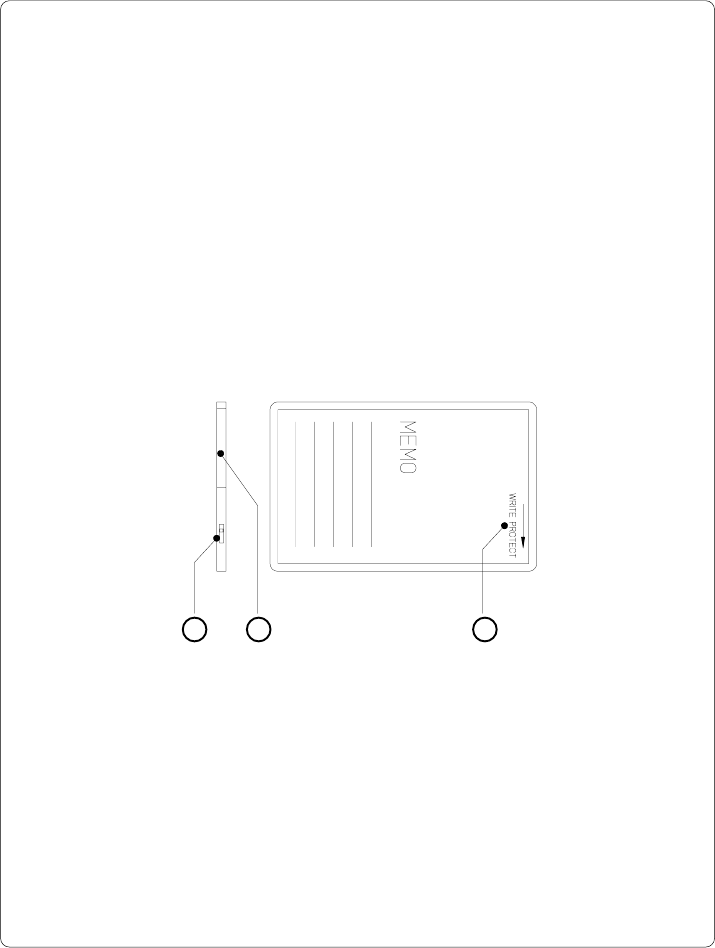
Fig. 13 o Write protection/ Inserting the battery
The write protection of the card may be activated or deactivated by shifting the
switch (1) located at the front side of the card. The interpretation of the setting
may be read from an imprint (3) on the back of the card.
If you want to format the card or write on it, switch off the write protection.
In case the battery has to be replaced, it is usually found in a slot (2) above the
switch (1).
For replacing or inserting the battery in sRAM cards refer to the instructions of
the manufacturer.
92 cab - Produkttechnik GmbH / Tharo Systems, Inc.
Installation of the Memory Card
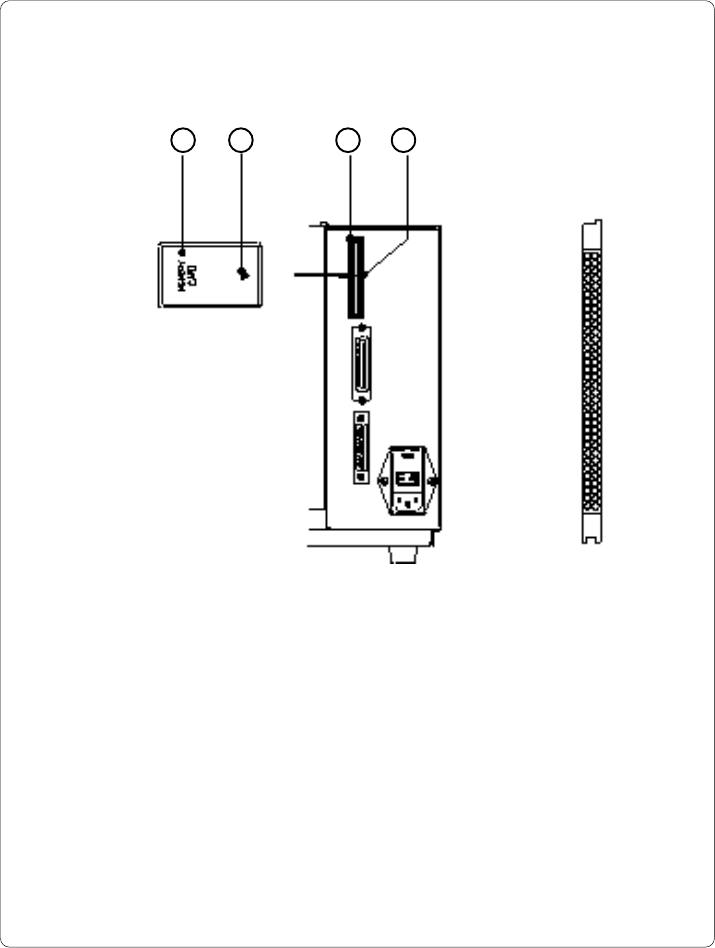
Fig. 13 p Installation of the memory card Fig. 13 q Connecting side
1 2 34
The front side of the memory card (1) is usually marked by the inscription
"MEMORY CARD", and an arrow (2) representing the direction of inserting the card
into the drive. There is also an arrow (4) impressed into the frame of the memory
card slot of the Apollo.
Insert the card (1) into the slot (3) so that the front of the card faces the arrow (4).
At the connecting side of the card there are different guides on the top and the
bottom which make it impossible to insert the card incorrectly.

93
cab - Produkttechnik GmbH / Tharo Systems, Inc.
Formatting the Memory Card
For operation, the memory card first has to be structured internally in a certain
way. Normally, memory cards are already pre-formatted in a suitable manner.
If the card you are using is not formatted at all, the Apollo will bring up one of
the messages "Unknown card" or "Structural err." Then, you may format the
card using one of the following three methods :
1. Formatting the card using a PC card drive of a lap-top and the DOS
command "FORMAT".
2. Formatting the card using the Apollo setup command "Format card".
(see Chapter 9)
3. Formatting the card using the Apollo's interface and the printer command
"Mf;name CR".
Writing on the Memory Card
There are also different methods to write onto a memory card.
The easiest way is to copy label formats, graphics, or font files directly onto the
card using a PC card drive of a lap-top or another computer and the DOS
command "COPY".
Another way is to write on the card using the card drive of the Apollo and
transfer the data via interface.
For saving a label, you need to put the label design commands into "brackets"
consisting of "Ms"-commands :
Ms LBL;ABC Command to save a file called "ABC"
J|
H 100,0,T |
S l1;0,0,68,71,108 | Contents of the file "ABC"
T 10,10,0,3,pt15;Memory card |
A 1[NOPRINT] |
Ms LBL End of Save File command
After completing the commands the file "ABC" is stored on the card with all
commands from "J" to "A" which describe the label format.
The parameter [NOPRINT] used within the command A line will suppress the print
of the label while saving the file.
Whenever the file "ABC" is called up, exactly one label will be printed.
If you want to print the label in a variable quantity do not use the A command
within the label description.