Apollo1_Operators_Manuel.pdf - 第56页
56 cab - Produkttechnik GmbH / Tharo Systems, Inc. Cut Position Using the optional cutter , the "Cut position" parameter allows you to alter the distance between the cutting edge and the rear edge of the label.…
55cab - Produkttechnik GmbH / Tharo Systems, Inc.
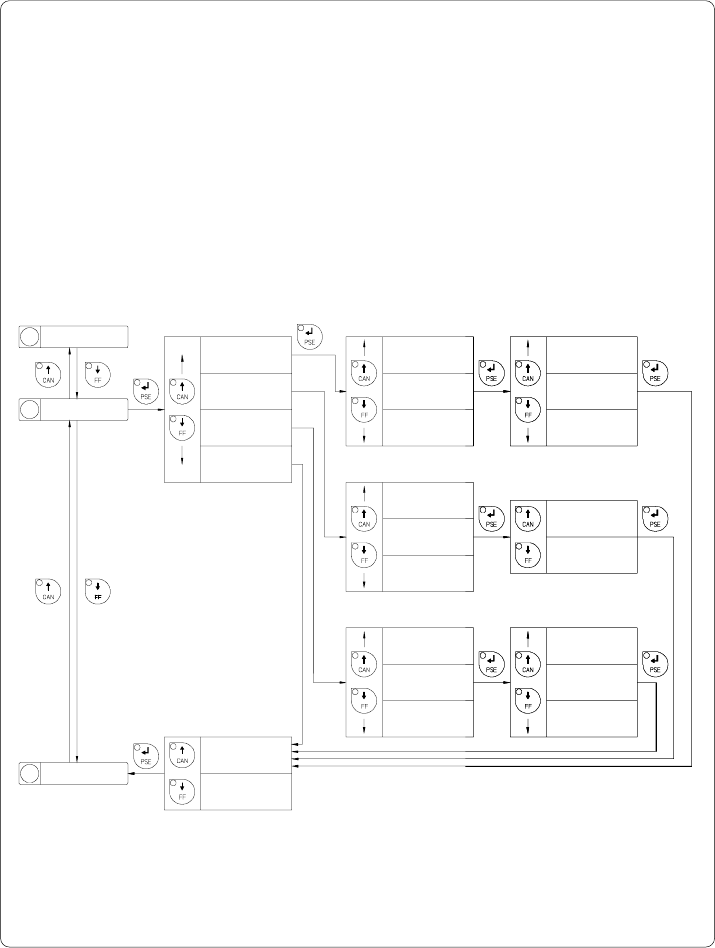
Interface
The settings of this parameter determine the method of communication
between printer and computer.
Therefore, the type of interface and, if necessary, the baud rate, and the
protocol or network address can be specified.
The parameter setting cannot be changed via software.
Default Setting : Interface RS-232, baud rate 9600, protocol RTS/CTS
(network address A)
Baud rate
57600
Interface
xxxxxxx Yes
Interface
xxxxxxx No
Confirmation
Baud rate Protocol
Baud rate
Interface
RS-422
Interface
RS-232C
Interface
RS-485
Interface
Centronics
Type of Interface
Fig. 9 e Set "Interface" parameter
3 Label sensor
4 Interface
5 Cut Position
Baud rate
1200
*
*
*
Baud rate
57600
Baud rate
1200
*
*
*
Baud rate
Baud rate
57600
Baud rate
1200
*
*
*
Network address
A
Network address
Z
Network address
Protocol
- - -
Protocol
RTS/CTS
Protocol
XON/XOFF
Protocol
Protocol
- - -
Protocol
XON/XOFF
*
*
*
56 cab - Produkttechnik GmbH / Tharo Systems, Inc.
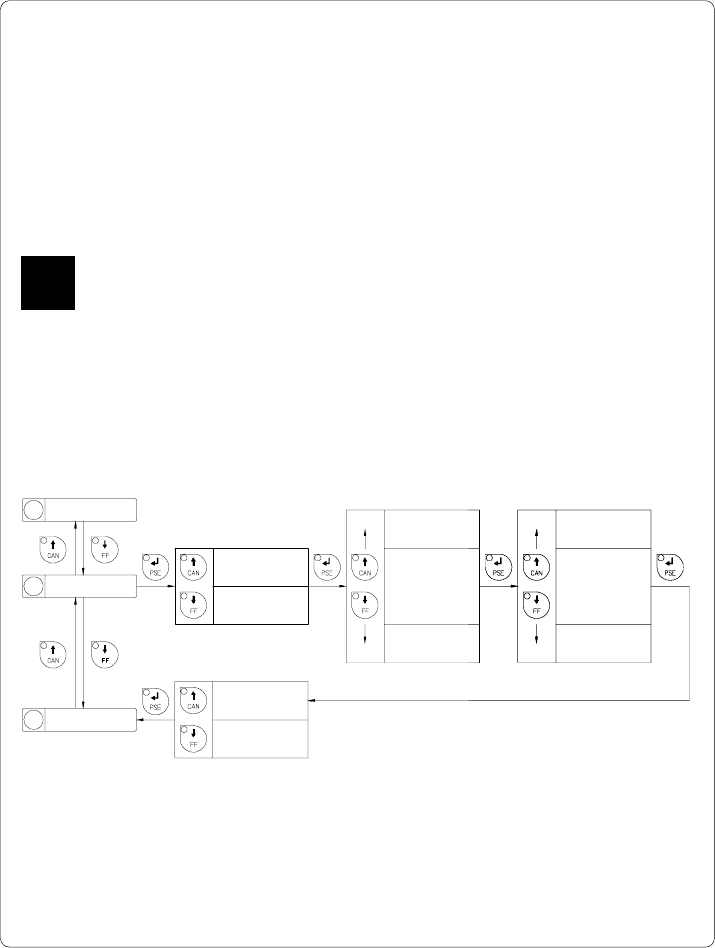
Cut Position
Using the optional cutter, the "Cut position" parameter allows you to alter the distance
between the cutting edge and the rear edge of the label. Normally, with the initial
offset value of "0" the cutting edge is in the middle of the gap between two labels.
Adjustments have to be carried out only once after a cutter has been installed.
(range from -.33 to +.33 in or -8.4mm to +8.4mm) If the cut position value is
positive, the media will be advanced before it is cut, that means there is a greater
distance between the cutting edge and the rear edge of the label.
It is recommended that you carry out changes for single print jobs in the software.
(e.g. if the cut is not wanted in the middle of the gap)
The software provides a second value for individual adjustments.
You may also change this value using the software commands. Any front panel value
and software command value are totaled together for printing.
The current field to be changed is flashing in the display.
4 Interface
6 Peel Position
5 Cut Position
Cut Position
+ x.x mm
Cut Position
- x.x mm
Cut Position
± 9.x mm
Cut Position
± 0.x mm
Cut Position
± x.9 mm
Cut Position
± x.0 mm
*
*
*
*
*
*
Cut Position
± x.x mm Yes
Cut Position
± x.x mm No
Confirmation
Sign (+ or -)
1/10 mm
mm
Fig. 9 f Set "Cut Position" parameter
F
57cab - Produkttechnik GmbH / Tharo Systems, Inc.
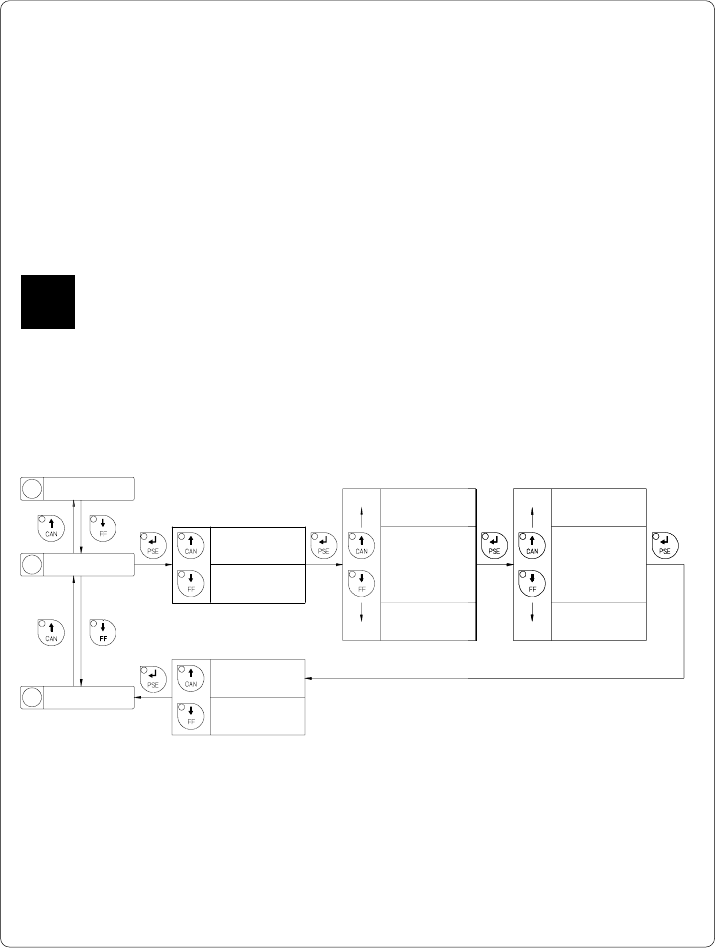
Peel Position
Using the optional present sensor, the "Peel position" parameter allows you to alter
the position of the dispensed label relative to the dispense edge.
Normally, with the initial offset value of "0" the label is removed from the carrier
ribbon until only a .08 in or 2 mm wide part of the label still sticks on the ribbon.
Adjustments have to be carried out only once when a present sensor is being
installed. (range from -.33 to +.33 in or -8.4 mm to +8.4 mm)
If the peel position value is positive, the label will be removed further leaving a
smaller strip sticking on the carrier ribbon.
It is recommended that you alter the parameter for single print jobs via software
(e.g. if an applicator is used and, therefore, the labels have to be removed
completely). The software provides a second value for individual adjustments.
You may also change this value using the software commands. Any front panel
value and software command value are totaled together for printing.
The current field to be changed is flashing in the display.
5 Cut Position
7 Printhead pos.
6 Peel Position
Peel Position
+ x.x mm
Peel Position
- x.x mm
Peel Position
± 9.x mm
Peel Position
± 0.x mm
Peel Position
± x.9 mm
Peel Position
± x.0 mm
*
*
*
*
*
*
Peel Position
± x.x mm Yes
Peel Position
± x.x mm No
Confirmation
Sign (+ or -)
1/10 mm
mm
Fig. 9 g Set "Peel Position" parameter
F