TM3070.Immediate stop after one pick.pdf - 第4页
SMT Software Engineering Group IMOperation sYAMAHAMOT ORCO.,LTD. MDOC -SOFT50136 4/10 3.3 Error Message The f ollowing err or m essage is displ ayed if th ere i s s omet hing wrong wit h vacu um…

SMT Software Engineering Group
IMOperationsYAMAHAMOTORCO.,LTD.
MDOC-SOFT50136
3/10
2. Outline of Function
This function makes a vacuum check of every single pick action. If the vacuum is not correct,
the machine is stopped immediately.
Without this function, when a head failed to pick one of the same parts group, machine was
stopped after the other heads finished picking rest of the group.
With this function, machine is stopped just after a pickup failure is detected by vacuum
check, without feeding or moving heads.
3. Detail of Function
3.1 Behavior
This function checks a pick up vacuum by each pick action. If vacuum level dose not reach
the specified value, the machine is stopped immediately. If vacuum level reaches the specified
value, the machine works normally.
3.2 Restrictions
There are some restrictions on this function as described below.
1. This function is NOT enabled for board data with [Standard] - [Vacuum Check] set to
[no use].
2. This function is enabled with [Pick Vacuum sensor chk] set to [special check] or
[normal check].
3. This function is enabled with [Package] set to [Tape]
4. Please note that when picking the target parts, each single head performs a
vacuum check, so that tact time becomes a little long.
SMT Software Engineering Group
IMOperationsYAMAHAMOTORCO.,LTD.
MDOC-SOFT50136
4/10
3.3 Error Message
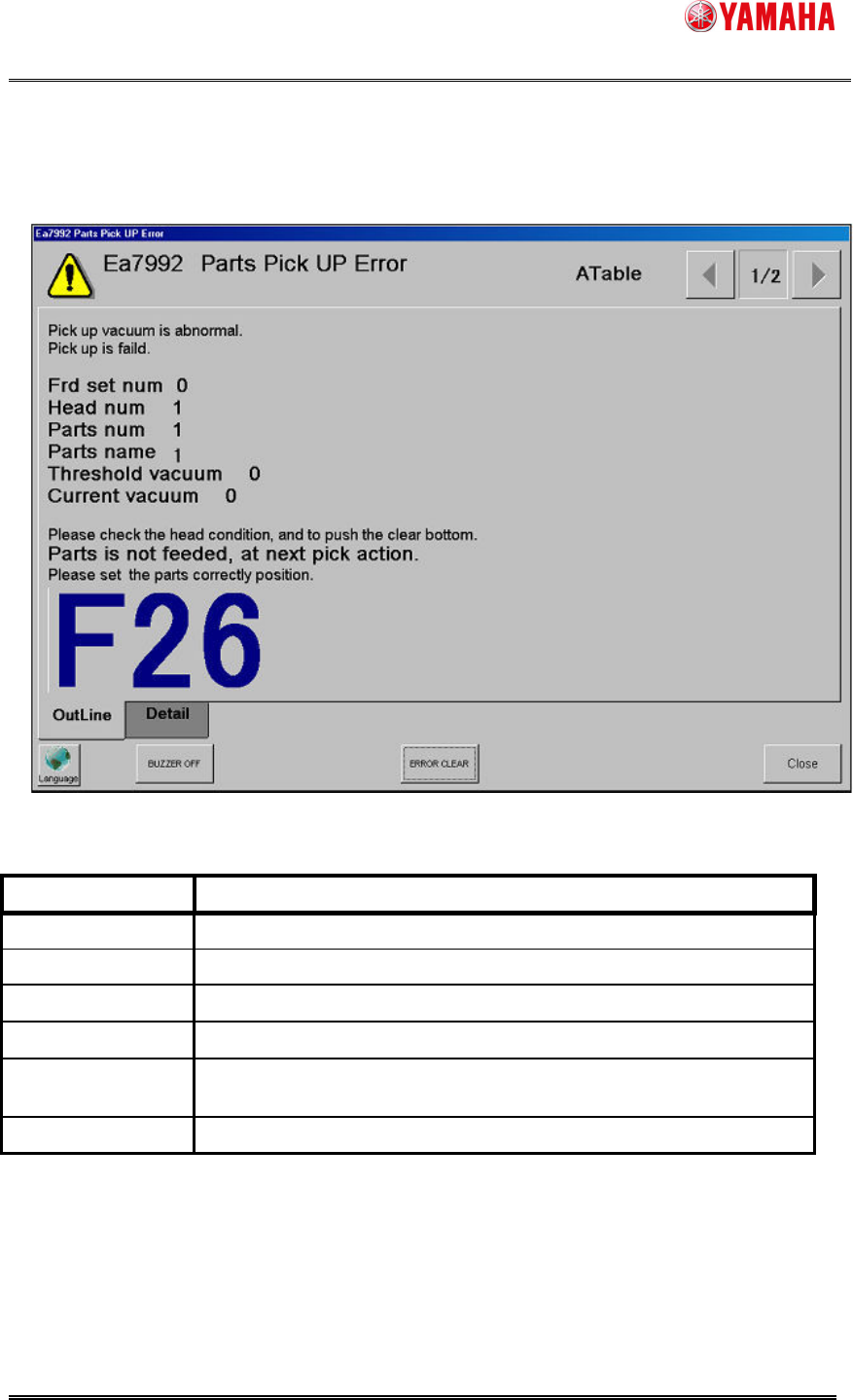
The following error message is displayed if there is something wrong with vacuum.
Name Contents
Feeder number Feeder number is displayed
Head number
Head number is displayed
Parts number
Parts number is displayed
Parts name
Parts name is displayed
Threshold
vacuum
Threshold vacuum is displayed
Current vacuum
Current vacuum is displayed
SMT Software Engineering Group
IMOperationsYAMAHAMOTORCO.,LTD.
MDOC-SOFT50136
5/10
3.4 Operation after error occurs
After “Ea7992: Parts Pick Up Error” occurs and machine restarts, it works as follows.
With electric drive feeder, parts are considered to be on the pickup position. So pickup action is
performed from the same position without feeding.
With air drive feeder, feeding must be performed automatically because of its structure. Please
feed the parts back by hand before starting auto-running.
3.5 Log
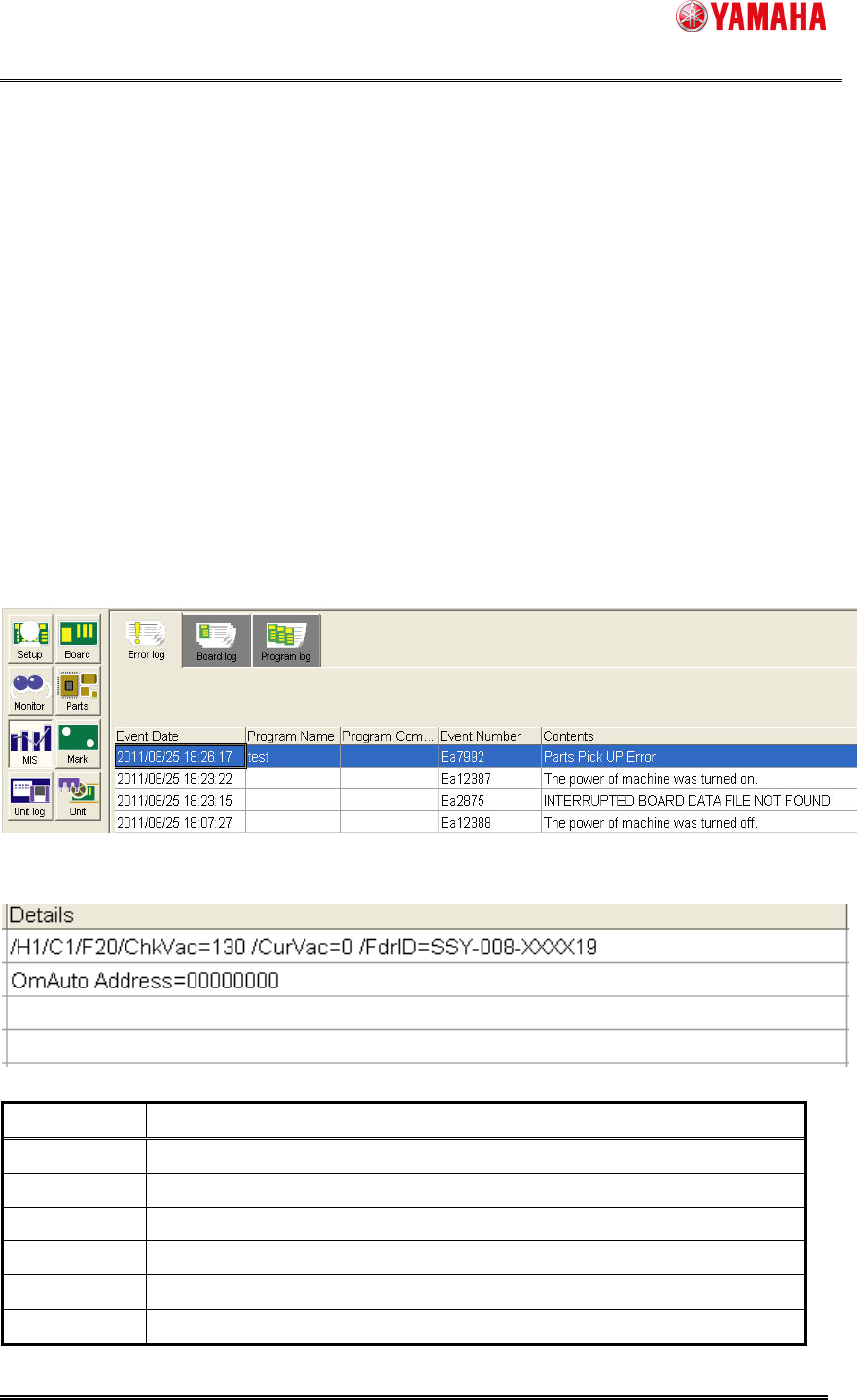
When “Ea7992: Parts Pick Up Error” occurs, the following logs are outputted.
3.5.1 Error Log
Following error numbers and messages are displayed.
The following details are displayed.
名称 内容
H Head number is displayed.
C Camera number is displayed.
F Feeder set number is displayed.
ChkVac= Check vacuum is displayed.
CurVac= Current vacuum is displayed.
FdrID= Feeder ID is displayed.