TM3832.Shifted check of board fixing.pdf - 第4页
S M T S o f t w a r e E n g i n e e r i n g G r o u p I M O p e r a t i o n s Y A M A H A M O T O R C O . , L T D . MDOC-SOFT501 81 4/10 An error stop will be carrie d out if at least one of three conditions i s below …
SMT Software Engineering Group
IM Operations YAMAHA MOTOR CO., LTD.
MDOC-SOFT50181
3/10
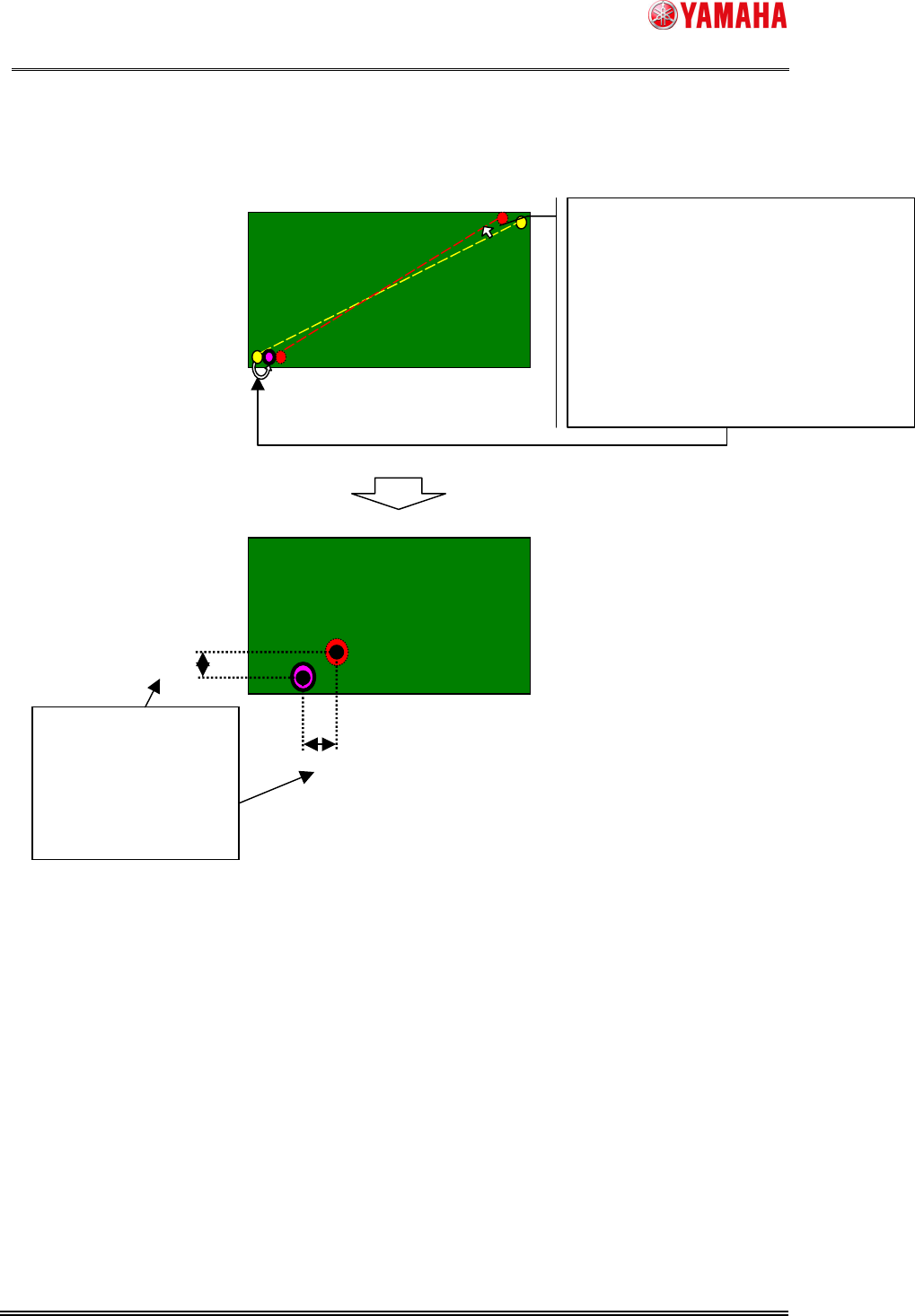
Fig 1 The calculation method of PCB fiducial correction value
When [Board]-[Fiducial]-[Board]-[Executed] is enabled, PCB fiducial recognition is
certainly carried out just before mounting, and the above-mentioned calculation method will
be carried out. In this function, the PCB fiducial correction value after mounting is also
calculated in the same way as before mounting.
And the difference of the correction value before mounting and after mounting was
calculated and if it is over the acceptable value (machine setup), a possibility that the Board
shift occurrence will be notified.
correction value X
correction value
Y
(1) Based on a theoretical value (Solid circle
) and
an actual measurement (Dots circle
), the
degree of rotation angle and pace of expansion
of a board are calculated.
(2) Mark positions
are calculated by adding
correction to the theoretical value (Solid circle
)
using the degree of rotation angle and pace of
expansion which were computed by (1).
.
(Thick circle)
(1)
It is considered that the
difference [The correct
theoretical
value(Thick circle)]
with [The a
ctual
measurement(Dots circle)] is
PCB fiducial correction value.
(2)
SMT Software Engineering Group
IM Operations YAMAHA MOTOR CO., LTD.
MDOC-SOFT50181
4/10
An error stop will be carried out if at least one of three conditions is below in agreement.
The error calculation method
1
(X shift value)
[Max Diff X(mm)] (*1) < |the PCB fiducial correction value X before mounting -
the PCB fiducial correction value X after mounting|
2
(Y shift value)
[Max Diff Y(mm)] (*1) < |the PCB fiducial correction value Y before mounting -
the PCB fiducial correction value Y after mounting|
3
(R shift value)
[Max Diff R(deg)] (*2) < |the PCB fiducial correction value R before mounting -
the PCB fiducial correction value R after mounting|
(*1)
[Machine]-[Setting]-[Machine Data] -[Mechanical]-[Position]-[Table A]-[Mount After FID
Check]-[Max Diff XY(mm)]
(*2)
[Machine]-[Setting]-[Machine Data] -[Mechanical]-[Position]-[Table A]-[Mount After FID
Check]-[Max Diff R(deg)]
The timing which checks difference can be chosen from following three.
Diff Check Timing Explanation
1 AllBoard A difference check is certainly carried out for every 1 board
loading.
2 SwitchBoard After a board data is read, only one board carries out a
difference check. The board after the 2nd sheet does not
carry out a difference check.
3 AutoRun If the RUN button is pushed in a halt state or a reset state,
only one board will carry out a difference check. The board
after the 2nd sheet does not carry out a difference check.
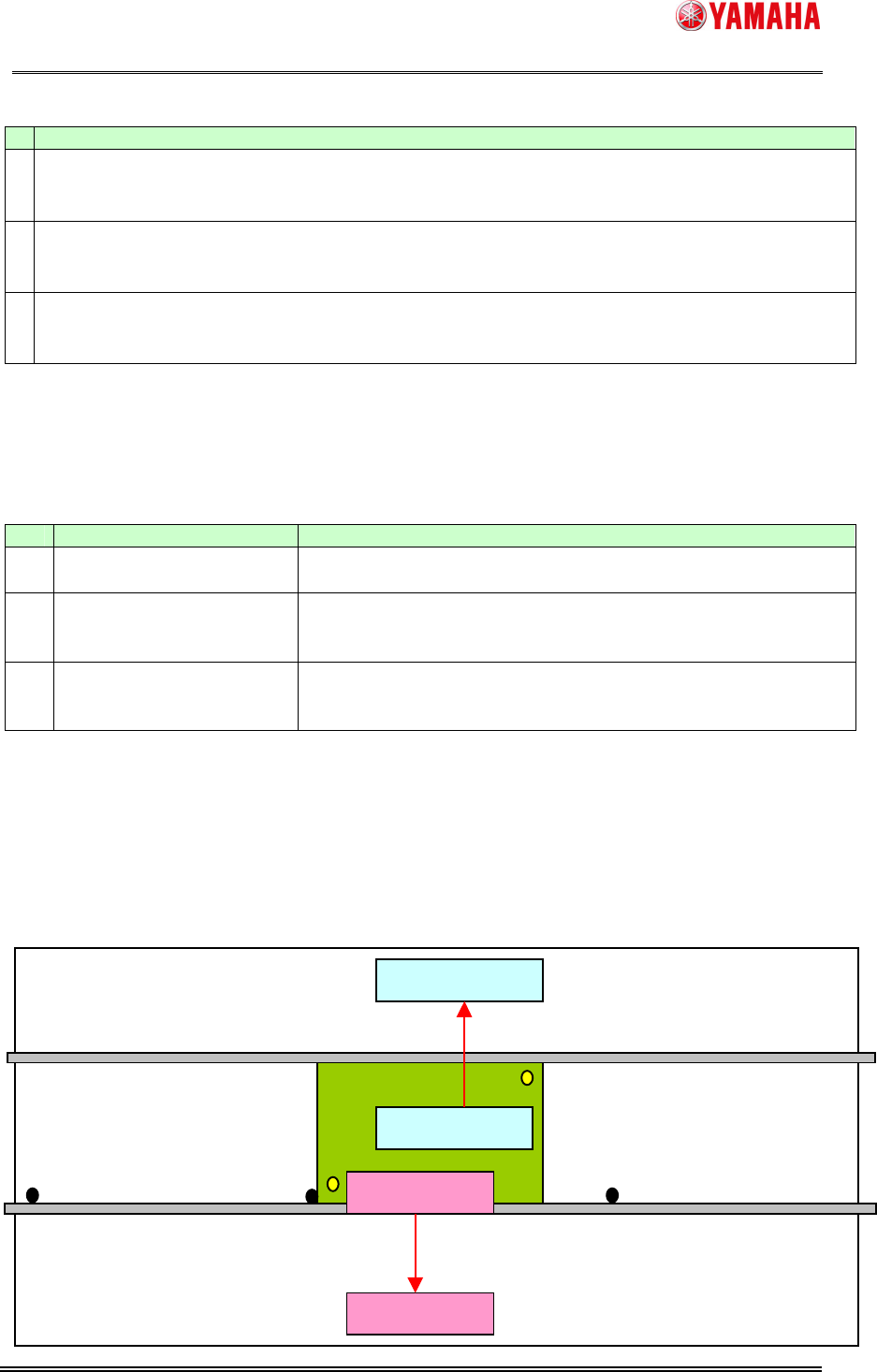
In the board data to be mounted by two or more tables onto one board, PCB fiducial after
mounting is carried out on each table.
When a PCB fiducial recognition error occurs, a vision cursor Teach dialog is displayed.
This function operates effectively by carrying out teaching correctly on this screen.
After one table finishes mounting, its mount head will moves to the waiting position.
【】
Waiting position
Board(mount pos.)
Mount parts
Mount parts
Waiting position
SMT Software Engineering Group
IM Operations YAMAHA MOTOR CO., LTD.
MDOC-SOFT50181
5/10
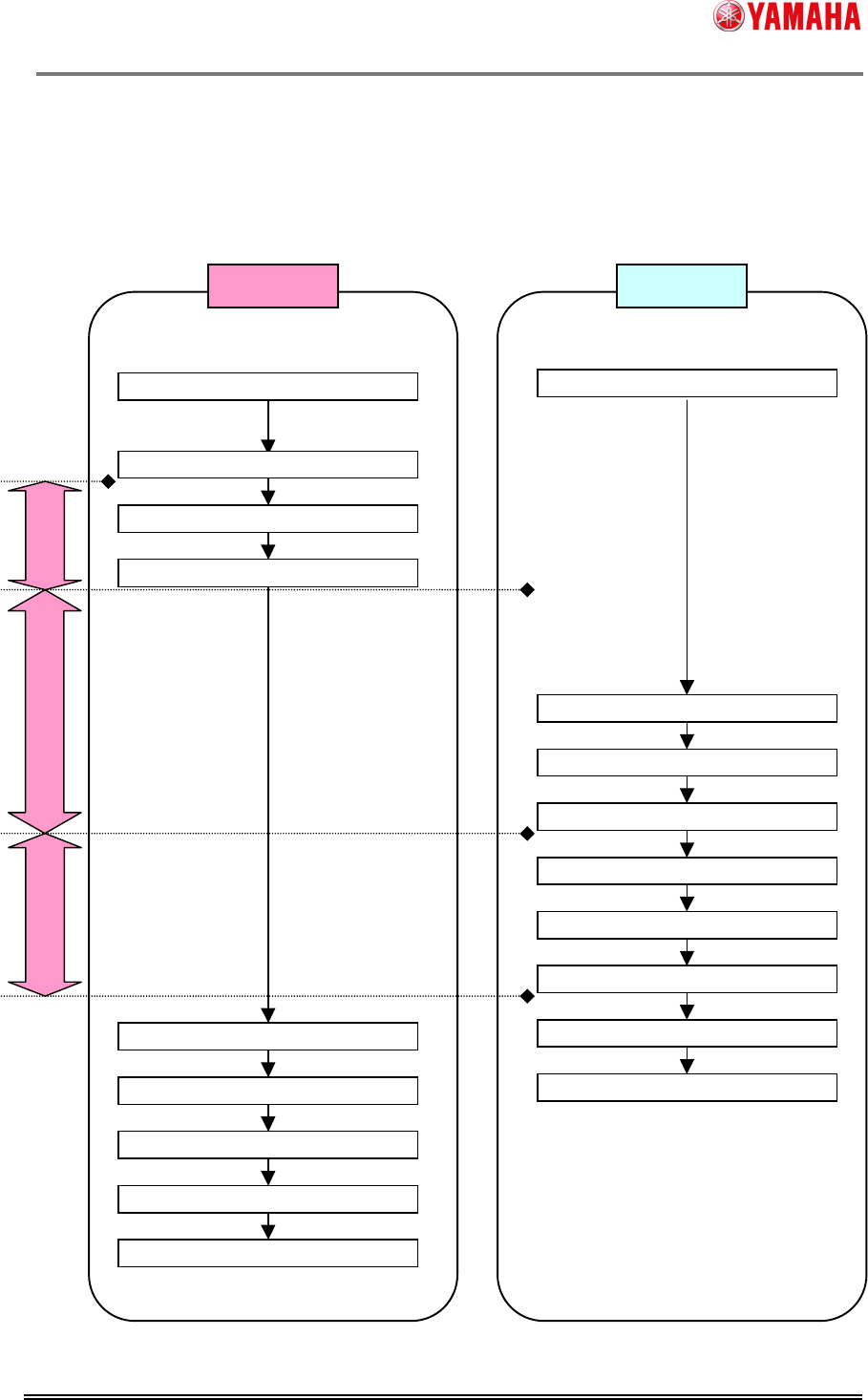
(1) After one table finishes mounting, its mount head moves to the waiting position.
(2) The table stays at the waiting position while the other one mounting and moving to its
waiting position.
(3) The table keeps staying at the waiting position until the other one finishes a PCB
fiducial recognition after mounting.
Mounting
MountingFinished
Mounting
MovingtoWaitPosition(Y-axis)
ArriveatWaitPosition(Y-axis)
MountingFinished
MovingtoWaitPosition(Y-axis)
ArriveatWaitPosition(Y-axis)
PCBfiducialworking
PCBfiducialfinishes
MovingtoWaitPosition
ArriveatWaitPosition
PCBfiducialstarts
PCBfiducialworking
PCBfiducialfinishes
MovingtoWaitPosition
ArriveatWaitPosition
PCBfiducialstarts
Table A Table B
(2)
(3)
(1)