00195044-11_UM_VisionTeachStation_DE EN.pdf - 第153页
Vision Teach Station User Manual 7 Software 11/2013 Edition 7.5 Error report 153 7.5 Error report 7.5.1 SIPLACE Vision Station The "BugReporter" is provided on the following path for reporting errors that occur…
7 Software Vision Teach Station User Manual
7.4 Licensing 11/2013 Edition
152
7.4 Licensing
As of the 5.0.2 version, the SIPLACE Vision Teach Station is available as a pure licensed software
product. 7
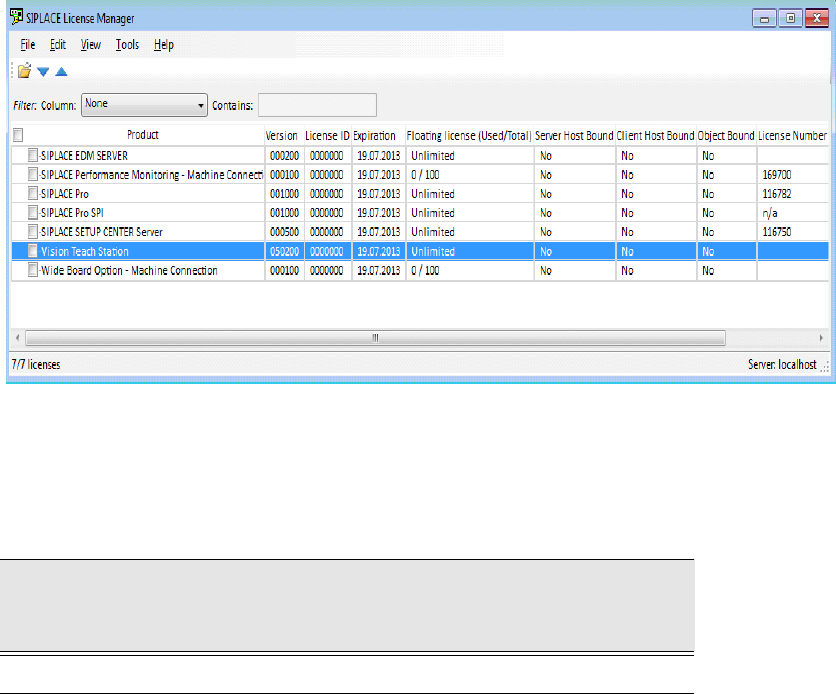
A "Vision Teach Station" license is required in the SIPLACE License Manager for operation. The
SIPLACE License Manager has to run on the same computer as the SIPLACE Vision Teach
Station software. 7
Fig. 7.4 - 6 License entry for the SIPLACE Vision Teach Station in the SIPLACE License Manager
The SIPLACE Vision Teach Station can be ordered as a licensed software product with the
following data:
Tab. 7.4 - 5 Vision Teach Station with software license
Software
Vision Teach Station
with software license
Software package required
V5.1.1
SIPLACE Vision Teach Suite V5.x, item no. 00119789-xx
Vision Teach Station User Manual 7 Software
11/2013 Edition 7.5 Error report
153
7.5 Error report
7.5.1 SIPLACE Vision Station
The "BugReporter" is provided on the following path for reporting errors that occur while the
SIPLACE vision teach station is in use to SIPLACE Service:
<Install path for SIPLACE Vision Teach Station>\BugReporter.exe 7
Alternatively, you can also run the BugReporter from the Start menu -> Programs -> TeachStation.
This allows you to save information about the SIPLACE vision teach station in a compressed file
(Zip file) and to send it to the Service for investigation, if necessary.
7.5.2 SIPLACE Pro
Errors that occur in association with SIPLACE Pro can be reported via the SIPLACE Pro Error
Reporter. This is called up from the "Start" menu Programs SIPLACE Pro SIPLACE Pro
Error Reporting.
7 Software Vision Teach Station User Manual
7.6 Features as of the 4.3.1 VTS version 11/2013 Edition
154
7.6 Features as of the 4.3.1 VTS version
The changes since SIPLACE Vision Teach Station V3.5.1 are described below.
7.6.1 SIPLACE Vision
7.6.1.1 SIPLACE Vision Quality Inspection Package (as of SIPLACE Pro 7.0)
The Quality Inspection Package extends the inspection options available for component shapes:
-Inspection of the colinearity of lead groups. This checks deviations of the positions of indivi-
dual lead ends from the typical lead-end positions of a group. This allows faulty leads to be
detected.
-Enhanced face-down detection. Face-down detection can now also be used for additional
component shapes such as SOT and SOxx. In addition to the brightness method, a second
method is now also available that evaluates the contrast in the evaluation area in order to dis-
tinguish the top and bottom. Face-down detection can also be used in conjunction with multiple
measurements.
-Inspection of the lead width. Deviations in the width of a lead compared with the nominal width
taking account of the tolerances indicate a faulty lead or a component that has not been picked
up correctly. Lead widths are only inspected for the following lead types: gullwing, wraparound
and JBend.
-Inspection of the lead lengths with chip and molded component shapes. If chip or molded
components are picked up on edge, this cannot be detected by means of dimension inspection
in the case of components whose height and width are the same. Because the leads are ge-
nerally of a different length on the side face, measurement of the lead length makes it possible
to detect such situations.
-Inspection whether more leads are present than described. If a component is measured cor-
rectly, an inspection is performed to see whether the component can be found at a second
position. This allows components that have been set up incorrectly to be detected.
7.6.1.2 Rectangular features on component shapes (as of SIPLACE Pro 7.0)
It is possible to measure rectangular features with "NONSTANDARD" component shapes. It was
previously only possible to describe rectangular features using corner features.
7.6.1.3 Improved teaching of irregular BGAs and CCGAs
With BGAs and CCGAs, it is now possible to teach termination groups whose features are irregu-
larly arranged in the component shape wizard.