TS570R-USER-GUIDE.pdf - 第3页
3 1. SAFETY 1.1 Intende d Use: WARNING: Use of this equipm ent in ways other than thos e described in this User Guide may result in injury to persons or damage to property. Use this equipment only as described in this Us…
2
CONTENTS
Page Number
1. Safety ………………………………………………………………… 3
2. Symbol Definitions ……………………………………………….. 4
3. Specifications ……………………………………………….……….. 5
4. Features …………………………………………………………….. 5
5. To Control Auger Valve………………………………….................... 6
5.1 Connecting the unit……..……………………………………… 6
5.1.1 Login …………………………………………………… 7
5.1.2 Pressure Calibration.…………………………………… . 7
5.2 Setup for Non-Encoder Auger Valve …………………........ 9
5.2.1 Voltage Input Adjustment ……………………………... 9
5.2.2 Pressure Adjustment ………………………………….. 9
5.2.3 To Change Pressure Unit Display …………..………... 10
5.2.4 Manual/Purge Dispense Cycle ………………………….. 10
5.2.5 Automatic Dispense Cycle …………………………… 11
5.2.6 Teach Mode Setting …………………………………….. 11
5.2.7 To run in Continuous mode …………………………….. 12
5.3 Setup for Encoder Auger Valve ………………………………. 13
5.4 Low Pressure Alarm Setting ……………………………….. 15
5.5 Stored Program in Memory Cell …………………………….. 16
5.5.1 To store dispense parameters …………………………… 16
5.5.2 To run in Single Sequence mode ……………………….. 16
5.5.3 To run in Continous Sequence mode …………………… 17
5.6 Cycle Counter ……… ……………………………………….... 18
5.7 Over Current Protection ……...………………………………... 19
5.8 To Change Password …………….…………………………… 20
5.9 To connect to Wi-Fi network ………………………………….. 21
6. Internet of Thing ……………………………………………………… 23
7. Software Upgrade …………………………………………………….. 29
8. Troubleshooting …………………………………………………….. 31
9. Maintenance …………………………………………………………. 32
10. Warranty ……………………………………………………………... 32
11. I/O Configuration and End of Cycle Switch ………………………. 33
3
1. SAFETY
1.1 Intended Use:
WARNING: Use of this equipment in ways other than those described in this User
Guide may result in injury to persons or damage to property. Use this equipment
only as described in this User Guide.
OK International cannot be responsible for injuries or damages resulting from
unintended applications of its equipment. Unintended uses may result form taking
the following actions:
Making changes to equipment that has not been recommended in the User
Guide
Using incompatible or damaged replacement parts
Using unapproved accessories or auxiliary equipment
1.2 Safety Precautions:
Do not operate this unit in excess of maximum ratings/settings
Always wear appropriate personal protective clothing or apparel
The fluid being dispensed may be toxic and/or hazardous. Refer to Material
Safety Data Sheet for proper handling and safety precautions
Do not smoke or use open flame when flammable materials are being dispensed
This equipment is for indoor use only
4
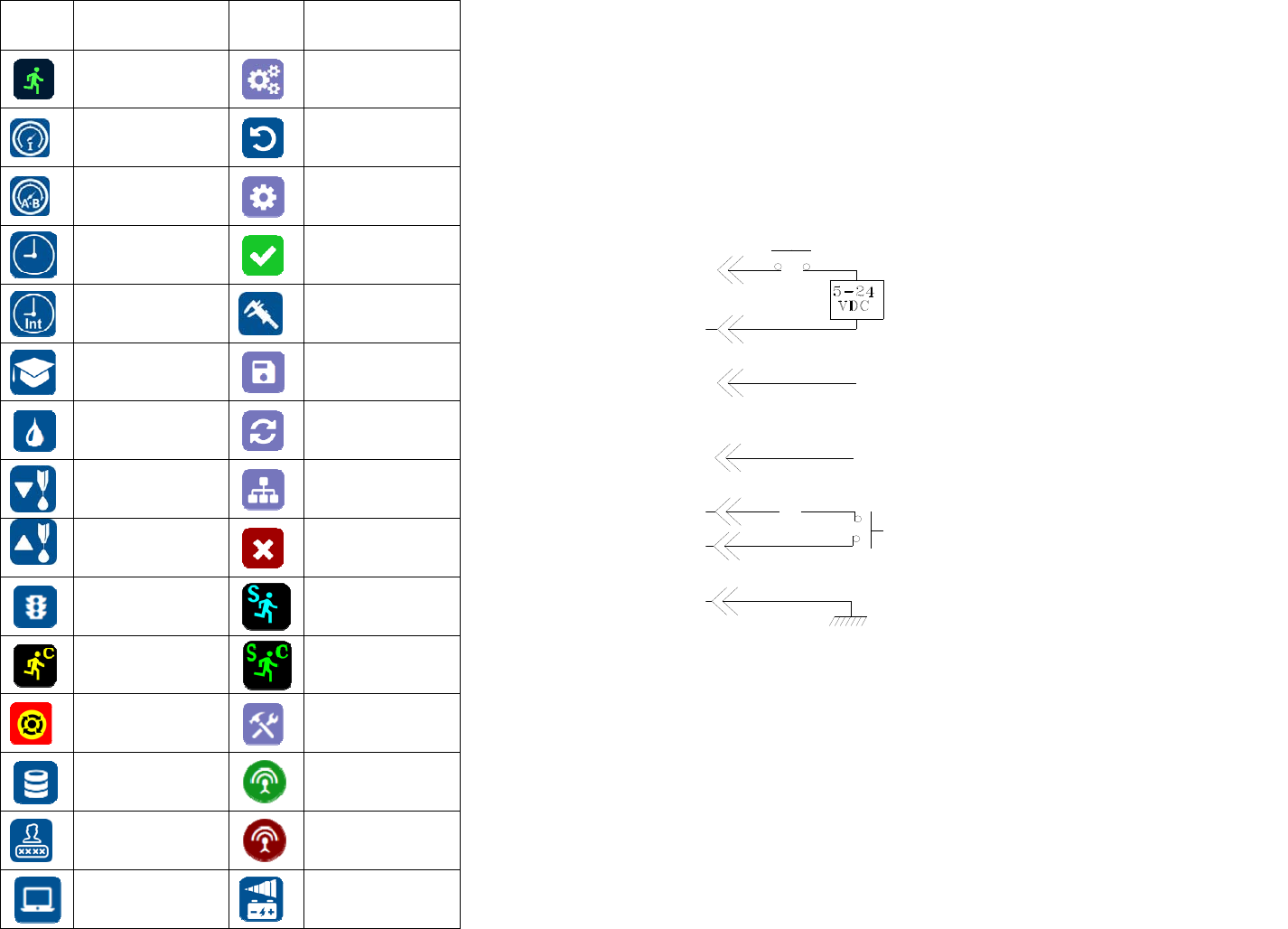
2. SYMBOL DEFINITIONS
Symbol Description Symbol Description
Run (Activate)
Setup
Input Touchure
Counter reset
Touchure Port A&B
Mac address
Timed mode
Accept change
Interrupt mode
Touchure calibration
Teach mode
Save
Purge mode
Reset time in Teach
mode
Dispense
IP address
Reverse (suck back)
Cancel
Run Method
Sequence Mode
Continous Mode
Sequence Continous
Mode
E-Stop
Change Password
Remote Server
On line
Login/Logout
Off Line
Controller type
Input Voltage
33
11. I/O CONFIGURATION AND END OF CYCLE FEEDBACK
During a dispense cycle, an open collector circuit closes and remains closed while
the valve is dispensing. Pin 3 and 4 can be as feedback signal to synchronize with
other devices. Power from an external source is allowed to pass through the circuit
to operate a 5 to 24 VDC load. Power consumption must not exceed 250 mA. The
load could be a relay, solenoid, counter, LED, or any device that will operate within
a 5 to 24 VDC range and a maximum of 250 mA.
Note: During the dispense cycle, pin 3 will be grounded. Please make sure the
external device (your machine that controls the dispenser/controller) has the same
ground as the controller.
7508-0270_A
Pin 7, 8, and 9 = Available
Chasis Ground
To initiate a dispense cycle with
contact closure
When low touchure alarm is triggered, Pin 4 is grounded (-)
When low touchure alarm is turned off,
Pin 4 is not connected (opened)
End of Cycle Feedback
During dispensing cycle, Pin 3 is grounded (-)
End of dispensing cycle,
Pin 3 is not connected (opened)
To initiate a dispense cycle with voltage
Pin 1 (+)
Pin 2 (-)
Pin 3
Pin 4
Pin 5
Pin 6
Pin 5