00195051-01.pdf - 第62页
8 Connecting SIPLACE Pro to the Unix Li ne Computer Installation manual SIPLACE Pro Edition 06/2006 US 60
Installation manual SIPLACE Pro 8 Connecting SIPLACE Pro to the Unix Line Computer
Edition 06/2006 US
59
Note
If you want to create a connection with a line computer, running operating system SCO ODT 3.0,
you have to build the following registry entry (as administrator): [HKEY_LOCAL_MACHINE\SYS-
TEM\CurrentControlSet\Services\Rdr\Parameters] "EnablePlainTextPass-
word"=dword:00000001 8
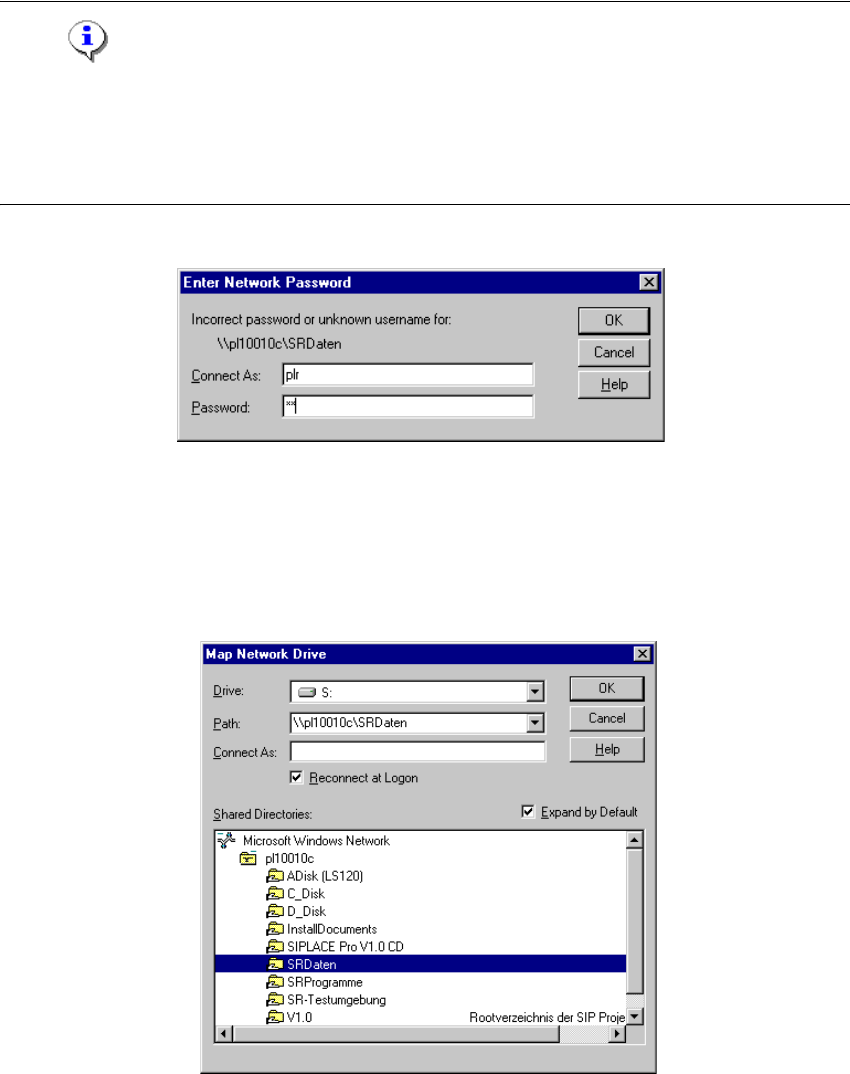
The following dialog is displayed: 8
Fig. 8 - 4 "Enter Network Password" dialog box
Æ Enter the user name (usually »plr«) in the field Connect As.
Æ Enter the password Password field.
Æ Confirm by clicking on OK.
The following dialog is displayed: 8
Fig. 8 - 5 "Map Network Drive" dialog box
Æ Select the connection you want (e.g.: master data).
Æ Confirm by clicking on OK.
A new network drive with the drive letter (e.g. S:) has been set up.
8 Connecting SIPLACE Pro to the Unix Line Computer Installation manual SIPLACE Pro
Edition 06/2006 US
60

Installation Manual Index
61
Index
C
Client Applications
. . . . . . . . . . . . . . . . . . . . . . .15
Client/Server configuration
. . . . . . . . . . . . . . . . .12
Connecting to the Unix Line Computer
. . . . . . . .57
E
Explanation of symbols
. . . . . . . . . . . . . . . . . . . . .5
I
Installation
. . . . . . . . . . . . . . . . . . . . . . . . . . . . . .13
Installing SIPLACE Pro
. . . . . . . . . . . . . . . . . . . .15
Internet Explorer 6.0
. . . . . . . . . . . . . . . . . . . . . .13
P
Preparations prior to installation
. . . . . . . . . . . . .13
S
Samba on the UNIX Line Computer
. . . . . . . . . .57
SCO ODT 3.0 operating system
. . . . . . . . . . . . .57
SCO ODT 5.0 operating system
. . . . . . . . . . . . .58
Scope of Delivery
. . . . . . . . . . . . . . . . . . . . . . . . .6
Server components
. . . . . . . . . . . . . . . . . . . . . . .12
Setting up the connection
. . . . . . . . . . . . . . . . . .60
Setup type – Custom
. . . . . . . . . . . . . . . . . . . . .21
Setup type – SIPLACE Pro Complete Installation
. . . . . . . . . . . . . . . . . . . . . . . . . . . . . . . . . . . .24
Setup type – SIPLACE Pro Desk
. . . . . . . . . . . .32
Setup Type – SIPLACE Pro Line Control GUI
. .34
Setup Type – SIPLACE Pro Line Control Server
37
Setup type – SIPLACE Pro Programming System
. . . . . . . . . . . . . . . . . . . . . . . . . . . . . . . . . . . .37
Setup type – SIPLACE Pro Server
. . . . . . . . . . .40
Setup Types
. . . . . . . . . . . . . . . . . . . . . . . . . . . .15
Single computer configuration
. . . . . . . . . . . . . .12
SIPLACE Pro - Custom
. . . . . . . . . . . . . . . . . . . .15
SIPLACE Pro Complete Installation
. . . . . . . . . .15
SIPLACE Pro Desk
. . . . . . . . . . . . . . . . . . . . . . . .9
SIPLACE Pro Line Control GUI
. . . . . . . . . . . . .15
SIPLACE Pro Line Control Server
. . . . . . . . . . .15
SIPLACE Pro Logfile
. . . . . . . . . . . . . . . . . . . . . .46
SIPLACE Pro Programming System
. . . . . . . . . .15
SIPLACE Pro Server
. . . . . . . . . . . . . . . . . . . . . . 8
Software configuration
. . . . . . . . . . . . . . . . . . . 13
System components
. . . . . . . . . . . . . . . . . . . . . 11
System configurations
. . . . . . . . . . . . . . . . . . . . 12
System requirements
. . . . . . . . . . . . . . . . . . . . . 8
T
Troubleshooting
. . . . . . . . . . . . . . . . . . . . . . . . 45
Troubleshooting when updating
. . . . . . . . . . . . 43
U
Uninstalling
. . . . . . . . . . . . . . . . . . . . . . . . . . . . 53
Update
. . . . . . . . . . . . . . . . . . . . . . . . . . . . . . . 43
W
Windows Scripting Host – Script Execution Error
.
. . . . . . . . . . . . . . . . . . . . . . . . . . . . . . . . . . . 45