00192790-01.pdf - 第31页
User Manual SIPLAC E S-25 HM / HS-50 2 PCB Camera Mu lticolor (Option) Software Version S C.502.xx 11/00 Issue 2.2 Illumination Setting 31 2ULHQW DWLRQDO$LGIRU6HOHFWLQJ,OOXPLQDWLRQ The followi ng table is d eri…
2 PCB Camera Multicolor (Option) User Manual SIPLACE S-25 HM / HS-50
2.2 Illumination Setting Software Version SC.502.xx 11/00 Issue
30
,OOXPLQDWLRQ6HWWLQJ
3RVVLEOH,OOXPLQDWLRQ6HWWLQJVDQG6HOHF WLRQ&ULWHULD
The following types of illumination are possible with the PCB camera Multicolor by using the per-
tinent setting (see Section 2.2.3):
– Standard light:
Using this mixture of white and IR light it is possible to recognize a broad range of fiducials. By
selecting special types of illumination, the contrast of the image can be improved and, as a
consequence, the range of recognizable fiducials increased.
– White light:
This is used for
VWDQGDUG
PCBs (tinned fiducials).
– Blue oblique illumination:
By using this light, an obvious improvement in contrast can usually be attained where bright
fiducials on a light base material are involved, e.g., on ceramic or CEM. In a few instances,
fiducials covered by solder resist can also be recognized better on a light background.
–IR light:
It is usually practical to use this type of illumination for fiducials that are covered by solder resist
or for fiducials on flex material. It may also be possible to improve recognition where silver-plat-
inum fiducials on ceramic are involved. Ascertain this in advance by conducting a trial center-
ing and/or a trial placement.

User Manual SIPLACE S-25 HM / HS-50 2 PCB Camera Multicolor (Option)
Software Version SC.502.xx 11/00 Issue 2.2 Illumination Setting
31
2ULHQW DWLRQDO$LGIRU6HOHFWLQJ,OOXPLQDWLRQ
The following table is derived from empirical values and is therefore only to serve as an orienta-
tional aid. A few materials often exhibit very drastic fluctuations (particularly in the case of CEM1),
therefore the best illumination has to be ascertained through testing. In each instance this is done
by selecting the setting for illumination during the course of a sample placement with recognition
of the position of the pertinent PCBs or ceramic substrates.
6HWWLQJWKH,OOXPLQDWLRQ
In case of doubt, the best illumination selection must be ascertained by using the function "Test
the fiducial" or the substrate to be populated.
NOTE:
The processes which must be executed prior to setting the illumination are described in detail in
the section "Teaching Fiducials" or "Teaching Synthetic Fiducials" of the User Manual, Software
version SC 502.xx.
During them, the current substrate or PCB is moved onto the processing belt of the conveyor and
mechanically centered / clamped in place.
Å Select the ICON "Setting illumination"
Å In the "illumination" menu select the "Setting illumination" button.
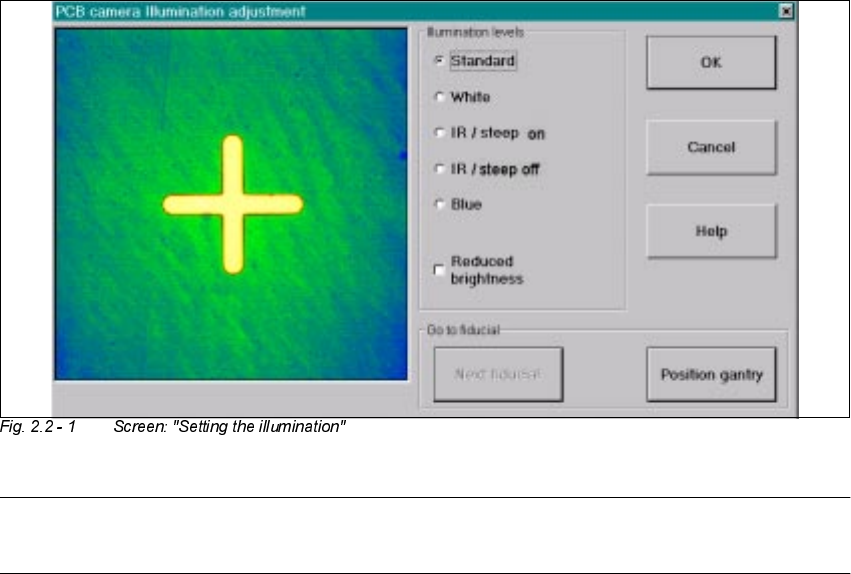
The following screen will appear:
Base material Fiducial material Oblique illu-
mination
BLUE
Infrared
illumination
White illumi-
nation
FR 4 Tin x
Ceramic NiAu, Cu, AgPl x
Ceramic AgPt x
CEM1 Bright copper fiducials,
tin
x
CEM1 Fiducials covered by sol-
der resist
(x) x
Flex on alumi-
num carrier
x
2 PCB Camera Multicolor (Option) User Manual SIPLACE S-25 HM / HS-50
2.2 Illumination Setting Software Version SC.502.xx 11/00 Issue
32
NOTE:
Utilize Section 2.2 and the table in Section 2.2.2 to select the best type of illumination.
Å Select the desired illumination level by activating the pertinent radio button.
Å Select the complete or the reduced brightness by activating or deactivating the rectangular
field.
Å Select the button "Positioning the gantry" and position the gantry over the fiducial that is cur-
rently to be recognized / taught.
Å Check the quality of the image on the vision screen (see the section "Teaching Fiducials" in the
User Manual SC 502.xx).
Å If the image of the fiducial is still not optimal, select another illumination level or, if appropriate,
change the brightness too and select the button "Positioning the gantry" again.
Å If the image of the fiducial is alright, select the button "OK".
As a result, the illumination set is accepted for all 4 gantries (HS-50) or both gantries
(S-25 HM).