00197543-01_SM_JTF-S_ JTF-M_en.pdf - 第23页
Service Works 2.1.6 Magazine Interfaces / Communications / Magazine Service Manual SIPLACE JEDEC Tray Feeder 23 2.1.6.2 2 . 1 . 6 . 2 M a g a z in e f o r S I P L A C E J T F - M Magazine for SIPLACE JTF-M The SIPLACE JT…
Service Works
Interfaces / Communications / Magazine 2.1.6 Magazine
22 Service Manual SIPLACE JEDEC Tray Feeder
2.1.6
2.1.6 Magazine
Magazine
2.1.6.1
2.1.6.1 No Magazine for SIPLACE JTF-S
No Magazine for SIPLACE JTF-S
(All compliant with the JEDEC standard. Publication 95 Page 4.10-12/D Reference JEDEC Standard No.
95-1, IEC 60286-5)
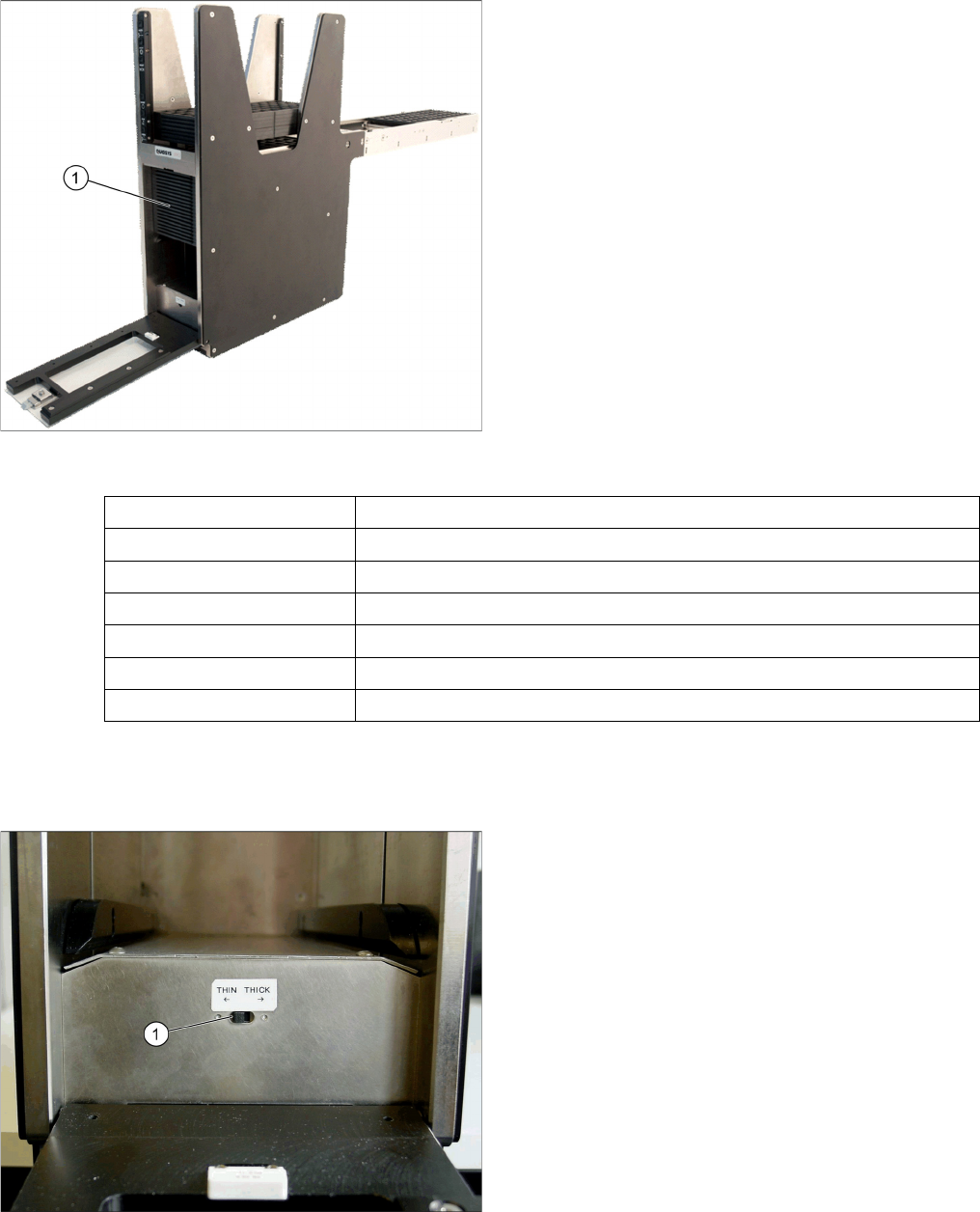
You can setup the SIPLACE JTF-S feeders with JEDEC-Trays with different heights:
SIPLACE JTF-S tray filling
The SIPLACE JTF-S can be filled directly (1) with JEDEC
Trays according the following standard:
1. Thin tray:7.62mm +/- 0.2mm
2. Thick tray:12.19mm +/- 0.2mm
Tray width 135.9 mm +0.25/- 0.13 mm
Tray length 322.6 mm +0.25/- 0.13 mm
Thin tray thickness 7.62 mm +/-0.2 mm
Thick tray thickness 12.19 mm +/-0.2 mm
Tray material The are trays made of plastic or opaque material (alu trays are optional).
Mass of tray 604 gramms / 1.33 lb
Tray flatness 0.800 mm over entire surface
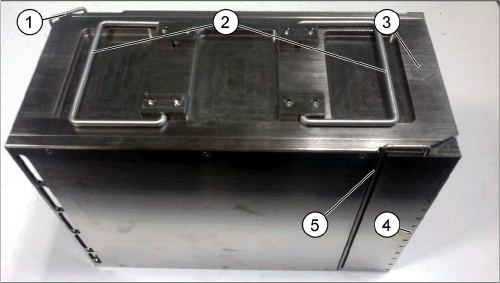
SIPLACE JTF-S switch setting tray thickness
1. Depending on the used tray type (thickness), the
switch (1) must be set in the correct position.
Service Works
2.1.6 Magazine Interfaces / Communications / Magazine
Service Manual SIPLACE JEDEC Tray Feeder 23
2.1.6.2
2.1.6.2 Magazine for SIPLACE JTF-M
Magazine for SIPLACE JTF-M
The SIPLACE JTF-M loads or unloads trays out of a magazine. There currently are two magazines avail-
able:
▪ 14 slots (thick trays or sheets) [00166673-xx]
▪ 18 slots (thin trays or sheets) [00166672-xx]
Loading Sequence of SIPLACE JTF-M tray magazine
► Move down the elevator to refill position with in the SIRIO menu.
► Open the loading door.
► Unlock the Tray lock 1 and Tray lock 2.
► Check the proper direction of the magazine. The arrow on top shows the direction the magazine has
to be inserted in the SIPLACE JTF-M.
► If the magazine is inserted in the wrong direction, the SIPLACE JTF-M will be unable to count the
magazine slots through the magazine slot detection slits and recognize the magazine is empty.
► Slide the magazine onto the elevator bars.
► Close the loading door.
► If the loading door cannot be closed, the JEDEC trays may be orientated wrong.
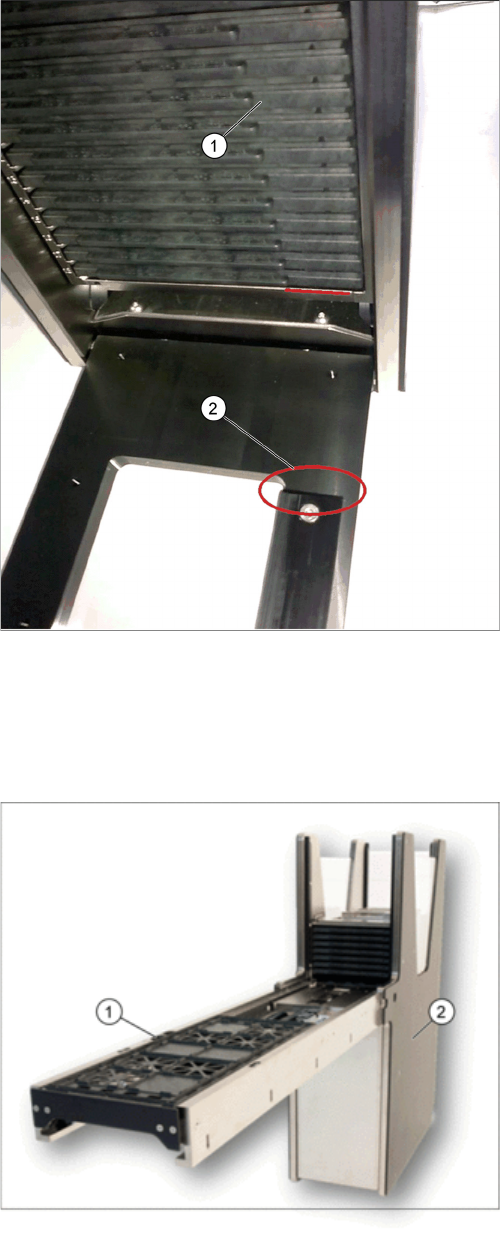
JTF-M Tray Magazin
1. Arrow for feeding direction of the magazine
2. Magazine handles
3. Magazine slot detection slits
4. Tray lock 1
5. Tray lock 2
Service Works
Overview SIPLACE JTF-Sections 2.1.6 Magazine
24 Service Manual SIPLACE JEDEC Tray Feeder
2.2
2.2 Overview SIPLACE JTF-Sections
Overview SIPLACE JTF-Sections
A SIPLACE JTF-Feeder can be split into two main sections:
SIPLACE JTF-M door lock orientation key
1. Tray magazine orientation
2. Tray orientation bar
JTF- main sections
1. Base section (tower)
2. Conveyor section