吸嘴交换站ANCsensorAdjustStep.pdf - 第7页
Service Engineer Service Informati on No: SI120 5003E - 000 = ANC con trol board n ozzle sensor adjustmen t procedure 7/ 12 1.2.3 When “ Nozzle Change ” cannot be performed automatically W hen a noz zl e change error has…
Service Engineer
Service Information
No: SI1205003E-000= ANC control board nozzle sensor adjustment procedure
6/12
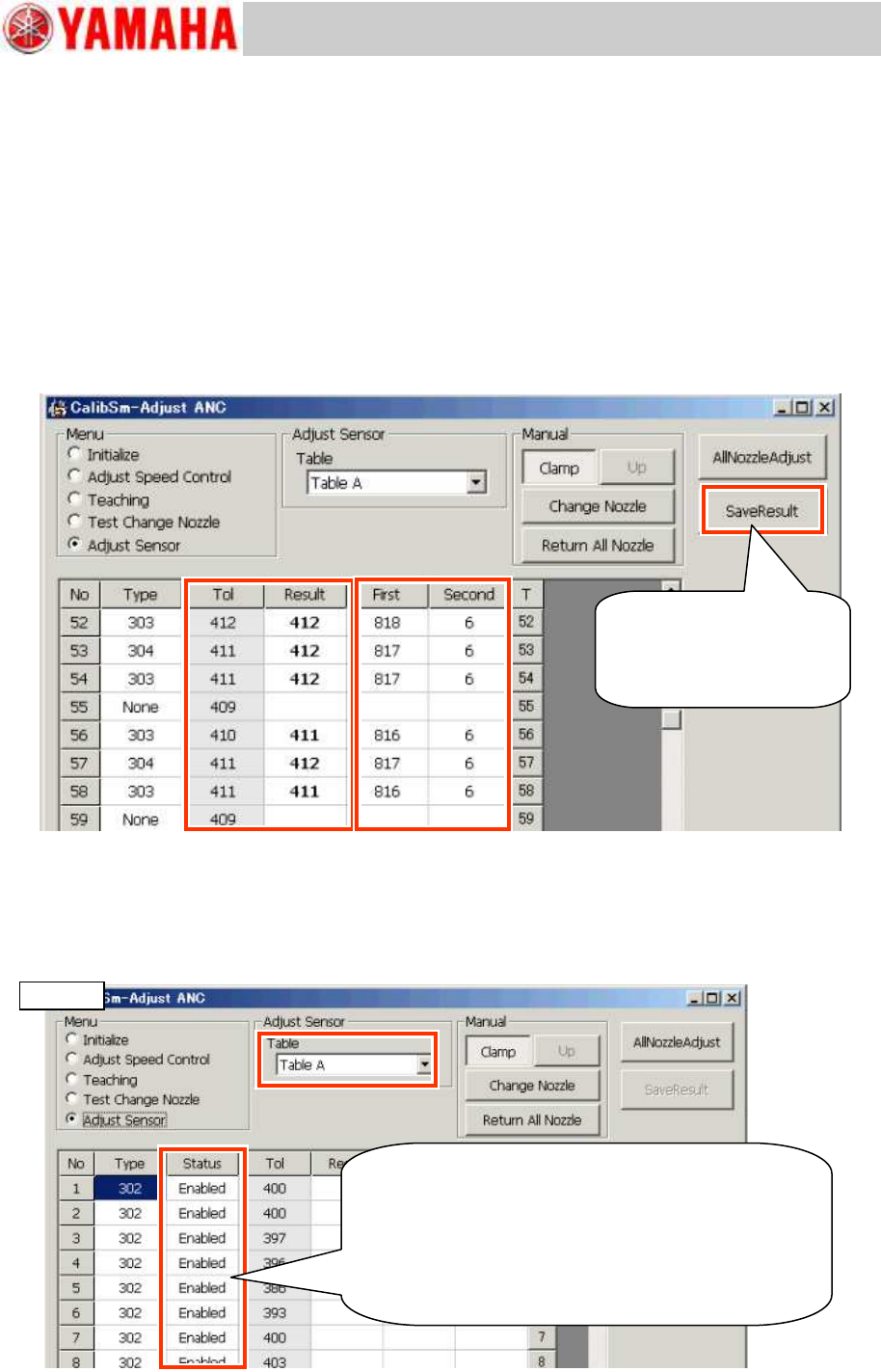
5. Check the detection level (Threshold) difference between the first and the second round of
measurement.
Repeat the measurement several times and make sure that there is enough difference between
the results of the first and the second round of measurement, and the difference does not vary
much.
Before shipment of the machine, the difference between the two measured results is set to be
approx. 800. However, if the difference is 400 or less even after cleaning the parts related to
nozzle detection, it is recommended to replace the ANC control board Assy.
6. Compare the “Tol” value (The current threshold) and the “Result” value (The threshold
after the measurement).
When there is not much difference between the “Tol” and the “Result” values, save the data.
If the difference is significant, identify the cause of it and take appropriate measures, and perform
the adjustment again.
Figure 7
7. Click the [Save Result] button.
8. Perform adjustment for the other tables. (* When the machine is equipped with more than
one tables.)
Select the table from the “Table” pull-down menu and repeat the procedures from step 3 through
step 7.
Figure 8
If the measured result
needs to be saved, click
the [Save Result] button
after checking the values.
In the YS24X model, all the station numbers are
displayed on the window. However, the adjustment
is performed only for the stations whose status is
set to “Enabled”.
When you need to adjust the station whose status
is set to “Disabled”, switch the table.
YS24X
Service Engineer
Service Information
No: SI1205003E-000= ANC control board nozzle sensor adjustment procedure
7/12
1.2.3 When “Nozzle Change” cannot be performed automatically
When a nozzle change error has occurred, adjust the threshold by putting in and taking out a
nozzle from the station by hand.
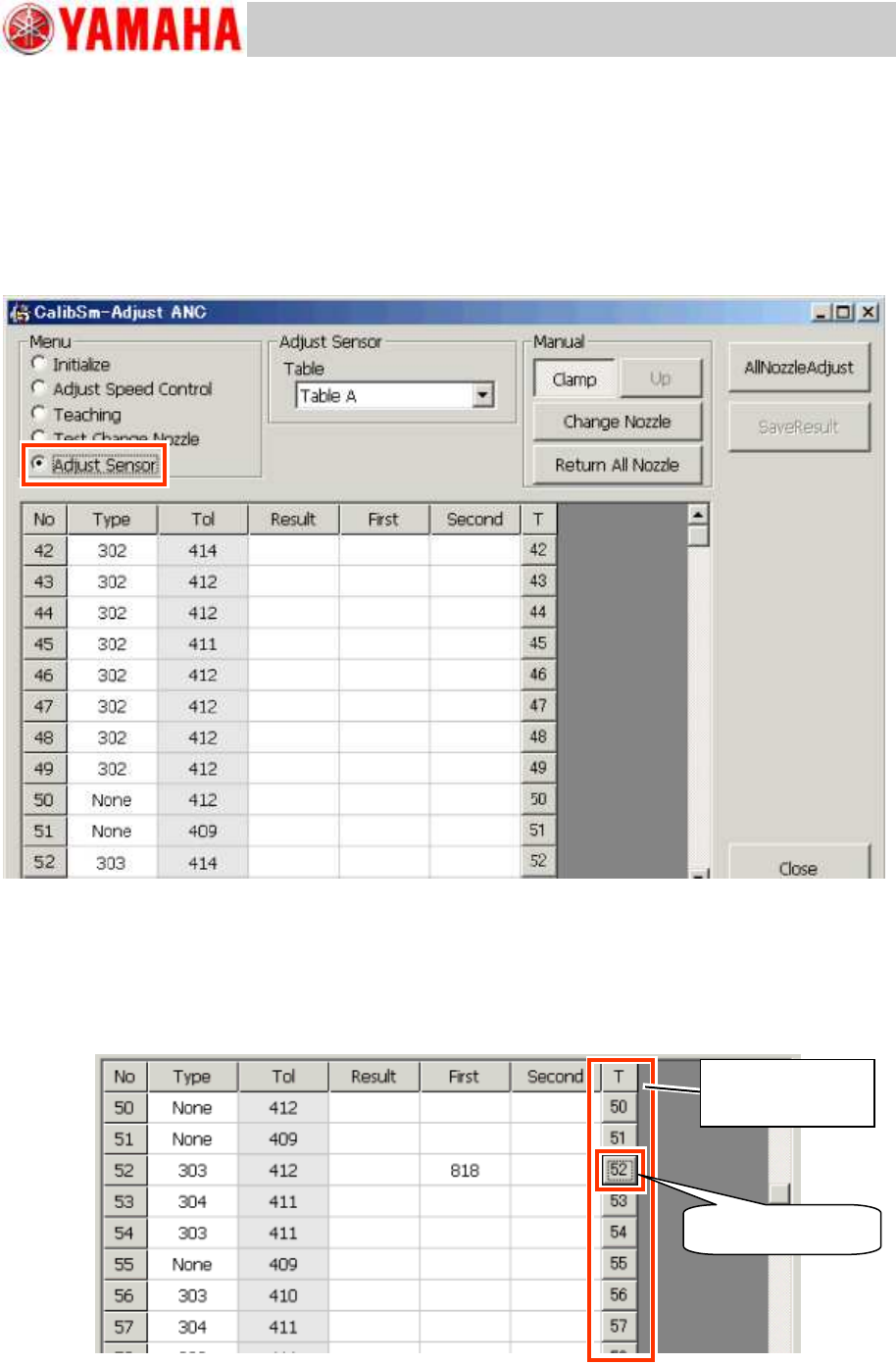
1. Select “Adjust Sensor” from “Menu”.
Click the [025 ANC Manual] button on the main menu of the CalibSm and select “Adjust Sensor”
from “Menu”.
Figure 9
2. Store all the nozzles in the ANC.
3. Perform teaching for the detection level when the nozzle is in the station.
If an error occurred to the No.52 nozzle, click the [52] button on the “T” column on the right side of
the window.
The sensitivity (Threshold) when the nozzle is in the station is displayed in the “First” field.
Figure 10
Click the [52] button.
[Teach] buttons for
each nozzle.
Service Engineer
Service Information
No: SI1205003E-000= ANC control board nozzle sensor adjustment procedure
8/12
4. Perform teaching for the detection level when the nozzles is out of the station.
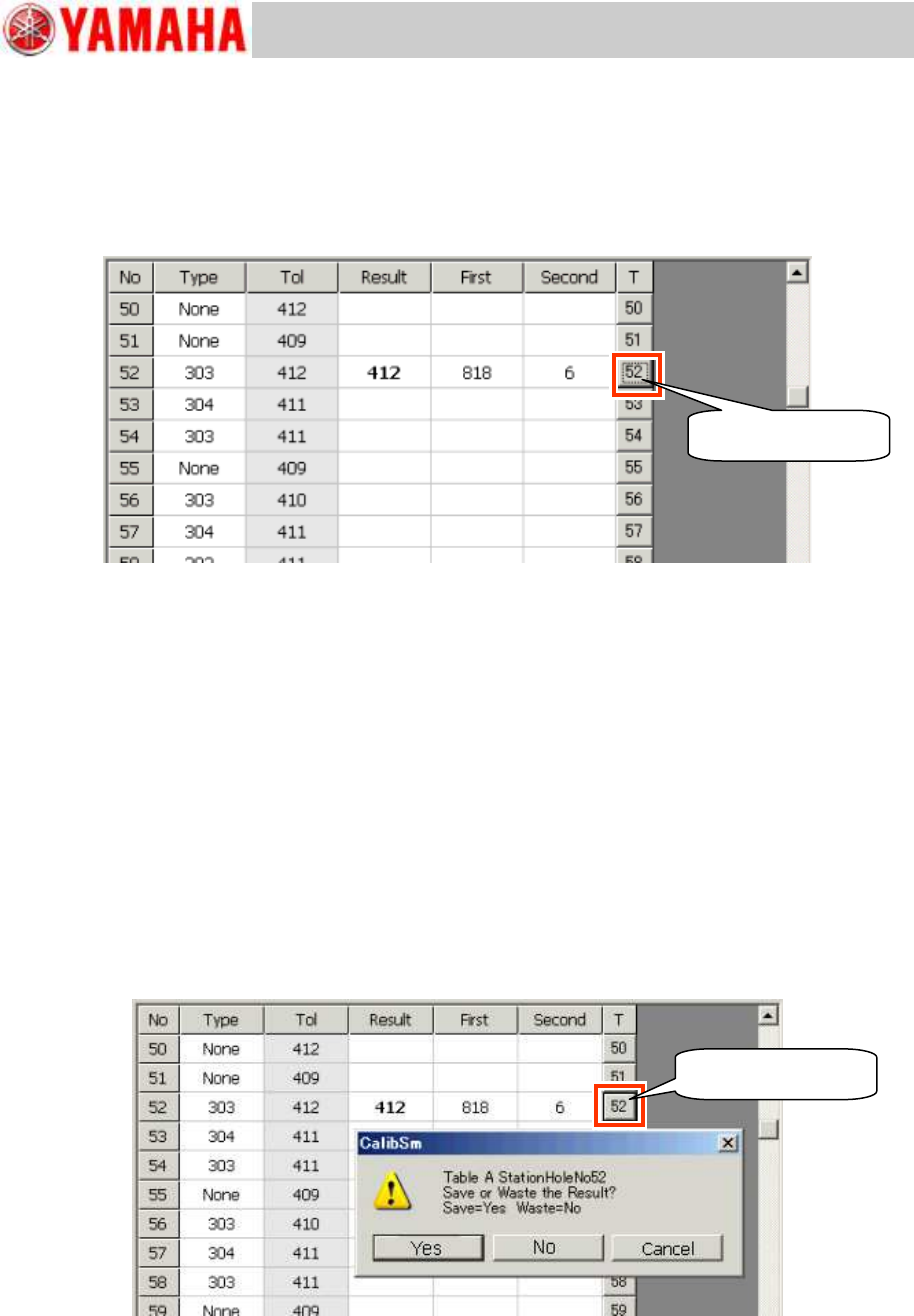
Take out the nozzle from the No.52 station and click the [52] button on the right side of the
window.
The sensitivity (Threshold) when the nozzle is taken out of the station is displayed in the “Second”
field.
Also the value intermediate between the results of the first and the second round of measurement
is displayed in the “Result” field.
Figure 11
5. Check the measured result.
Repeat the measurement several times and make sure that there is enough difference
between the results of the first and the second round of measurement, and the difference
does not vary much.
Before shipment of the machine, the difference between the two measured results is set to
be approx. 800. However, if the difference is 400 or less even after cleaning the parts
related to nozzle detection, it is recommended to replace the ANC control board Assy.
Compare the “Tol” value (The current threshold) and the “Result” value (The threshold after
the measurement).
When there is not much difference between the “Tol” value and the “Result” value, save
the data.
If the difference is significant, identify the cause of it and take appropriate measures, and
perform the adjustment again.
6. Save the measured result.
When you need to save the measured result as the new threshold, click the [52] button on the “T”
column (“Teach” button).
Figure 12
7. Perform the adjustment for other nozzles.
If other sensors need to be adjusted, repeat the procedures from step 3 through step 6.
If other nozzles can be changed automatically, use the “ANC Auto” utility for the adjustment.
Click the [52] button.
Click the [52] button.