Micron Installation V9 Power Up Sequence.pdf - 第6页
POWER UP SEQUENCE MACHINE POWER UP SEQUENCE 5.6 Installation Manual Chapter Issue 8, Jan 16 E Stop Loop Operation Carry out the following procedure for E S top loop operation check: 1. Press the E S top button. The Resto…
POWER UP SEQUENCE
MACHINE POWER UP SEQUENCE
Chapter Issue 8, Jan 16 Installation Manual 5.5
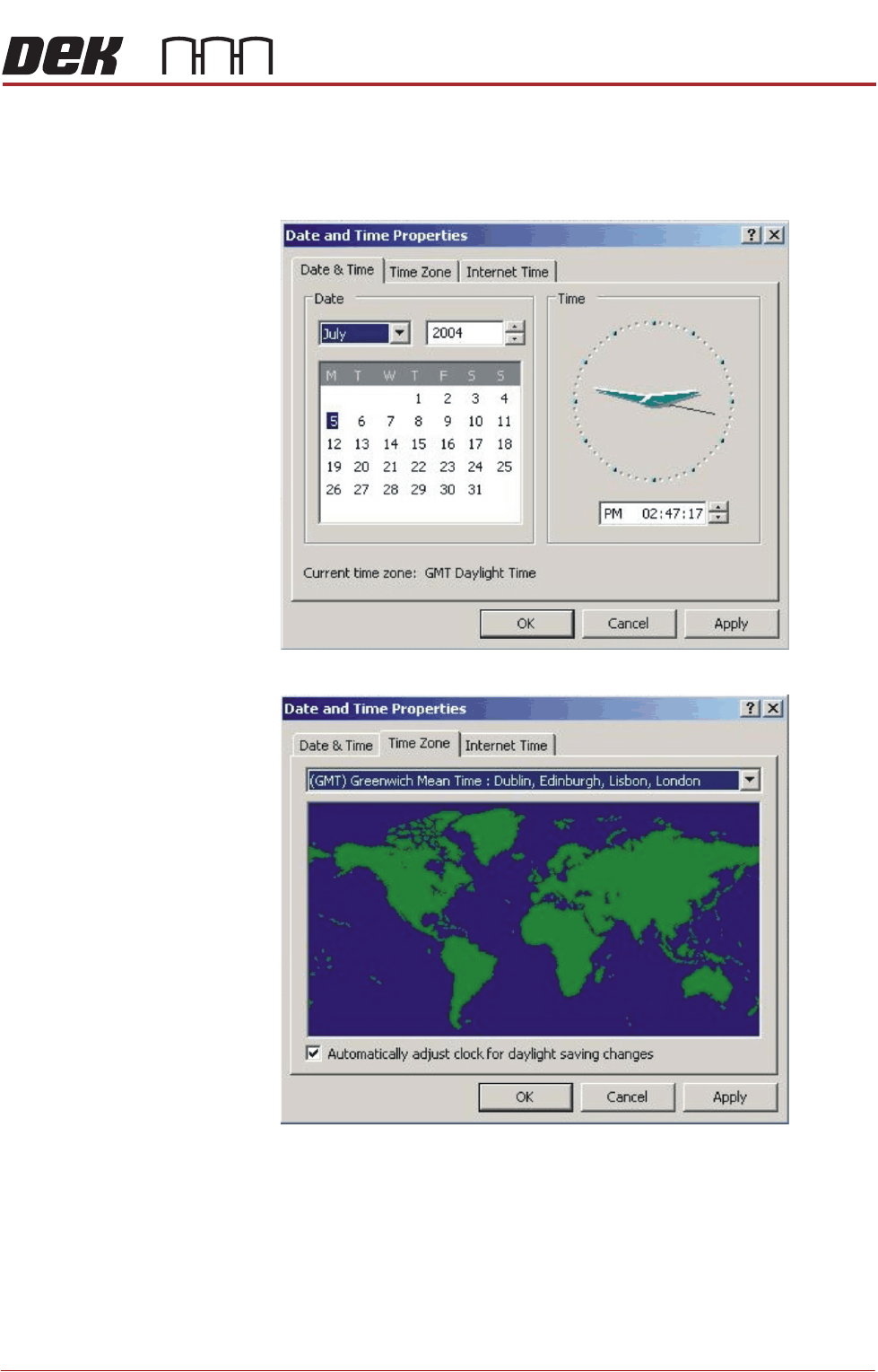
Time and Date
(Windows XP)
In order for the machine PC to log events correctly, the system time, date and
correct time zone must be set.
1. Using the mouse, double click on the time, displayed at the right hand side
of the Windows taskbar. The Date/Time Properties window is displayed.
2. Click on the Time Zone tab.
3. Select the appropriate time zone from the drop down menu box.
4. Click on Apply.
5. Click on the Date & Time tab.
6. Adjust to local time and date and select OK.
7. Select Start on the taskbar.
8. Select DEK Printer Software.
9. Press the System button.

POWER UP SEQUENCE
MACHINE POWER UP SEQUENCE
5.6 Installation Manual Chapter Issue 8, Jan 16
E Stop Loop
Operation
Carry out the following procedure for E Stop loop operation check:
1. Press the E Stop button. The Restore Power window is displayed.
2. Reset the E Stop by turning the E Stop button clockwise until it unlatches.
3. Press the System button when prompted.
4. Open the front printhead cover. The Machine Operation Suspended -
Cover Open window is displayed.
5. Close the front printhead cover.
6. Press the System button when prompted.
Cover Open
Operation
1. After initialisation, open the front printhead cover. The open cover page is
displayed.
2. Close the front printhead cover.
3. Press the System button to check that system power is restored.
Screen Cleaner Function Check
CAUTION
RECOMMENDED SOLVENTS. ANY SOLVENTS USED MUST COMPLY WITH
LOCAL ENVIRONMENTAL GUIDELINES. ASM RECOMMEND USING SOLVENTS
THAT ARE ENVIRONMENTALLY FRIENDLY, IE CFC FREE AND WATER BASED.
SOLVENTS USED MUST HAVE FAST EVAPORATION RATES AND FLASHPOINT
SPECIFICATIONS GREATER THAN 39ºC.
WARNING
SOLVENT SPRAY. THE UNDER STENCIL CLEANER SPRAYS A FINE JET OF
SOLVENT SOLUTION ON TO THE CLEANER. APPROVED PROTECTIVE
CLOTHING SHOULD BE WORN.
CAUTION
PRINT MEDIUM AND SOLVENTS. WHEN USING OR HANDLING ANY PRINT
MEDIUM OR SOLVENT FORMULATION THE MANUFACTURERS’ SAFETY DATA
SHEETS MUST BE STRICTLY ADHERED TO.
MANDATORY
TOXIC CHEMICALS MAY BE PRESENT. SAFETY GLOVES MUST BE WORN.
MANDATORY
TOXIC CHEMICALS MAY BE PRESENT. EYE PROTECTION MUST BE WORN.
NOTE
If the Under Stencil Cleaner has not been used for lengthy periods, refer to
Technical Bulletin TB 329 to complete the cleaning regime for the spray bar.

POWER UP SEQUENCE
MACHINE POWER UP SEQUENCE
Chapter Issue 8, Jan 16 Installation Manual 5.7
To setup the USC carry out the following:
1. Ensure that the external solvent tank is fitted with an empty 5 litre container.
2. Select Maintenance.
3. Select Calibrations.
4. Select Solvent.
5. Select Set Solv Empty.
6. Confirm by selecting Yes.
7. Replace the empty 5 litre container with a 5 litre container full of the solvent
to be used.
8. Select Set Solv Full.
9. Confirm by selecting Yes.
10. Select Exit.
11. Select Exit.
12. Select Back.
13. Select Open Cover Commands.
14. Open the front printhead cover.
15. Select Prime Solvent.
16. When prompted, press the two button control switches simultaneously until
the paper is wet (this may take several attempts before solvent is sprayed
onto the paper).
17. Select Prime Paper.
18. When prompted, press the two button control switches simultaneously to
feed a clean area of dry paper over the solvent dispense pipe ensuring that
the paper feeds correctly.
19. Close the front printhead cover and press the System button.
20. Select Cancel.
Paste Dispenser
Function Check
To check that the paste dispenser level sensor works with the customers’ paste,
use the following procedure:
1. Select Maintenance.
2. Select Diagnostics.
3. Use the Incr. or Decr. buttons to highlight Paste Dispenser System.
4. Select Select Module.
5. Note that the Paste Cartridge Empty is displaying ON.
6. Fit a full paste cartridge containing the paste to be used by the customer.
7. Move the paste dispenser by hand so that the paste level sensor is aligned
with the paste in the cartridge.
8. Ensure that the Paste Cartridge Empty is displaying OFF.
9. Paste consistency varies throughout the cartridge, ensure the sensor can
detect paste throughout the length of the cartridge without the Paste Car-
tridge Empty switching to ON.