00194585_Installation_Manual_EDM_en.pdf - 第49页
Installation Manual SIPLACE EDM Version 1.1 Issue 07/2005 Key Re que st te m pla te list T r a n sit io n : getT emplateLi st Fi x ed te m pla te T r ansi tion: us eTemplate c l i entIdle pull Dat a S elec t t em p lat e…

Installation Manual, SIPLACE EDM Version 1.1 Issue 07/2005
</customConfig>
Module: Fixed Objects
Key Form Contents
objectNames A semicolon-separated (“;”), full SIPLACE Pro path.
The following generalized constructs are allowed for
the object names:
Type:* - All objects of this type
Type:Path\* - All objects of this type in this
path (not in subfolders of this
path)
List containing the names of the
objects to be transferred.
Table 10 Additional settings for "fixed objects"
An example for Table 10:
<customConfig>
<add key=“objectNames“ value=“Import\100.gf;System\12.gf;System\100*“/>
</customConfig>
48 of 64
Installation Manual SIPLACE EDM Version 1.1 Issue 07/2005
Key
Request template
list
Transition:
getTemplateList
Fixed template
Transition:
useTemplate
clientIdle
pullData
Select template
Transition:
selectTemplate
waitTemplate
Fixed objects
Transition:
useIdentities
Process template
Transition:
handleTemplate
Select objects
Transition:
selectIdentities
selectObjects
waitData
Import objects
Transition:
importData
done
State
Transition
Alternative
modules
Additional
configuration
necessary
VDM for
component
shape
Import objects
Transition:
importDataVdm
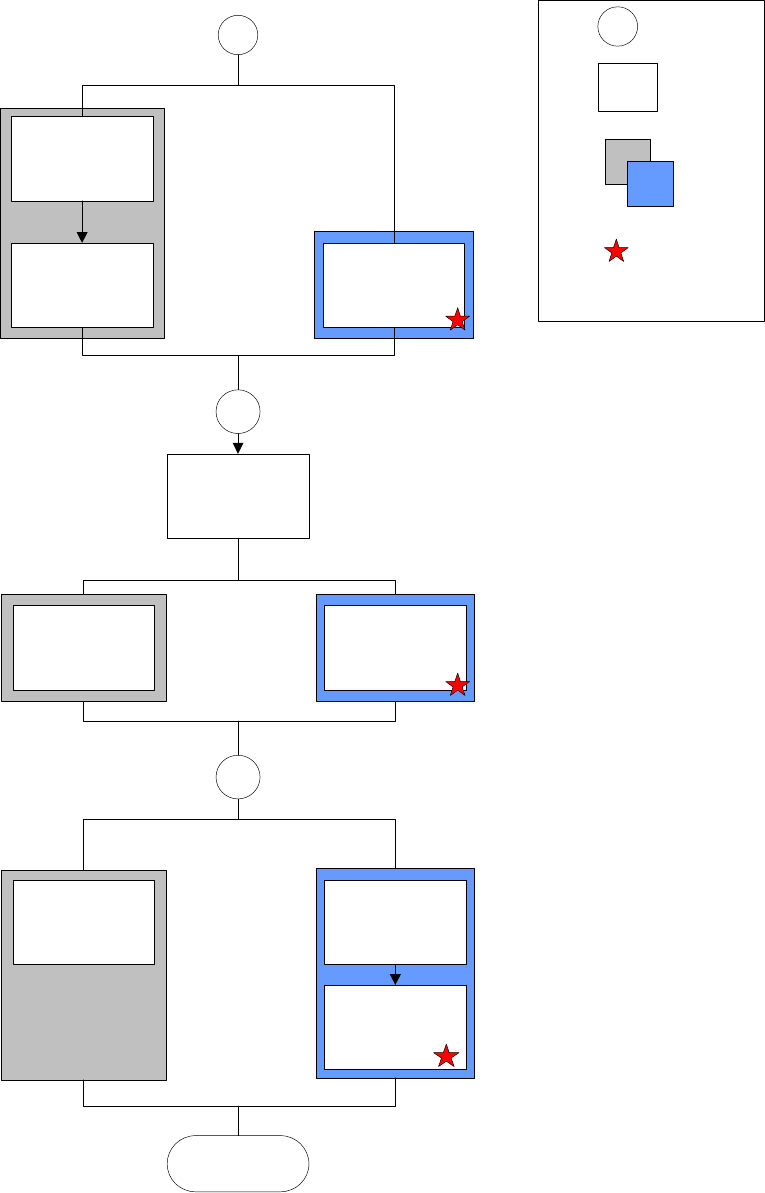
Figure 15 Current configuration options for client workflows
49 of 64
Installation Manual, SIPLACE EDM Version 1.1 Issue 07/2005
VDM Blob extension 5.3.3
5.3.4
The VDM Blob extension is started in another branch of the client workflow configuration. No
changes should be made in this section. To obtain detailed information, refer to the comments at
this location in the configuration file itself.
Default configuration
See 7.2. ClientWorkflow.xml
50 of 64