力辰PV系列膏体粘度计说明书(英文版).pdf - 第10页
9 with the cursor , and then press the "OK" but ton to enter query record m ode (as shown i n Figure 6). In this mode, you can clearly view the rotor, rotational speed, measured vi scosity , and measurement tim…
8
Figure 4
⑧
If you need to set a timer, return to the main menu; press the ◀ or ▶ keys to navigate to the
Settings Center, then press the OK key to enter the Settings Center. Press the ▼ key to open the
drop-down menu, select "7. Timer On/Off," and press OK to proceed. Subsequently, use the ▲ or ▼
keys to toggle the timer on/off, press OK to select the desired mode, and press the back key to exit.
Once back at the measurement item interface, select the sub-parameter "rotational speed," and you
can then configure the timed measurement (Note: If the specified timer duration is shorter than the
minimum measurement duration, the timer duration will be automatically set to the minimum
measurement duration);
⑨ Press the pause button during measurement to halt the instrument; if you then press the confirm
button, the instrument will resume measurement using the previously set rotor number, rotational
speed, and timing duration. To change the rotor or rotational speed, you must first press the return
button;
⑩
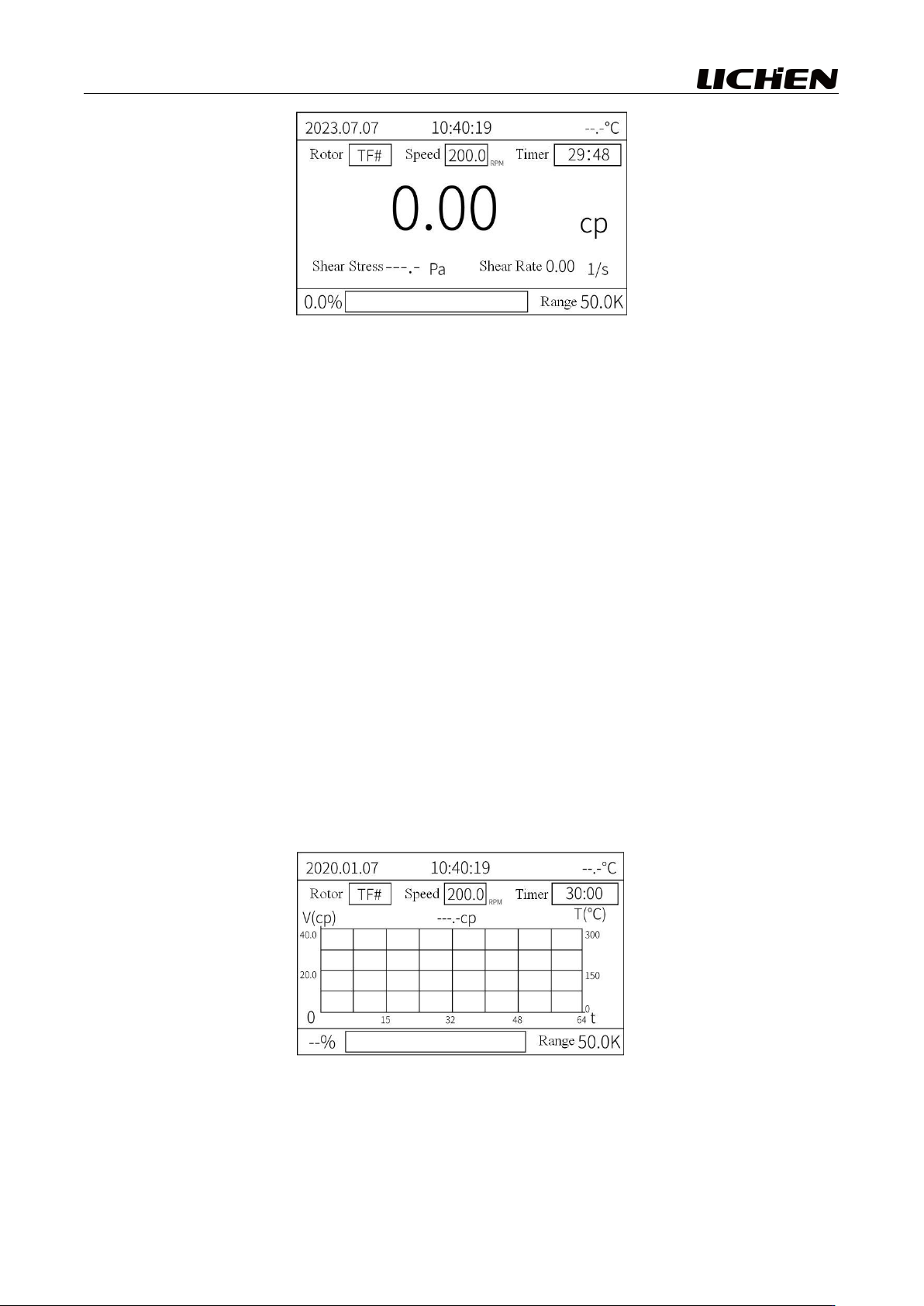
Return to the main menu interface as shown in Figure 1; select the viscosity-temperature curve
with the cursor, then press the OK button to enter the viscosity-temperature curve measurement
mode, as shown in Figure 5. The settings for the rotor, rotational speed, and timing are the same as
those for the measurement parameters (where V represents the viscosity value, T represents the
temperature, and t represents the time);
Figure 5
⑪ To save the measurement results, once the measured values have stabilized, simply press the
"Save" button; a pop-up window will appear, indicating that the save operation was successful. To
view the results, return to the main menu interface (as shown in Figure 1), select "Query Records"
9
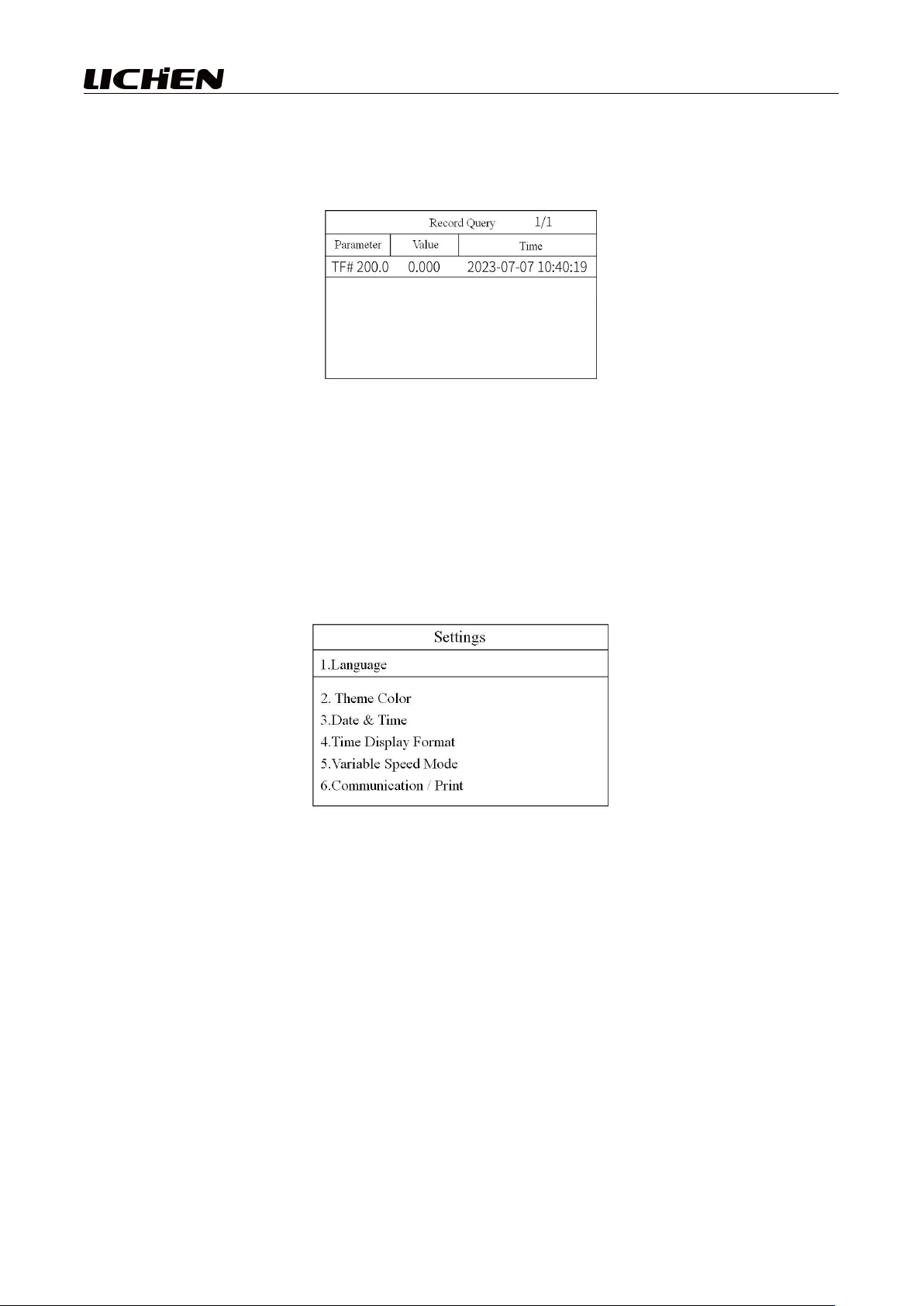
with the cursor, and then press the "OK" button to enter query record mode (as shown in Figure 6).
In this mode, you can clearly view the rotor, rotational speed, measured viscosity, and measurement
time;
Figure 6
⑫ To return to the main menu interface, refer to Figure 1; then, position the cursor over the "Settings
Center" option and press the "OK" button to enter the Settings Center, as shown in Figure 7. This
instrument features: dual-language switching (Chinese/English); six theme color options (blue, green,
red, orange, purple, black); date and time settings; time display format settings (12-hour or 24-hour);
two speed control modes (step speed control / continuous speed control); communication and
printing mode selection (these modes must be configured in advance to ensure accurate operation);
and timer on/off settings.
Figure 7
V. Maintenance
1. The rotor used for measurement (including the outer cylinder) must be clean and free of
contaminants; it should generally be cleaned promptly after measurement, particularly after
measuring paint and adhesives;
2. When cleaning, remove the rotor for cleaning; it is strictly prohibited to clean the rotor directly on
the instrument, and excessive force should be avoided to prevent the rotor from bending;
3. The mating surfaces and threaded sections between the connecting screw and the rotor shall be
kept clean; otherwise, the proper connection of the rotor and its rotational stability during operation
may be compromised;
4. Pay attention to the cleaning procedure: the viscometer may be soaked in an appropriate organic
solvent; however, avoid using hard objects such as metal cutlery for scraping, as severe scratches on
the rotor surface of the viscometer can lead to deviations in the measurement results;
10
5. After cleaning, the rotor shall be properly placed in the storage box;
6. If the instrument will not be used for an extended period, disconnect the power supply and store it
in a cool, dry place.
VI. Unboxing Inspection
Carefully open the packaging, then count and inspect all components.
If you notice any damage, please contact us immediately.
Packing List:
1、Instrument Head ×1
2、TA-TF rotor ×1
3、RS232 communication cable ×1
4、Temperature probe ×1
5、Cross Arm for Instrument Head ×1
6、Power adapter ×1
7、Main unit base ×1
8、Lifting Column ×1
9、Column fixing bolt ×1
10、Hexagon Socket Wrench ×1
11、Open- end Wrench ×1
12、Product Manual ×1
VII. Appendix (Physical samples, operational demonstrations, interface schematics, etc.)
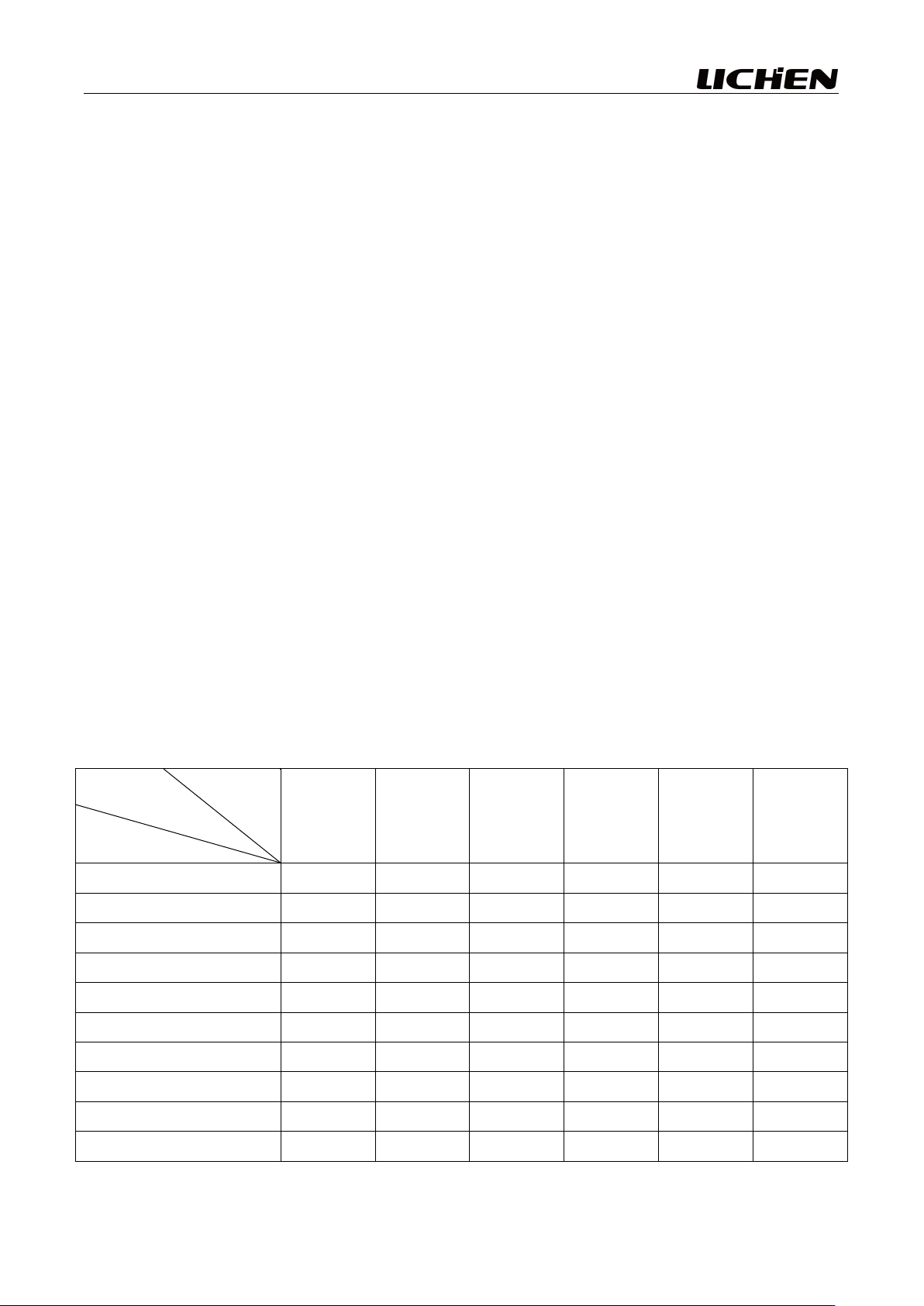
odometer:
speed
range
rotor
TA
TB
TC
TD
TE
TF
0.5
400K
800K
2M
4M
10M
20M
1
200K
400K
1M
2M
5M
10M
2
100K
200K
500K
1M
2.5M
5M
2.5
80K
160K
400K
800K
2M
4M
4
50K
100K
250K
500K
1.3M
2.5M
5
40K
80K
200K
400K
1M
2M
10
20K
40K
100K
200K
500K
1M
20
10K
20K
50K
100K
250K
500K
50
4K
8K
20K
40K
100K
200K
100
2K
4K
10K
20K
50K
100K