力辰PV系列膏体粘度计说明书(英文版).pdf - 第5页
4 The rear layout of t he instrument is shown in the figure (without the rotor installed): 1. RS232 interface, printer interface 2. Power swit ch 3. T emperature sensor probe i nterface 4. Horizontal bar i nterface 5. P …
3
III. Product Portfolio
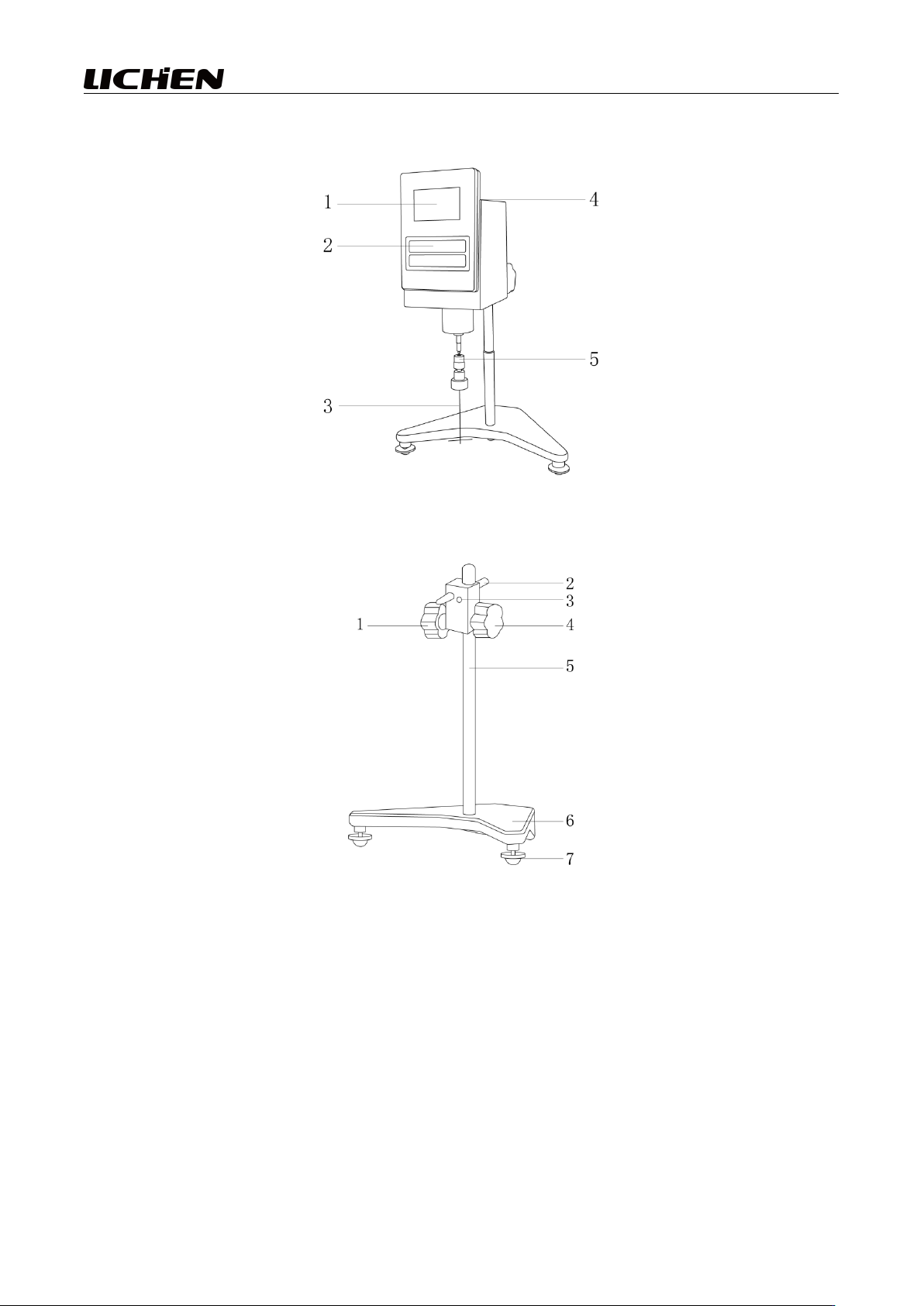
The overall structure of the machine (with the rotor installed) is shown in the figure:
1. Display screen 2. Operation buttons 3. Rotor
4. Viscosity meter head level bubble indicator 5. Rotor connector
1. Machine head fixed handwheel 2. Machine head crossbar
3. Lift and tension adjustment screw (requires hex key) 4. Lift handwheel
5. Lift column 6. Main unit base
7. Main unit base level adjustment knob
4
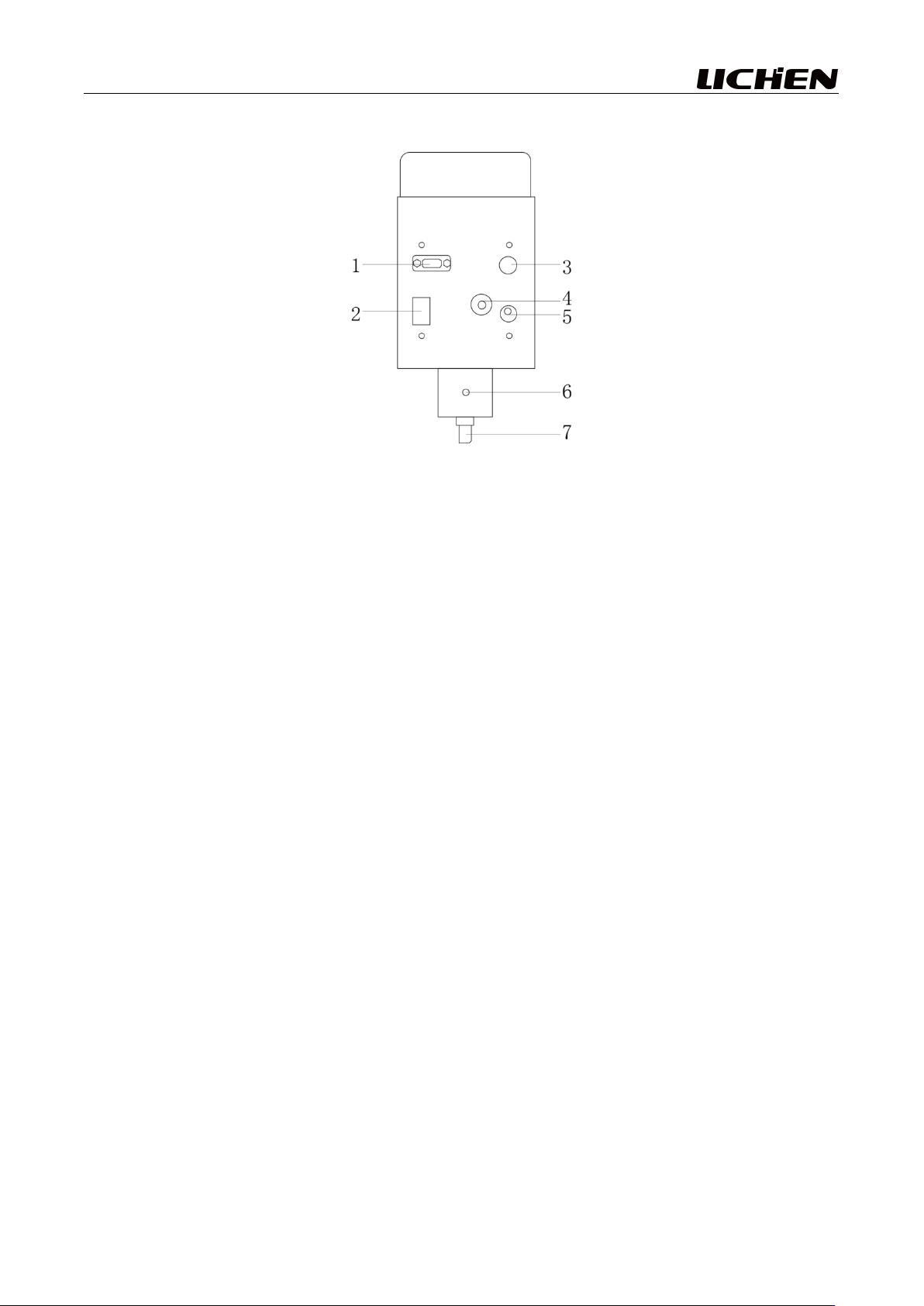
The rear layout of the instrument is shown in the figure (without the rotor installed):
1. RS232 interface, printer interface 2. Power switch 3. Temperature sensor probe interface
4. Horizontal bar interface 5. Power cord socket 6. Protective frame mounting hole
7. Yellow protective cap
IV. Installation and Use
1. Selection of the work environment
(1) The studio shall be kept clean and dry;
(2) The instrument should be placed away from sources of electromagnetic interference;
(3) The use of instruments shall be prohibited in areas posing an explosion hazard;
(4) Do not operate the instrument for extended periods in environments with high humidity or high
dust content.
2. Installation
(1) Open the packaging box and the instrument storage box, then, in accordance with the inventory
list provided in the appendix of this manual, conduct an inventory and inspection of all instrument
components;
(2) The instrument shall be installed on a workbench free of corrosive gases, strong electromagnetic
interference, and vibration;
(3) Insert the column into the corresponding hole of the main unit base; first, use a hex key to tighten
the bolts on the column (connected to the bottom of the base) to secure the column, then tighten the
screws on the front of the base to fix the column housing;
(4) Rotate the lifting handwheel to move the device up and down until it reaches its highest position.
If the lifting handwheel feels too tight or too loose during rotation, adjust the locking screw located
in front of the lifting base; it is advisable to tighten it slightly to prevent the viscometer head from
falling due to its own weight;
(5) Connect the head crossbar to the crossbar interface located behind the viscometer head, then
5
secure it with a socket wrench; next, insert the viscometer head crossbar into the fixed circular hole
of the head to keep the head approximately level, and turn the fixed handwheel to lock it in place,
preventing the head from tipping over;
(6) Adjust the level adjustment screws on the main instrument base so that the level bubble on the
viscometer head is centered;
(7) Loosen and remove the yellow protective cap located beneath the viscometer head. Attach the
connector to the rotor connection point, then select an appropriate rotor and insert it into the
connector, securing it in place.
Pay attention to:
① When loading or unloading the rotor, operate with care: gently lift the connector at the lower end
of the instrument upward before disassembly or assembly; avoid applying excessive force and
prevent the rotor from experiencing lateral stress to prevent bending of the rotor;
② After installing the rotor, do not rotate it in the absence of liquid to avoid damaging the rotor tip
and the bearings;
③ Before measurement, estimate the viscosity range of the liquid to be measured, and then select an
appropriate rotor and operating speed from the range table. If the approximate viscosity of the liquid
cannot be estimated, it should be treated as having high viscosity. In such cases, select rotors in
ascending order of size (using rotor numbers in descending order) and operating speeds in ascending
order.
(8) Check whether the level bubble on the viscometer head is centered. If the instrument is not level,
adjust the level adjustment screw on the main instrument base;
(9) Insert the power plug into the power socket, connect the power supply to the back of the
instrument, and complete the installation of the entire unit.
3.Make use of
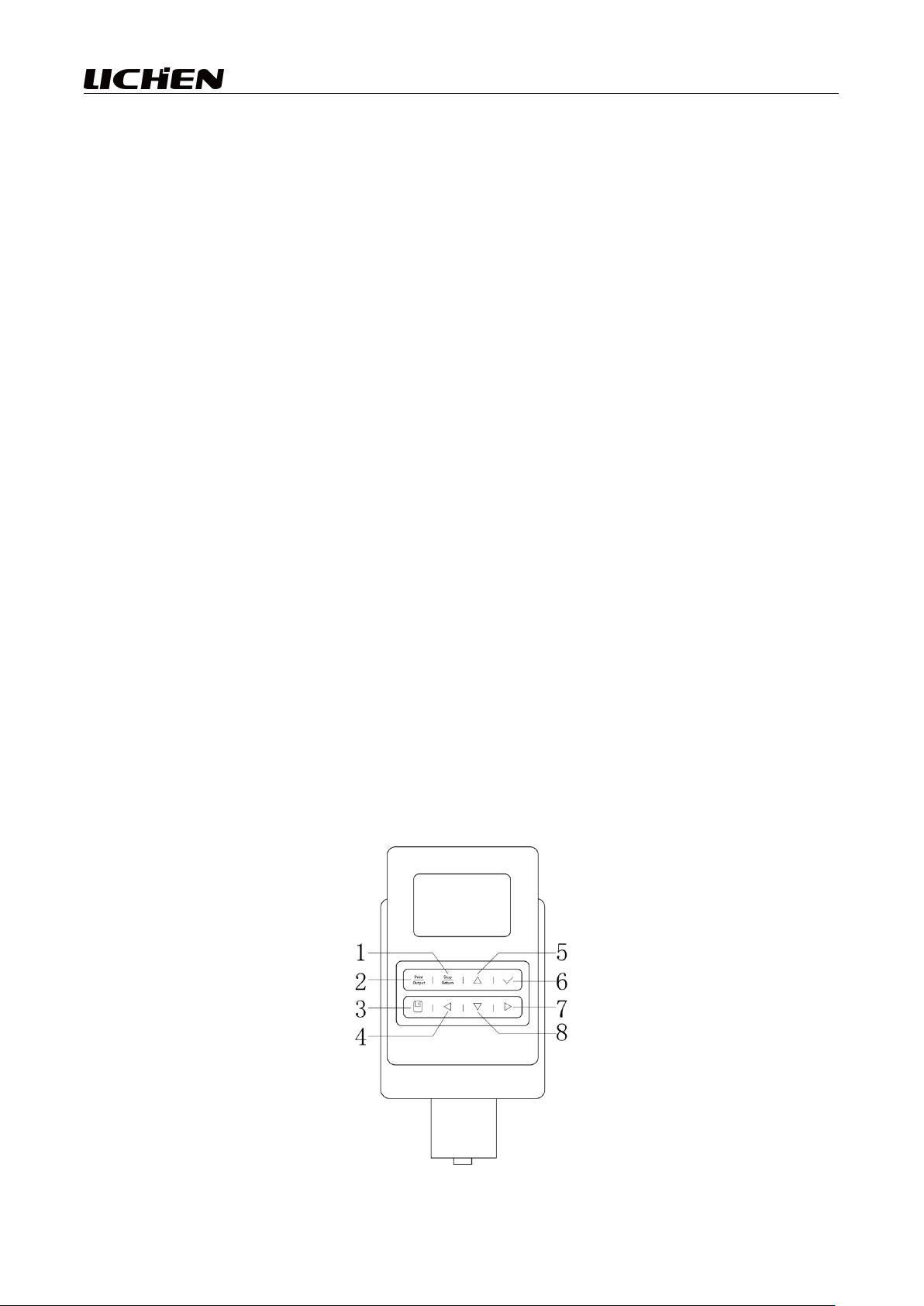
(1) User Interface (Button Functions)