00198382-03_UM_SIPLACE-CA4-V2_EN.pdf - 第235页
Instruction manual SIPLACE CA4 V 2 5 Tasks at the placement machi ne From software version 713.0 Ed ition 12/2019 5.11 Observing displa ys on the feeder module 235 5.1 1 Observing displays on the feeder module 5 Fig. 5.1…
5 Tasks at the placement machine Instruction manual SIPLACE CA4 V2
5.10 Setting up the feeder modules From software version 713.0 Edition 12/2019
234
Pull the cover foil at the side of the pick-up window forward and out underneath the pick-up
window.
Fold the cover foil back until it lies against the pull-off edge (item 3 in fig. 5.10 - 5, page 233).
5
Push the lever (item 5 in fig. 5.10 - 5, page 233) back to lower the pickup window.
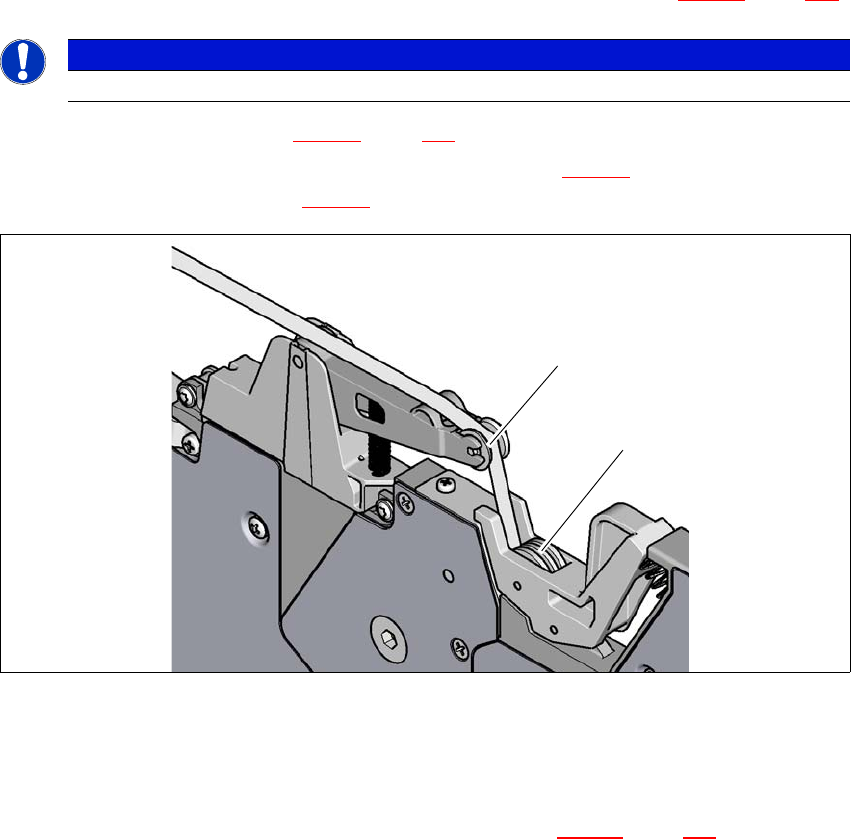
Guide the cover foil over the cover foil rocker (item 2 in fig. 5.10 - 7) until it reaches the foil
packing wheels (item 1 in fig. 5.10 - 7
).
5
Fig. 5.10 - 7 Guiding the cover foil to the foil packing wheels
(1) Cover foil packing wheels
(2) Cover foil
5
On the operator panel, press the FOIL button (item 3 in fig. 5.10 - 6, page 233) until the cover
foil is tensioned. The cover foil rocker points down and stops the drive motor.
Cut the component tape flush with the front end of the feeder module.
5.10.5 Configuring components on the SIPLACE SmartFeeder
The operation and setting up is described in the SIPLACE SmartFeeder X /Xi job guides.
PLEASE NOTE
Do not lower the pick-up window until the cover foil is lying against the pull-off edge.
(1)
(2)
Instruction manual SIPLACE CA4 V2 5 Tasks at the placement machine
From software version 713.0 Edition 12/2019 5.11 Observing displays on the feeder module
235
5.11 Observing displays on the feeder module
5
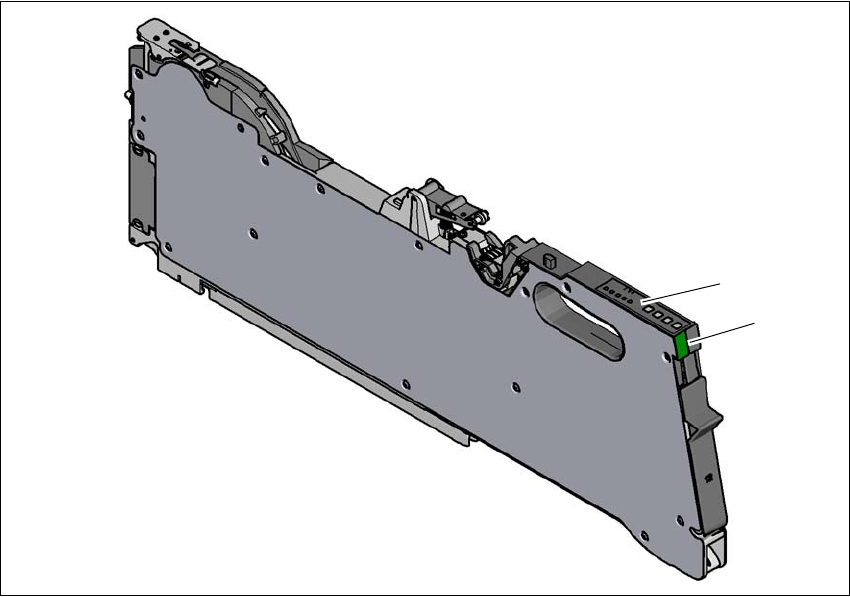
Fig. 5.11 - 1 SIPLACE SmartFeeder X
(1) Operating panel - LED display
(2) Status display
(2)
(1)
5 Tasks at the placement machine Instruction manual SIPLACE CA4 V2
5.11 Observing displays on the feeder module From software version 713.0 Edition 12/2019
236
5.11.1 Operating panel - LED display
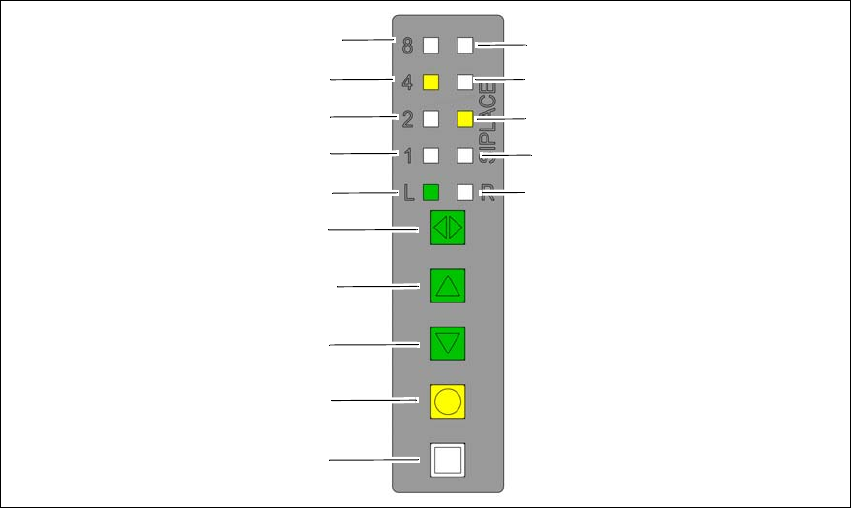
The SIPLACE SmartFeeder have a multicolored status display for each track and LED displays,
to indicate the operating states.
5
Fig. 5.11 - 2 Buttons, LED and status displays: Example of SIPLACE SmartFeeder 2x8 mm
(1) SET button
(2) FOIL button
(3) BACK button
(4) FORWARD button
(5) Track change button for switching between right and left
(6) LED L left track active
(7) LED 1 mm increment for left track
(8) LED 2 mm increment for left track
(9) LED 4 mm increment for left track
(10) LED 8 mm increment for left track
(11) LED R right track active
(12) LED 1 mm increment for right track
(13) LED 2 mm increment for right track
(14) LED 4 mm increment for right track
(15) LED 8 mm increment for right track
(8)
(1)
(2)
(3)
(4)
(5)
(6)
(7)
(9)
(10)
(15)
(14)
(13)
(12)
(11)