00197284-03_VD_LED_Pairing_V2_1_DE_EN.pdf - 第8页
LED Pairing / Sof tware Version Descript ion Ausgabe 05/2015 Edition 8 4 Installation SIPLACE LED Pairing w ill be installed together with SIPLACE Pro . The SIPLACE LED Pairing Controlle r will be installed on the line c…
LED Pairing / Software Version Description Ausgabe 05/2015 Edition
7
3 System Requirements
The Support Media DVD included in the installation package checks the necessary system
requirements of your system and installs these. Amongst others e.g. Microsoft .NET Framework,
the License Manager and the Error Reporting tool.
The use of the Support Media V1.16 is obligatory.
The system requirements (supported operating system and database variants) and an overview of
mutually compatible products can be found in the Assembly Instructions SIPLACE Support Media,
item no. [00197214-xx].
LED Pairing / Software Version Description Ausgabe 05/2015 Edition
8
4 Installation
SIPLACE LED Pairing will be installed together with SIPLACE Pro.
The SIPLACE LED Pairing Controller will be installed on the line computer on which OIB Core is
installed and will be configured via the OIB Operation Manager.
Further information can be found in the LED Pairing Installation Manual, item no. [00197283-xx],
and in the installation manuals of SIPLACE Pro and SIPLACE OIB.
LED Pairing / Software Version Description Ausgabe 05/2015 Edition
9
5 Brief Description
With SIPLACE Pro LED Pairing it is possible to match LEDs that have different brightness classes
with adjusted series resistors, to achieve homogenous brightness.
As prerequisite for working with SIPLACE Pro LED Pairing, LED matrix files have to be created.
The LED matrix file is a simple text file (*.TXT) that may be created with any text editor. This file
describes the connection between the LED brightness class and the series resistors.
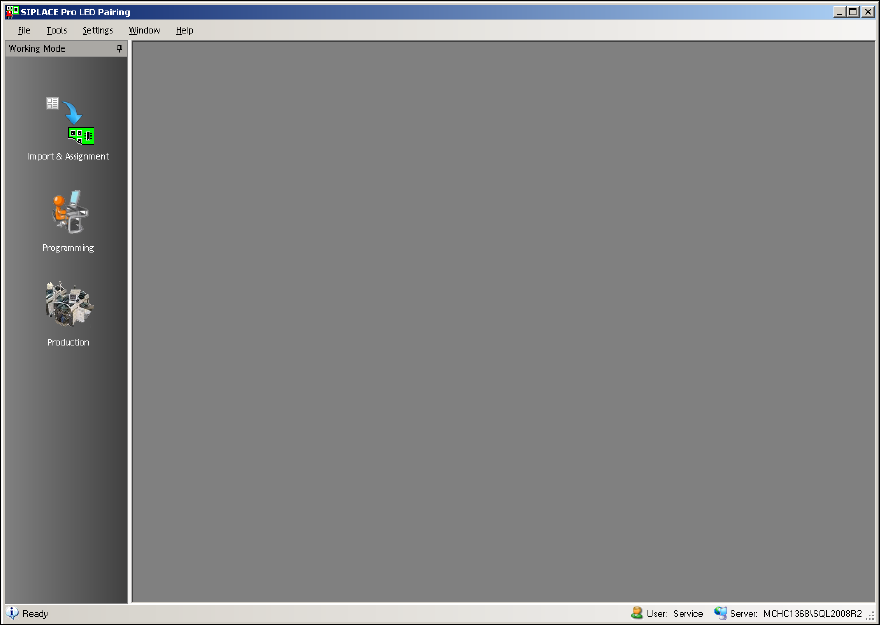
SIPLACE Pro LED Pairing has three views in which the user is guided through the creation of
production data on a job-oriented basis.
1. Import & Assignment
LED matrix files are imported, converted to *.LRX or *.LRX2 files (depending on the
configuration) and then get assigned; each placement list can have a LED matrix file assigned
to it.
2. Programming
Job, recipe and setup templates are generated and optimized, based on previously optimized
reference jobs and the assigned LED matrix file.
3. Production
Available LED brightness classes are selected on the basis of the LED matrix file. Then the
recipes and setups used for production are automatically generated, on the basis of a recipe
template (for recipe changeover) or a real recipe (for new definition after change to another
LED brightness class).
The following window displays the main view of SIPLACE Pro LED Pairing.
Figure 5-1: SIPLACE LED Pairing – Main view