00191171-01.pdf - 第29页
Operating Manual Offset calibrat ion system for SIPL ACE 80 S15 / S2 0 / F3 / F 4 Edition 01/ 98 Page 29 of 47 1.3 Re quired T ools and Aids − Case (item no. 00335381-01) with non-distor ting microscope (item no. 0033451…

Offset calibration system for SIPLACE 80 S15 / S20 / F3 / F4 Operating Manual
Edition 01/98
Page 28 of 47
1.2 Definitions
Qualified or adequately trained personnel:
People familiar with the installation, running and servicing of the placement machine and its associated
equipment and who have the appropriate qualifications, such as:
•
Training or instruction in how to switch on and off, isolate, ground or mark circuits and system com-
ponents in accordance with standard safety practices, and the authorization to do so
•
Training or instruction in how to maintain and use appropriate safety equipment in accordance with
standard safety practices
•
Training in first aid
Danger !!!
Where you see this word in these instructions, death, serious injury or considerable damage will re-
sult if the warning is not heeded.
Caution !
Where you see this word in these instructions, minor injuries or damage to property can result if the
warning is not heeded.
Note
Where you see this word in these instructions, you will find important information on the product or on
the relevant part of the instructions, to which you should pay particular attention.
Failure to observe all the instructions can result in death, serious injury and/or considerable damage!
Operating Manual Offset calibration system for SIPLACE 80 S15 / S20 / F3 / F4
Edition 01/98
Page 29 of 47
1.3 Required Tools and Aids
−
Case (item no. 00335381-01) with non-distorting microscope (item no. 00334518-01), complete
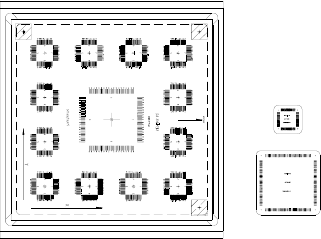
offset measuring plate (referred to below as ”glass plate”, item no. 00334513-01) and plastic cover
(item no. 00334509-01), box with glass components (item no. 00334587-01), placement software
(on diskette), adhesive sheet, glass cleaner, a component rail for small glass components, a com-
ponent holder for a large glass component
−
Linear feeder, e.g. item no.: 00142031-03
−
Nozzles (undamaged, new if possible):
Type 617 for SIPLACE S15
Type 720 for SIPLACE S20 and SIPLACE F4
Type 820 for SIPLACE F4/6
Type 419 for the IC head
−
Soft cloth for the reject bin
Non-essential but useful:
−
MS Excel from version 5.0 (Windows 3.x) or later
− Excel pages for evaluation (files on diskette)
1.4 Prerequisites for the Machine
− The machine must be at operating temperature (operation for at least 3 hours)
Offset calibration system for SIPLACE 80 S15 / S20 / F3 / F4 Operating Manual
Edition 01/98
Page 30 of 47
−
A conveyor width of 135 mm must be possible, i.e. the ceramic substrate centering and vacuum
PCB support must be removed
−
Feeder position must be free
1.5 Prerequisites for the Operating Personnel
Only qualified or adequately trained personnel are allowed to undertake the work described here. See
the definition in 0 in this regard. Furthermore, completion of a Siemens service technician course is
also a prerequisite.
2. Determining the Correction Values
2.1 Preparatory Work
•
Adjust the conveyor width to the width of the glass plate.
•
Setting up the feeder: Select the position (left/right) on the basis of the head which is to be meas-
ured and place the required component rail onto the feeder. Thoroughly clean the glass compo-
nents with glass cleaner and then use the suction device to place them onto the feeder. Their ori-
entation does not matter (the components are symmetrical). However, make sure the pin struc-
tures are underneath.
•
Set up the correct nozzles for your machine type:
Turret head of the SIPLACE S15: Type 617
Turret head of the SIPLACE S20 and SIPLACE F4: Type 720
Turret head of the SIPLACE F4/6: Type 820
IC head of the SIPLACE F range: Type 419
•
Clean the glass plate (use the glass cleaner in the case) and apply the adhesive pads. Do this by
carefully pulling off the white protective sheet without separating the adhesive pads from the trans-
parent backing sheet. Place the glass plate on a clean surface (the lettering appears as a mirror
image when seen from above). Line up the backing sheet of the adhesive pads with the right-hand
front edge of the glass plate (as seen in the transport direction). Each of the adhesive pads must
now be located approximately in the center of the individual placement positions. Press the adhe-
sive pads down firmly and carefully pull off the backing sheet. Make sure none of the adhesive
pads remain on the backing sheet. It is possible to place components onto the same adhesive pads
several times.
• Place a soft cloth in the reject bin.