TM3592.SystemFullBackup.pdf - 第12页
SMT Software En gineering Group IM Operations YAMAHA Motor Co., Lt d. MD OC-SOFT50111 SystemFullBacku pSpecifications 12/19 4 4 4 4 . . . . 2 2 2 2 Res tore Data toFLA …
SMT Software Engineering Group
IM Operations
YAMAHA Motor Co., Ltd.
MDOC-SOFT50111 SystemFullBackupSpecifications
11/19
4
44
4.HowtoRestoreSystem
.HowtoRestoreSystem.HowtoRestoreSystem
.HowtoRestoreSystem
4
44
4.
..
.1
11
1WhattoPrepare
WhattoPrepareWhattoPrepare
WhattoPrepare
1)
1)1)
1)
FLASHDISK
FLASHDISKFLASHDISK
FLASHDISK
PrepareYAMAHAFLASHDISKwhichisattachedtothemachine.
Ifyouwanttotakeouttheflashdiskfromthemachine,pleasecontacttoourservicesectionor
agency
YoucanpurchasetheflashdiskunderthefollowingpartsNo.andpartsname.
FLASHDISK. PartNo./PartName. TheDiskSize[GB]
KHL-M4255-000/FLASHDISK 1
2)
2)2)
2)
PC
PCPC
PC
PrepareaPCtorestorethesavedSystemFullBackupdata.
ItsOSshouldbeWindows®Xp(orLater).
OS(PC)
Windows®XpProfessional(32bit)/Windows®Vista(32bit)/Windows®7(32bit/64bit)
3) MemoryCardRea
3) MemoryCardRea3) MemoryCardRea
3) MemoryCardReader/Writer(USB),MemoryCardAdapter(PCCard)
der/Writer(USB),MemoryCardAdapter(PCCard)der/Writer(USB),MemoryCardAdapter(PCCard)
der/Writer(USB),MemoryCardAdapter(PCCard)
PrepareoneoftheabovetoconnectFLASHDISKtothePC.
ThelistbelowshowsthetypicalmeasuretoconnecttheFLASHDISKtoPC.
Pleasechoosesuitableway.
Device(Bus) PC
MemoryCardReader/Writer(USB) Desktop,Note
MemoryCardAdapter(PCCard) Note
Note:
ThissoftwareneedsPnP(PlugandPlay).
PnPissupportedbytheUSB,andPCCard.
Ifyouchooseanothermeasure,pleasecheckthesupportofthePnPfunction.
SMT Software Engineering Group
IM Operations
YAMAHA Motor Co., Ltd.
MDOC-SOFT50111 SystemFullBackupSpecifications
12/19
4
44
4.
..
.2
22
2
RestoreDatatoFLASHDISK(onPC)
RestoreDatatoFLASHDISK(onPC) RestoreDatatoFLASHDISK(onPC)
RestoreDatatoFLASHDISK(onPC)
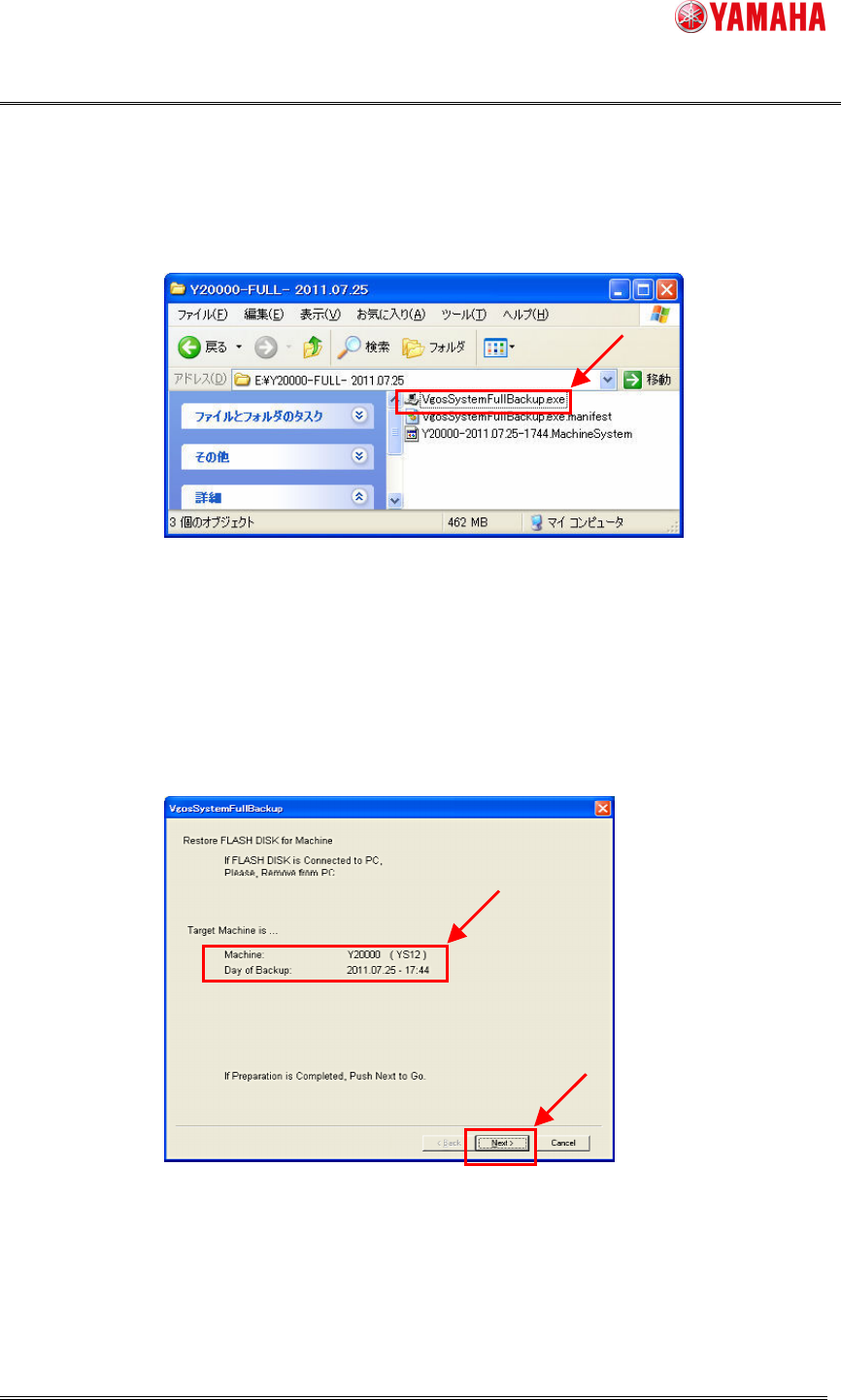
1) Startthesoftware:VgosSystemFullbackup.exeinthedestinationfolderofSystemFullBackup.
2) ConfirmthatTargetMachineiscorrect,andclickthe[Next]button.
IftheotherFLASHDISKisalreadyconnectedtothePC,removeit,andclickthe[Next]
button.
SMT Software Engineering Group
IM Operations
YAMAHA Motor Co., Ltd.
MDOC-SOFT50111 SystemFullBackupSpecifications
13/19
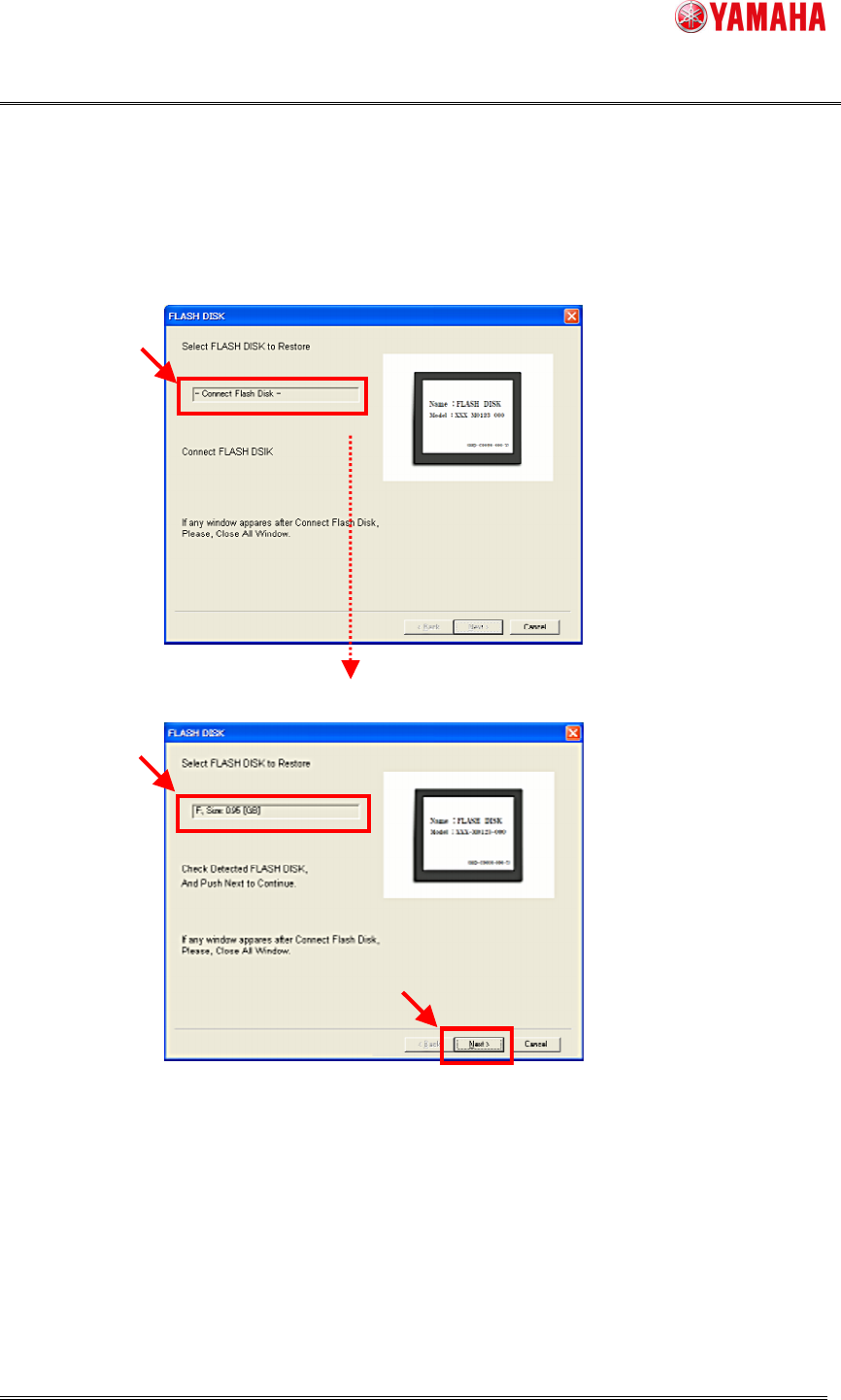
3) ConnectFLASHDISKtoPC.
WhenthePCdetectsnewFLASHDISK,theFLASHDISKscreenisdisplayed.
Clickthe[Next]buttontocontinue.
FLASHDISKunconnected.
FLASHDISKconnected.(detected).
Note:
WhenFLASHDISKisconnected,awindow(Ex.thewindowsexplore)canbeappeared.
Closethosewindows.
IfFLASHDISKisnotdetected,removeonce,andconnectitagain.
AllcontentsinFLASHDISKwillbereplacedtothesaveddata.