TM3592.SystemFullBackup.pdf - 第8页
SMT Software En gineering Group IM Operations YAMAHA Motor Co., Lt d. MD OC-SOFT50111 SystemFullBacku pSpecifications 8/19 3 3 3 3 . . . . 3 3 3 3 Co nfigur a tionof Syst em Ful…
SMT Software Engineering Group
IM Operations
YAMAHA Motor Co., Ltd.
MDOC-SOFT50111 SystemFullBackupSpecifications
7/19
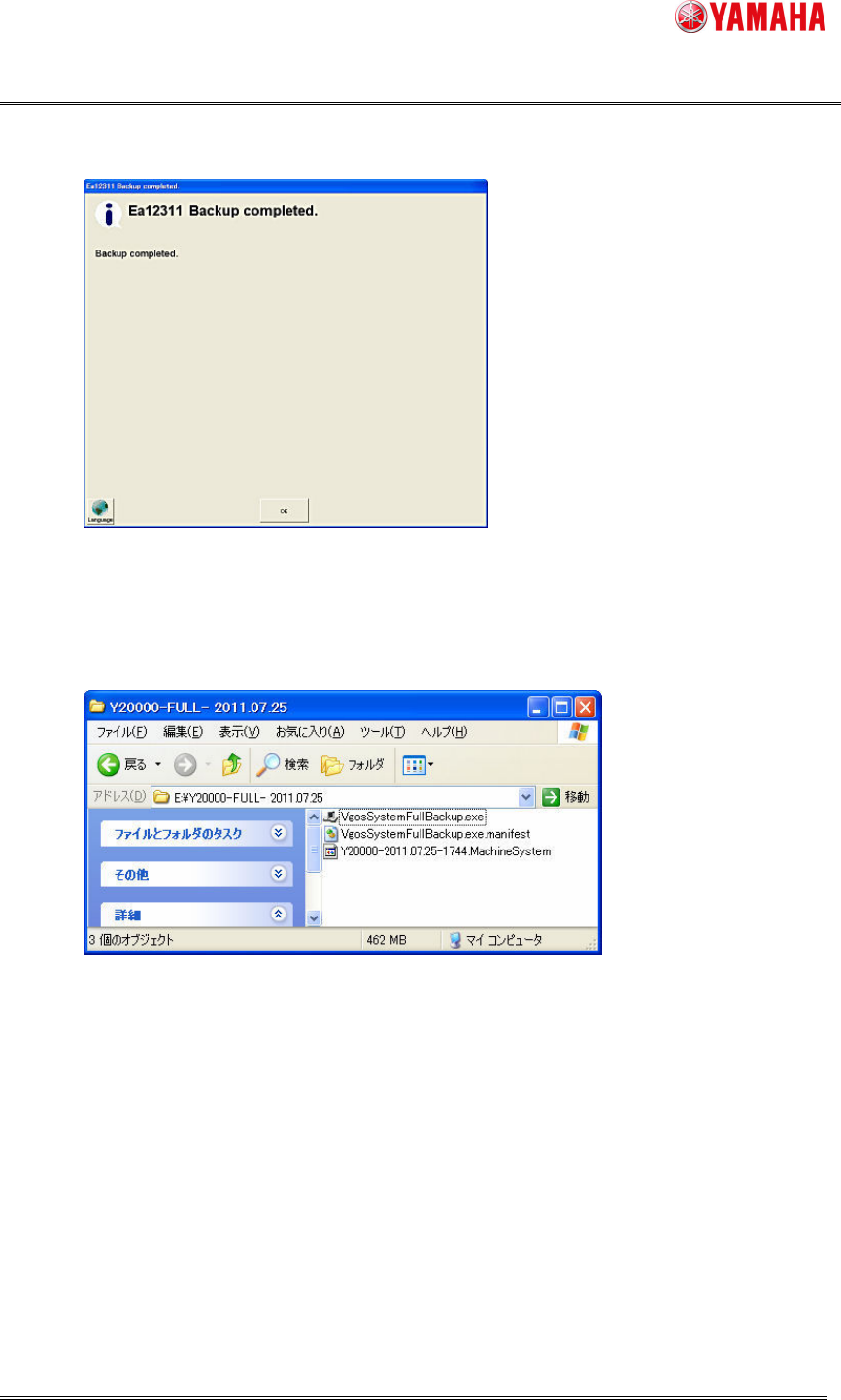
6.Whenthebackupiscompleted,click[OK]button.
WithexecutingSystemFullBackup,3filesarecreated.
ThesefilesareusedforrestorationoftheFLASHDISK.
Note: Thesaveddataincludesimportantdata.(Ex.theBoardDataetc.)
ThesefilesmustbekeptSTRICTLY.
SMT Software Engineering Group
IM Operations
YAMAHA Motor Co., Ltd.
MDOC-SOFT50111 SystemFullBackupSpecifications
8/19
3
33
3.
..
.3
33
3ConfigurationofSystemFullBackup
ConfigurationofSystemFullBackupConfigurationofSystemFullBackup
ConfigurationofSystemFullBackup
3.3.1ConfigurationofSavingofSystemFullBackup
3.3.1ConfigurationofSavingofSystemFullBackup3.3.1ConfigurationofSavingofSystemFullBackup
3.3.1ConfigurationofSavingofSystemFullBackup
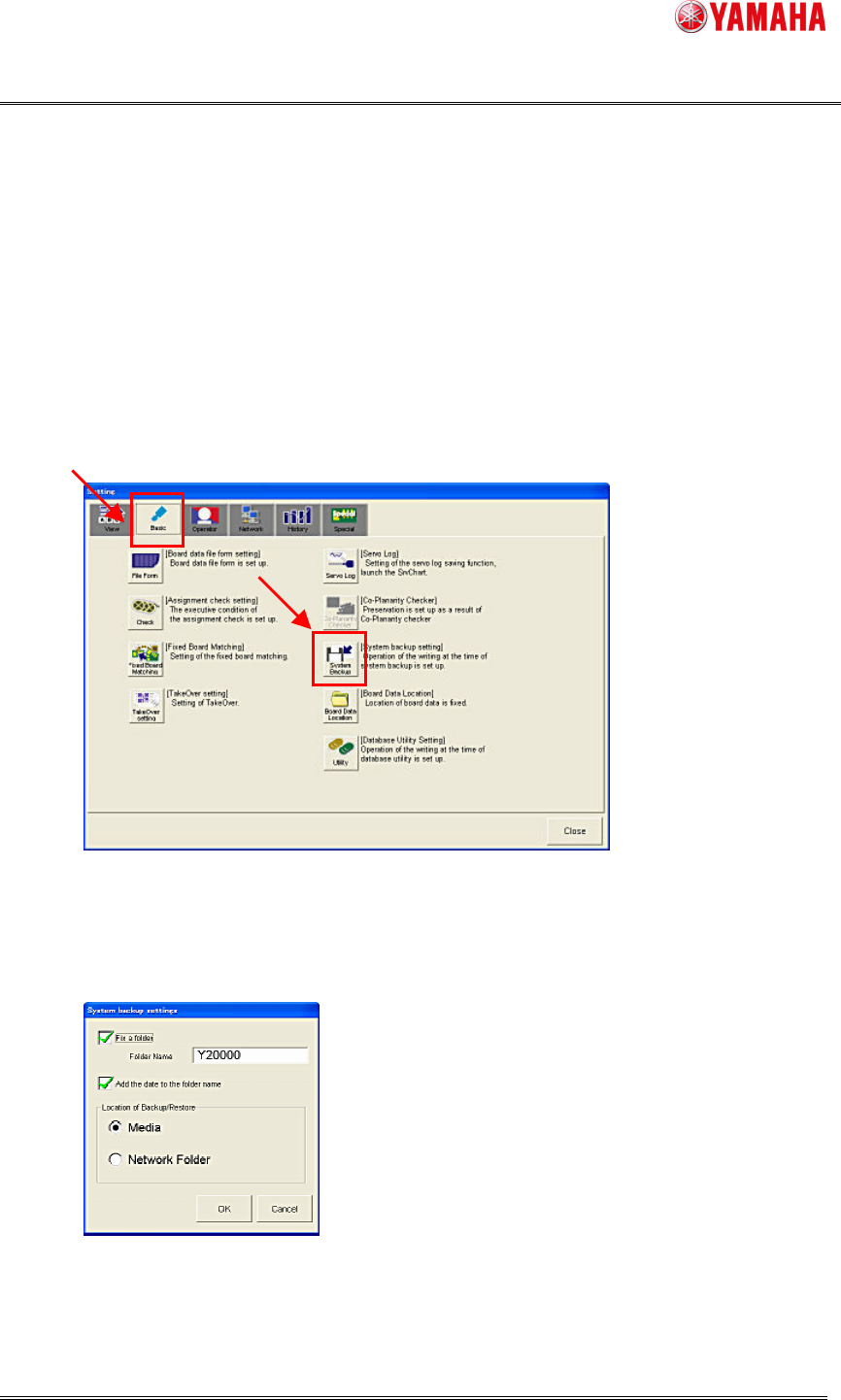
Click[Setup]-[SoftwareSetting]-[Basic]-[Systembackupsetting].
Note:
ThedestinationsettingofSystemFullBackupisincommonwiththatoftheSystemBackup.
[SoftwareSetting]Dialog
Clickthe[SystemBackup]button,andthefollowingdialogisdisplayed.
[SystemBackupSetting]Dialog
SMT Software Engineering Group
IM Operations
YAMAHA Motor Co., Ltd.
MDOC-SOFT50111 SystemFullBackupSpecifications
9/19
1)[Fixafolder]box,[Addthedatetothefoldername]box
When[Fixafolder]boxismarked, ([FolderName]plus“-FULL-”)isaddedautomaticallyto
thedestinationfoldernames.
(ThisistodistinguishSystemFullBackupandSystemBackup)
When[Addthedatetothefoldername]boxismarked,thedateisaddtothedestination
foldernamecreatedbythe[Fixafolder].
Anexampleisshownbelow.
Conditions:
[LocationofBackup/Restore]:[NetworkFolder]
Thedestinationfoldername(folderpath):E:\BackupSave
[FolderName]:Y20000
Thedate:2011/09/14
Fix Date add FullPath
Check Check Y20000-FULL-2011.09.14 E:\BackupSave\Y20000-FULL-2011.09.14\
Check - Y20000-FULL- E:\BackupSave\Y20000-FULL-\
- Check -(Nostringadded) E:\BackupSave\
- - -(Nostringadded) E:\BackupSave\
Fix:[Fixafolder]/Date:[Addthedatetothefoldername]
When [Media] is selected in [Location of Backup/Restore], the destination folder name
(folderpath)becomesthepathtothemedia(USBMemory).
2) [LocationofBackup/Restore]
When[Media]isselected,SystemFullBackupdataissavedinUSBMemory.
(FloppyDiskisnotavailable.)
When[NetworkFolder]isselected,thenetworkstoragecanbeavailableasthedestination.
ThenetworkpathneedstobeselectedatthetimeofexecutingtheSystemFullBackup.