TP2171.P-Tool for Dual Lane Machine.pdf - 第23页
SMT Software Eng ineering Group IM Operations Y AMAHA MOTOR CO., L TD. MDOC-SOFT50069 23/27 2.6. Pr oducing the different ki nd of board ’ T y pe- N ’ option (V1.25STD R1.000 or later) 2.6.1. Summar y The machi ne that s…
SMT Software Engineering Group
IM Operations YAMAHA MOTOR CO., LTD.
MDOC-SOFT50069
22/27
(8) The behavior of optimizer using synchronized transfer (V1.24STD R1.000 of later)
Optimizer output the result that the motion of mounter is like the following.
If one side head completes mounting earlier, it helps the other one in order to shorten cycle time.
In the following case, cycle time can be improved.
• The difference at the complete time of the front and rear head was great and the board data
was created using “Multi-Combined Program” (Refer to “2.2.1. Multi Lane Utility”)
• The result of “Mount Mode: Each Lanes” was outputted before
When [Mount/Transfer decision method] is set to “Auto”, optimizer automatically decides the
necessity of the above motion. (Refer to “2.5 Optimizer (6) [Detail] setting is extended. 3”.)
In case of the above motion, the “Mount Mode” is “Parallel Lanes” and “Transfer Mode” is
“Synchronous Transfer”.
[Note]
Because of the additional calculation process to improve cycle time, optimization time may
increase.
When it is necessary to shorten calculation time, change [Set optimization parameters] -[Basic
Condition] -[Exec Condition] –[Level] into “Standard” or “Short Calculation Time”.
SMT Software Engineering Group
IM Operations YAMAHA MOTOR CO., LTD.
MDOC-SOFT50069
23/27
2.6. Producing the different kind of board ’Type-N’ option
(V1.25STD R1.000 or later)
2.6.1. Summary
The machine that supports ‘Type-N’ (Producing the Different Kind of Board) is capable of
producing two board data at the same time.
Optimizer assigns feeders to a near side of the plates from the mount lane so that it is possible
to switch board data individually with respecting to each lane (Feeders of front lane parts are
assigned to front plate and feeders of rear lane parts are assigned to rear plate.).
Each head unit mounts boards on their closer side of the lanes.
2.6.2. Setting Method
<Optimizer>
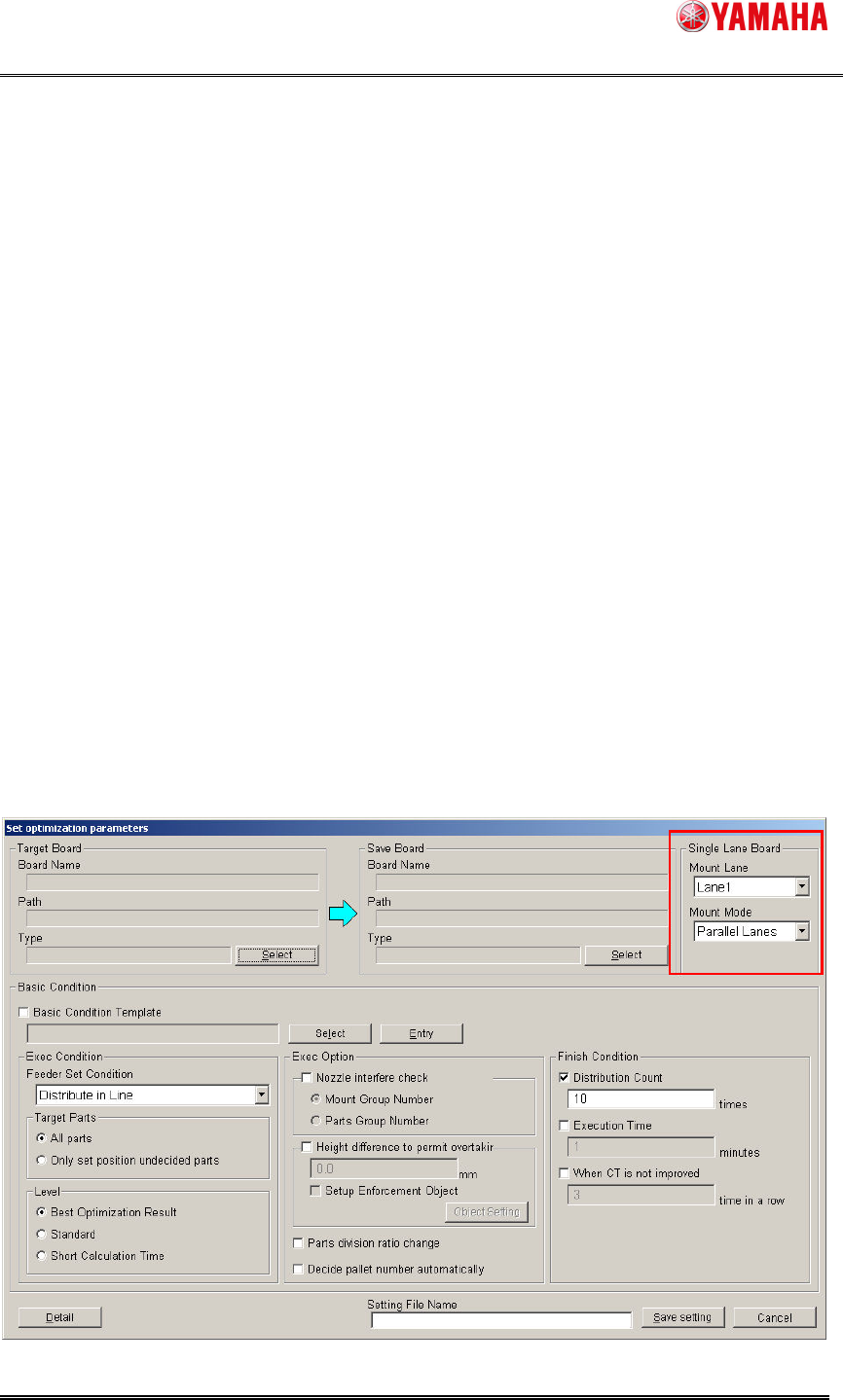
Select [Optimizer] – [set optimization parameters] – [Single Lane Board] – [Mount Lane] and
[Mount Mode]. This is enabled only when the kind of the selected board data in [Target / Save
Board] is ‘Single Board Data’. (When the kind of the board data is ‘Combined Board Data’, the
behavior of the optimizer is the same as that of other than producing the different kind of board)

SMT Software Engineering Group
IM Operations YAMAHA MOTOR CO., LTD.
MDOC-SOFT50069
24/27
Mount Lane Feature
Lane1 Output results of mounting in Lane1.
Lane2 Output results of mounting in Lane2
[Mount Mode] is displayed only when Type-N option is enabled in all machines in the line.
Mount Mode Feature
Parallel Lanes
(Default)
Optimizer assigns feeders to the near side plate from the mount
lane so that it is possible to switch board data individually with
respecting to each lane.
In the following cases, an error occurs during the optimization
(Ea17853: Feeder Overflow etc.).
1. Feeders overflow from the designated side of feeder plate. (In
this case, change [Mount Mode] to ‘Each Lanes’).
2. Tray changer parts are used in target board data and no tray
changer exists in the designated lane for ‘Mount Lane’. (In this
case, change [Mount Lane] to the lane that has tray changer.)
Alternate Lanes Feeders are assigned to all feeder plates.
The machine mounts using both of the head unit for one kind of
board data.