TP2171.P-Tool for Dual Lane Machine.pdf - 第25页
SMT Software Eng ineering Group IM Operations Y AMAHA MOTOR CO., L TD. MDOC-SOFT50069 25/27 <Feed er V iew er> Select [Feeder Vi ewer] - [Product Board List] - [Optim ized Lane] an d [Mount Mode] . Setting m ethod …
SMT Software Engineering Group
IM Operations YAMAHA MOTOR CO., LTD.
MDOC-SOFT50069
24/27
Mount Lane Feature
Lane1 Output results of mounting in Lane1.
Lane2 Output results of mounting in Lane2
[Mount Mode] is displayed only when Type-N option is enabled in all machines in the line.
Mount Mode Feature
Parallel Lanes
(Default)
Optimizer assigns feeders to the near side plate from the mount
lane so that it is possible to switch board data individually with
respecting to each lane.
In the following cases, an error occurs during the optimization
(Ea17853: Feeder Overflow etc.).
1. Feeders overflow from the designated side of feeder plate. (In
this case, change [Mount Mode] to ‘Each Lanes’).
2. Tray changer parts are used in target board data and no tray
changer exists in the designated lane for ‘Mount Lane’. (In this
case, change [Mount Lane] to the lane that has tray changer.)
Alternate Lanes Feeders are assigned to all feeder plates.
The machine mounts using both of the head unit for one kind of
board data.
SMT Software Engineering Group
IM Operations YAMAHA MOTOR CO., LTD.
MDOC-SOFT50069
25/27
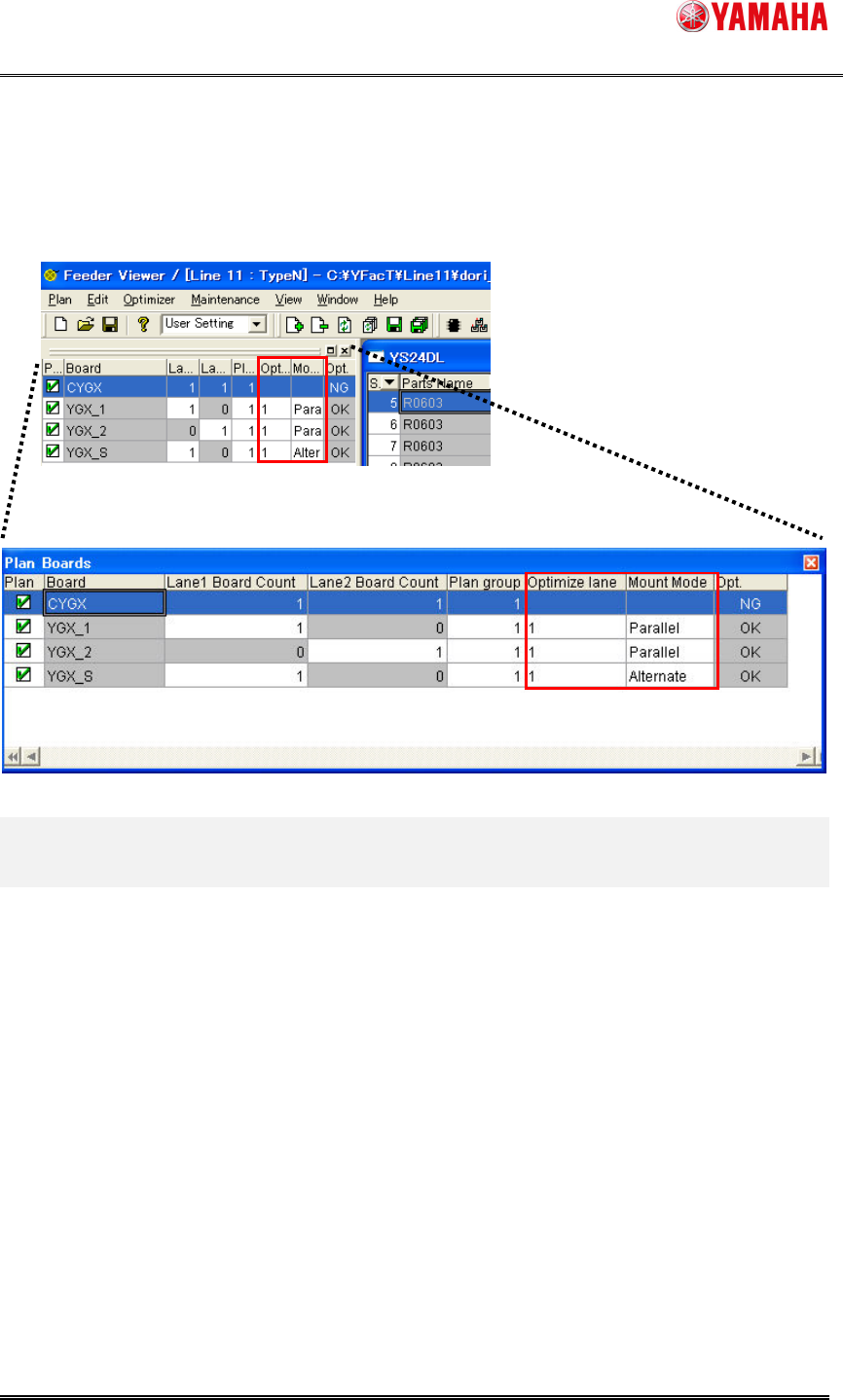
<Feeder Viewer>
Select [Feeder Viewer] - [Product Board List] - [Optimized Lane] and [Mount Mode].
Setting method is similar to the case of optimization.
SMT Software Engineering Group
IM Operations YAMAHA MOTOR CO., LTD.
MDOC-SOFT50069
26/27
3. Limitations
[Board Explorer]
Board data conversion of the combined board data is not supported. Convert after dividing
to single board data.
YGX(Combined) is not added to [Set Default Data Type]. In case of Dual Lane Machine,
select [YGX] setting.
YGX(Combined) is not added to [Board Explorer] - [View] – [Data Type]. In case of Dual
Lane Machine, select [YGX] setting.
Combining program of Multi Lane Utility is disable on the line that does not has dual lane
machine.
[Board Editor]
YGX(Combined) of line data are need to has same combined program. For example, it is
not allowed that one machine has single combined program and other machine has multi
combined program.
If line data of YGX has other lane number, it is changed to lane number of last machine. (For
example, if No. 1 machine has lane 1 and No.2 machine has lane 2, it is changed to lane 2
for line data.
Reading YGX(Combined) board data, the following functions are limited. Use after dividing
to single board data.
[File] – [Print]
[File] – [Preview]
[File] – [Output mount data as]
[Edit] – [Undo][Redo]
[Tool] – [Block Offset] and all
[Tool] – [Dot Dispense] and all
[Tool] – [Printer Information Support] – [Inspection Object Assign Mounter Data] and all
[Tool] – [Mount Pos. Conversion of Mask Hole Datum Pos] and all
[Parts] The function to delete mount information automatically when deleting parts
information.
[Graphic View] – [Mount New][Delete Selected Item]
On the line with dual lane machine, the following functions are limited.
[File] – [Individual Data] and all. (It is enable only for printer)
[Optimizer] – [Export Parts List]