工作头自动清洗机使用说明书.pdf - 第33页
INS-HDCLN-002S0 4. 安装 工作头自动清洗机使用说明书 23 4. 设定 IP 地址后,显示以下的确认画面。 a. 要将所变更的 IP 地址反映到工作头自动清洗机中的 时候,请将工作头自动清洗 机的 主开关设置为 OFF,然后重新启动 。 b. 点击 「Back」按钮,就会移动到 IP 地址设定画面 。 5. 重新启动工作头自动清洗机,完成 IP 地址的设定 。 4.4.3 设定语言 1. 从主菜单 中选择 「Se tt…
4. 安装 INS-HDCLN-002S0
22 工作头自动清洗机使用说明书
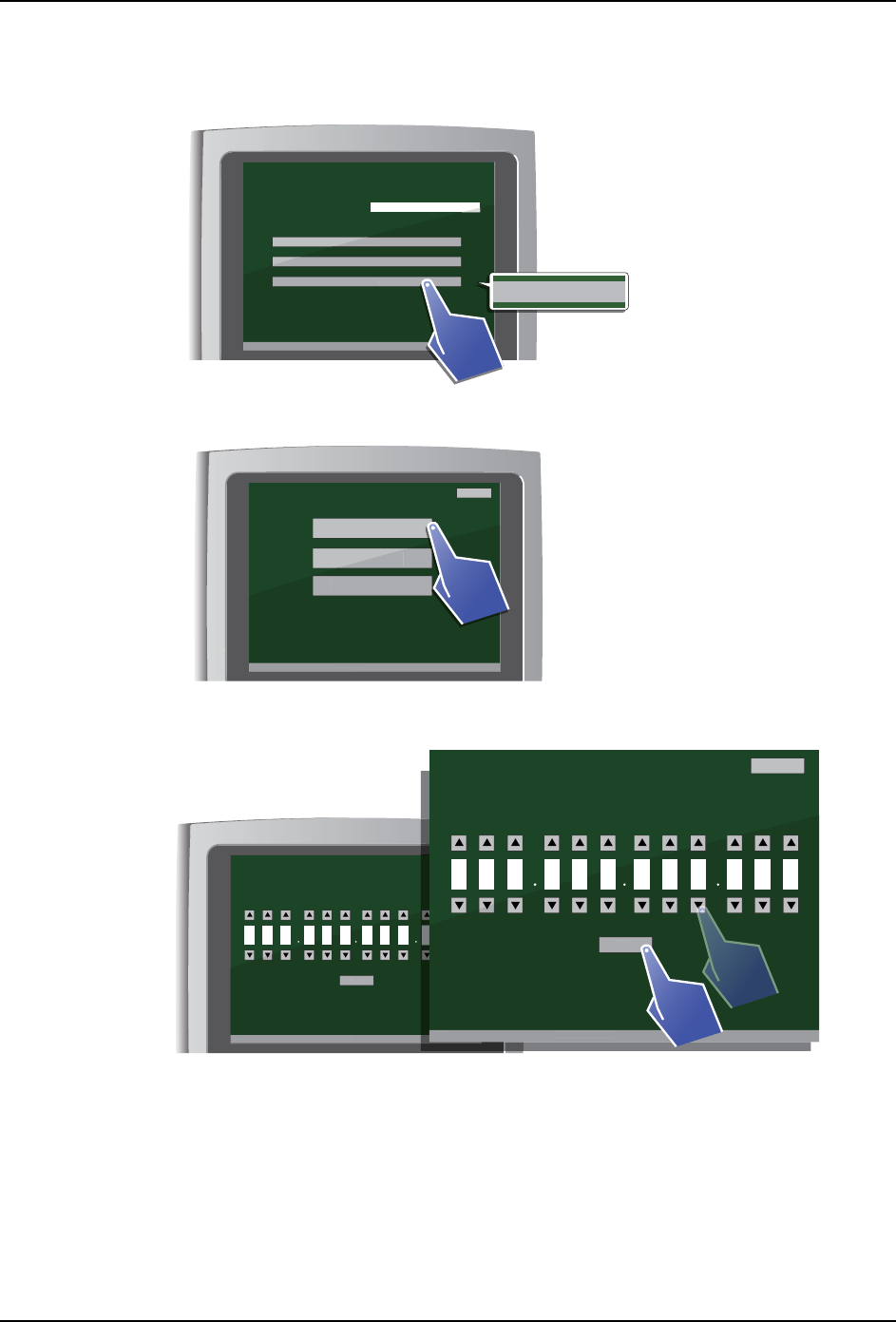
4.4.2 设定 IP 地址
1. 从主菜单中选择 「Settings」。
2. 从设定画面上所显示的项目中选择 「IP address」。
3. 显示 IP 地址设定画面。设定工作头自动清洗机的 IP 地址。
a. 所显示的数字是 IP 地址。请点击各位的三角形按钮 (上、下),变更数字。
b. 点击 「OK」按钮,所设定的 IP 地址就会被确定。
c. 点击 「Back」按钮,则返回到设定画面。
01NST-2624E
[ Main menu ]
V3.00 [ Filter exchange notice ]
Head serial number S/N
Cleaning
Inspection
Settings
V
3
.
00
[
Fi
l
ter exc
h
an
g
e notice
]
Cleaning
Inspect
i
on
S
ettings
Settings
01NST-1880E
[ Settings ]
V3.00 [ Filter exchange notice ]
Language
IP address
Date & Time
Back
V
3
.
00
[
Fi
l
ter exc
h
an
g
e notice
]
Language
Date & Time
[ IP address setting ]
V3.00 [ Filter exchange notice ]
Back
OK
V
3
.
00
[
Fi
l
ter exc
h
an
g
e notice
]
O
K
61 9 52 4 00 0 00 1
0
[ IP address setting ]
V3.00 [ Filter exchange notice ]
Back
OK
V
3
.
00
[
Fi
l
ter exc
h
ange notice
]
O
K
61 9 52 4 00 0 00 1
01NST-1881E
INS-HDCLN-002S0 4. 安装
工作头自动清洗机使用说明书 23
4. 设定 IP 地址后,显示以下的确认画面。
a. 要将所变更的 IP 地址反映到工作头自动清洗机中的时候,请将工作头自动清洗机的
主开关设置为 OFF,然后重新启动。
b. 点击 「Back」按钮,就会移动到 IP 地址设定画面。
5. 重新启动工作头自动清洗机,完成 IP 地址的设定。
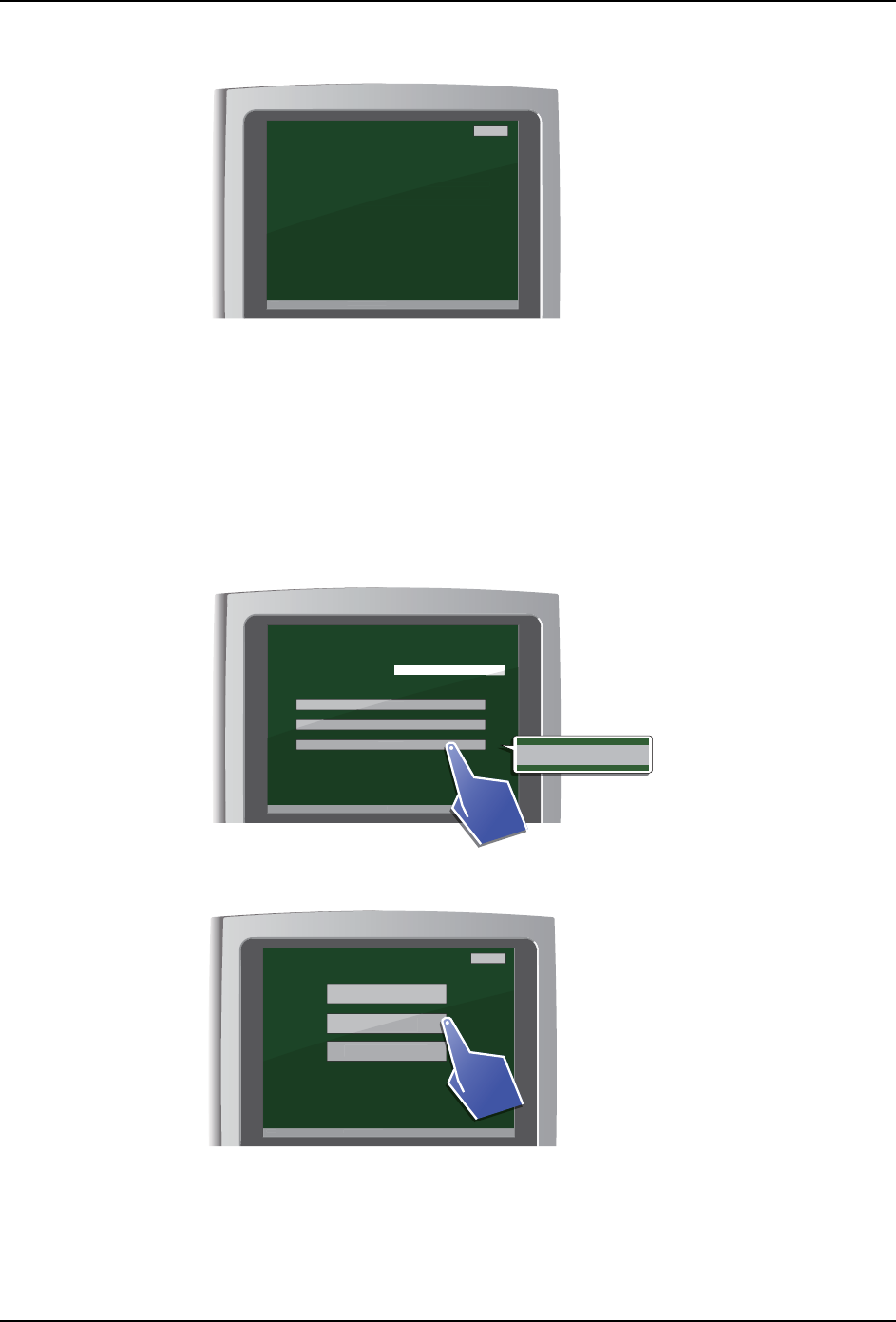
4.4.3 设定语言
1. 从主菜单中选择 「Settings」。
2. 从设定画面上所显示的项目中选择 「Language」。
01NST-2025E
[ Machine restart check ]
V3.00 [ Filter exchange notice ]
The changed IP address will become valid after restarting.
Push down the POWER button and restart the machine.
If the settings are not updated, push the "Back" button.
Back
V
3
.
00
[
Fi
l
ter exc
h
an
g
e notice
]
ng.
start the machine.
not updated, push the "Back" button.
01NST-2624E
[ Main menu ]
V3.00 [ Filter exchange notice ]
Head serial number S/N
Cleaning
Inspection
Settings
V
3
.
00
[
Fi
l
ter exc
h
an
g
e notice
]
Cleaning
Inspect
i
on
S
ettings
Settings
01NST-1882E
[ Settings ]
V3.00 [ Filter exchange notice ]
Language
IP address
Date & Time
Back
V
3
.
00
[
Fi
l
ter exc
h
an
g
e notice
]
Language
Date & Time
4. 安装 INS-HDCLN-002S0
24 工作头自动清洗机使用说明书
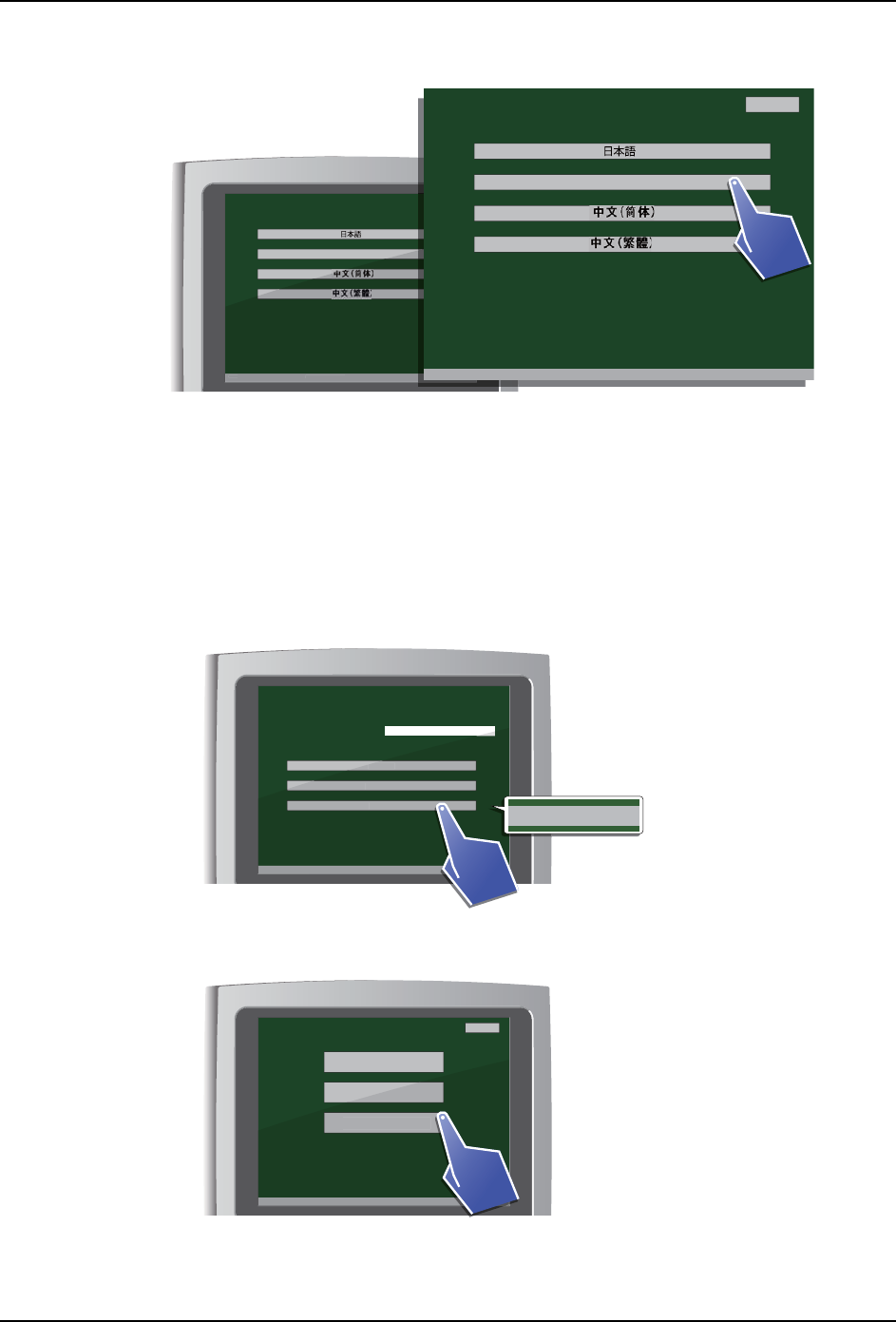
3. 显示语言设定画面。请选择要使用的语言。
a. 从所显示的语言项目中,点击画面上希望显示的语言。
b. 点击 「Back」按钮,则返回到设定画面。
4. 画面的语言如果改变时,则完成语言的设定。
4.4.4 设定日期和时间
1. 从主菜单中选择 「Settings」。
2. 从设定画面上所显示的项目中选择 「Date & Time」。
[ IP address setting ]
V3.00 [ Filter exchange notice ]
Back
English
OK
V3.0
0
[
Fi
l
ter exc
h
an
g
e notice
]
01NST-1883E
[ IP address setting ]
V3.00 [ Filter exchange notice ]
Back
English
OK
01NST-2624E
[ Main menu ]
V3.00 [ Filter exchange notice ]
Head serial number S/N
Cleaning
Inspection
Settings
V
3
.
00
[
Fi
l
ter exc
h
an
g
e notice
]
Cleaning
Inspect
i
on
S
ettings
Settings
01NST-2626E
[ Settings ]
V3.00 [ Filter exchange notice ]
Back
IP address
Language
Date & Time
V
3
.
00
[
Fi
l
ter exc
h
an
g
e notice
]
Language
D
a
te
&
Time